Using the mechanical (knead balls) massage functions
32
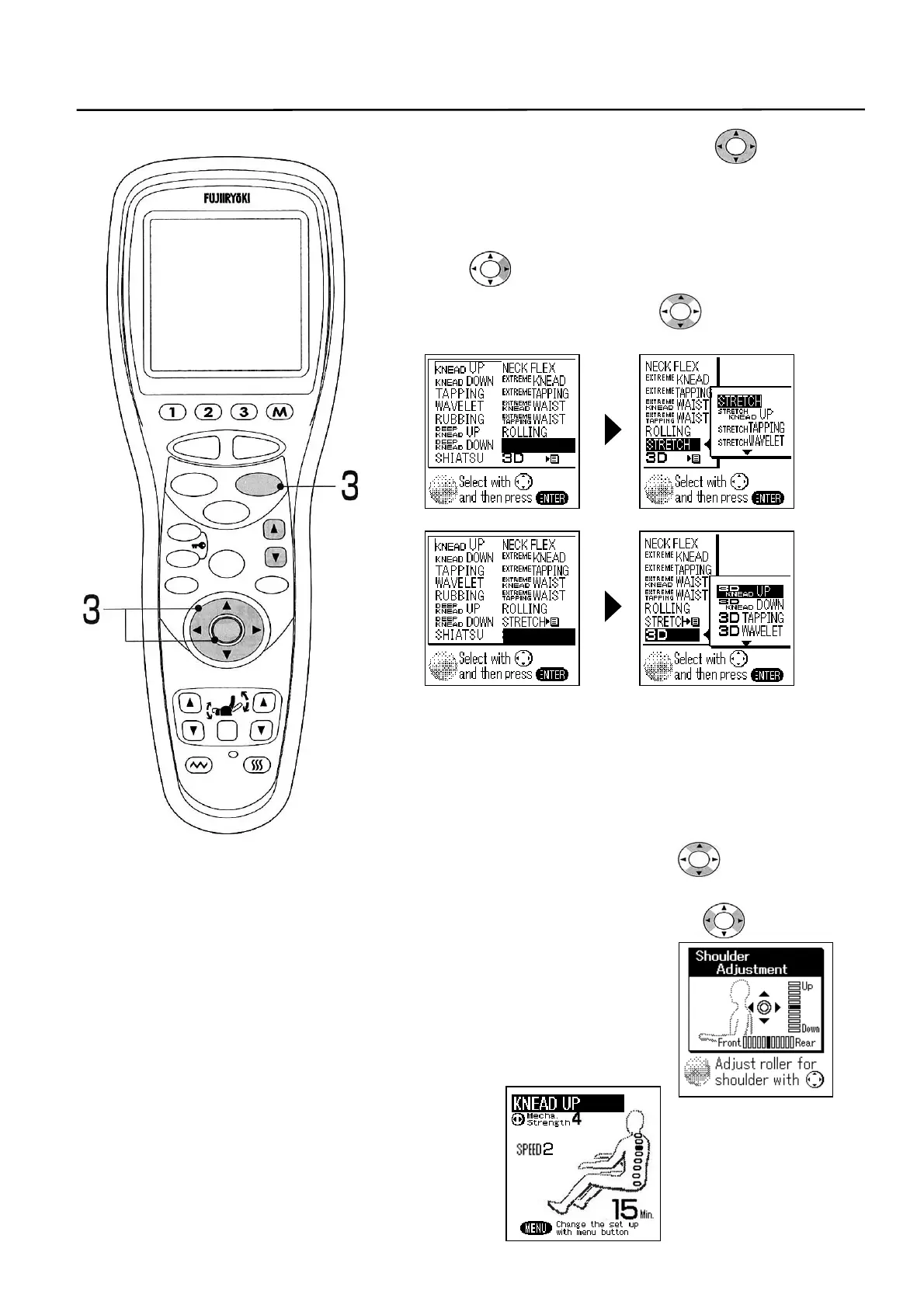
3. Select a desired function with the switch or
[FUNCTION] button and then press the [ENTER]
button.
• When selecting “STRETCH” or “3D”
① Select the “STRETCH” or “3D”, and
② Press the switch or [ENTER] button to display the
detail screen.
Select a desired function using the switch or
[FUNCTION] button and then press the [ENTER] button.
① ②
• When you have selected the “NECK FLEX”, “EXTREME
KNEAD”, “EXTREME TAPPING” or “ROLLING”, it is
necessary to set initially the shoulder position.
Although the front and rear positions of knead balls can
also be set at this time, this is effective only when the
“NECK FLEX”, “EXTREME KNEAD” or “EXTREME
TAPPING” has been selected.
Adjust the shoulder position with the switch or
HEIGHT ADJUSTMENT [S] or [T] button and the front
and rear position of knead balls with the switch.
• If you select the “KNEAD UP”, “KNEAD DOWN”,
“TAPPING”, “WAVELET”, “RUBBING”, “DEEP
KNEAD UP”, “DEEP KNEAD DOWN”, “SHIATSU”,
“STRETCH” or “3D” after selecting the “ROLLING”,
the selected movement is combined with the
“ROLLING”.
4. Selected function is started.
STOP
STAR
RESE
AUTO
FUNCTION
AIR
REPEAT
SKIP
SHDR
MENU
ARM
ENTER
FOOTREST RECLINER
RESET
VIBRATION HEATER
HEIGH
ADJUSTMEN
STRETCH
f
■
3D
f
■
POINT



 To Next Page