11
Getting Started
arrows U
Formatting SD Card Cautions
When using a new SD Card for the first time, always
format it on handset.
・Formatting erases all data on SD Card. Carefully check
any SD Card that was used on another device before
formatting.
・Charge Battery while formatting, or format with
adequate battery charge.
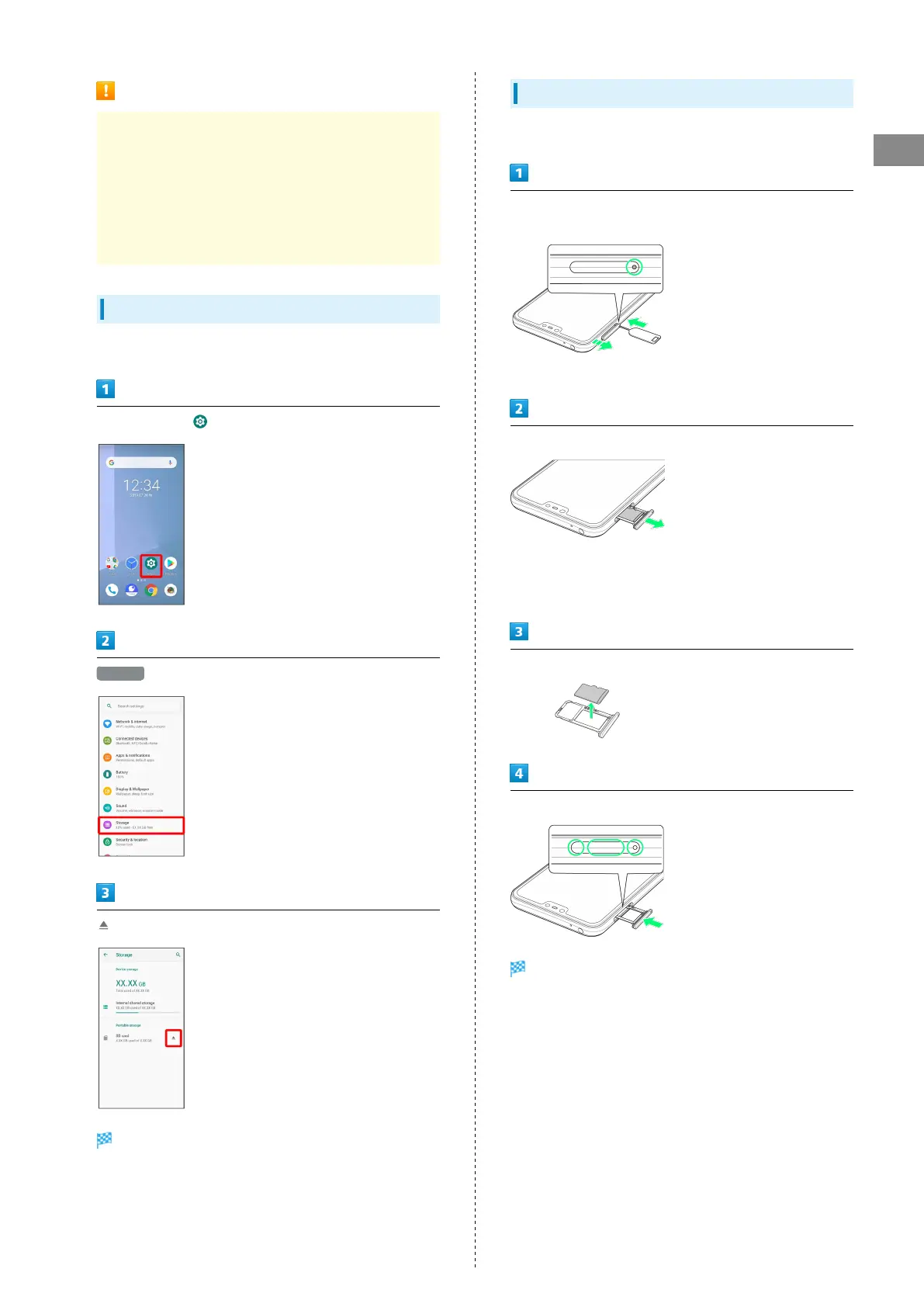
Unmounting SD Card
Always unmount SD Card before removing.
In Home Screen, (Settings)
Storage
for "SD card"
SD Card is unmounted.
Removing SD Card
Always unmount SD Card and power off first.
With Display upward, insert SIM Removal Pin in hole in Slot
Cap
・Insert firmly and straight until Slot Cap ejects.
Pull Slot Cap out
・Slot Cap detaches from handset.
・Pull out straight without bending in direction shown.
・Do not push down on ejected Slot Cap. May damage Slot Cap.
Remove SD Card
With Display upward, insert Slot Cap
SD Card is removed.
・Insert straight without bending in direction shown, and
press firmly where circled ○.
・Make sure there is no gap between handset and Slot Cap.



 To Next Page