62
Applications
Setting Required Permissions for
Applications
Set the operation of applications when activating for the
first time.
The type and content of a confirmation differs with the
application. Activating (らくらくコミュニティ) for the
first time is described as an example.
・An application may not function correctly if permission to
use it was not set.
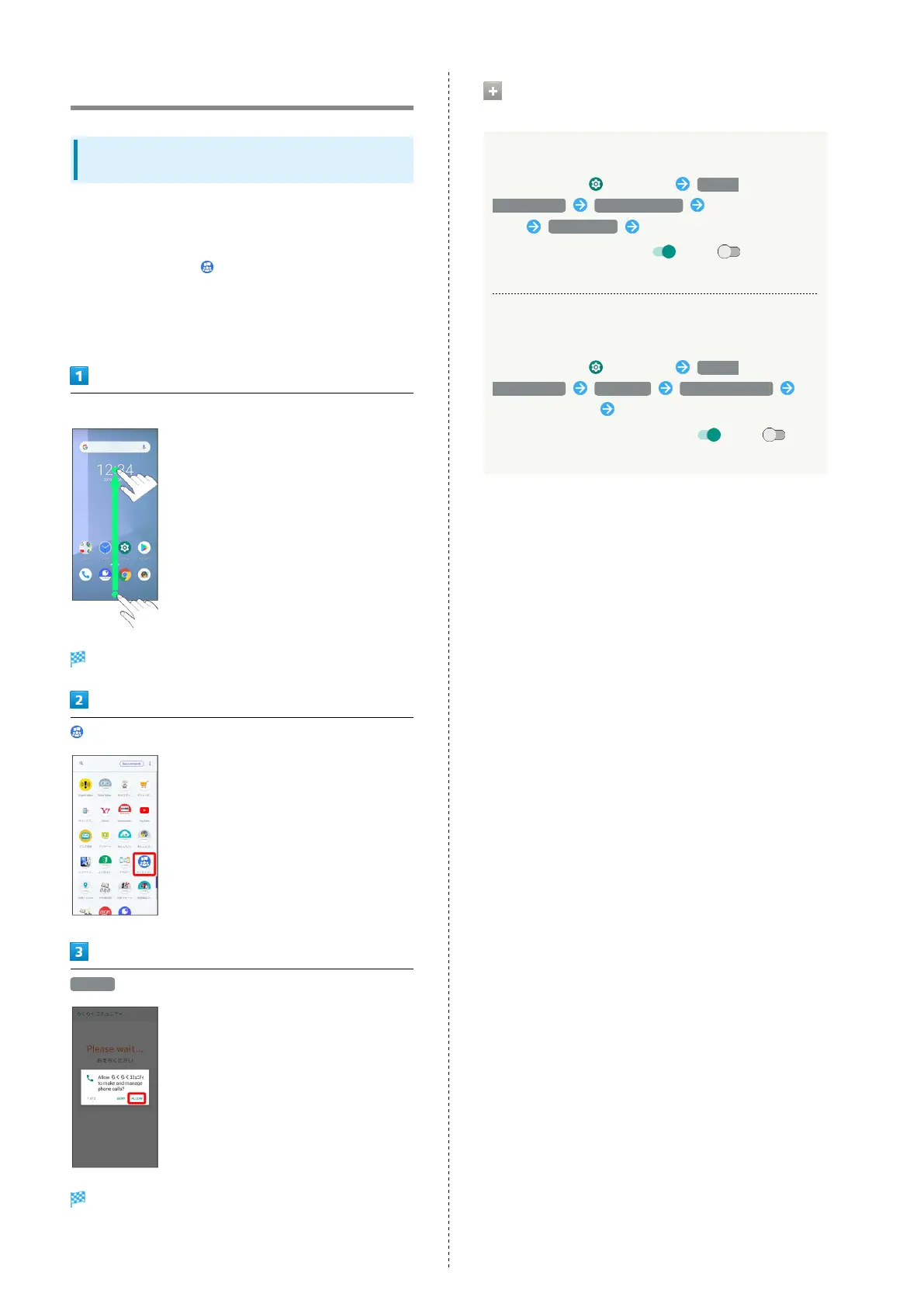
In Home Screen, Drag bottom of Display up
Launcher opens.
(らくらくコミュニティ)
ALLOW
Settings are complete.
・For several functions, continue in the same way.
Other Ways to Set Required Permissions
for Applications
Setting Functions to Use for Each Application
In Home Screen, (Settings) Apps &
notifications See all XX apps Tap application
name Permissions Tap function
・
Tap function to toggle on ( )/off ( ).
・If confirmation appears, follow onscreen instructions.
Setting Applications with Permitted Usage for
Each Function
In Home Screen, (Settings) Apps &
notifications Advanced App permissions
Tap function name Tap application name
・
Tap application name to toggle on ( )/off ( ).
・If confirmation appears, follow onscreen instructions.



 To Next Page