78
System Settings
Check and make settings for language, text entry, date and
time, data backup, default reset, and handset information.
System Settings
Settable items are the following.
Item Description
About phone
Check handset status and legal
information, the Android version, save
emergency information, etc.
Languages &
input
Make settings for display and text entry.
Gestures
Set whether Pressing Power Key twice
activates Camera, type of ringing that
is prevented by Pressing Power Key and
Volume Up Key, etc.
Date & time Make settings for date and time.
Advanced
・Backup
Back up application data, call history, etc.
to Google server.
・Reset options
Reset network settings, application
settings, and internal storage.
・System information
Check IMEI and authentication
information.
・System update
Check whether updates are required via
the Internet, and update as required.
See "Updating Software" for details.
・Easy data transfer support
Import data (Address Book, Schedule
(Calendar)) saved to SD Card on other
mobiles to handset.
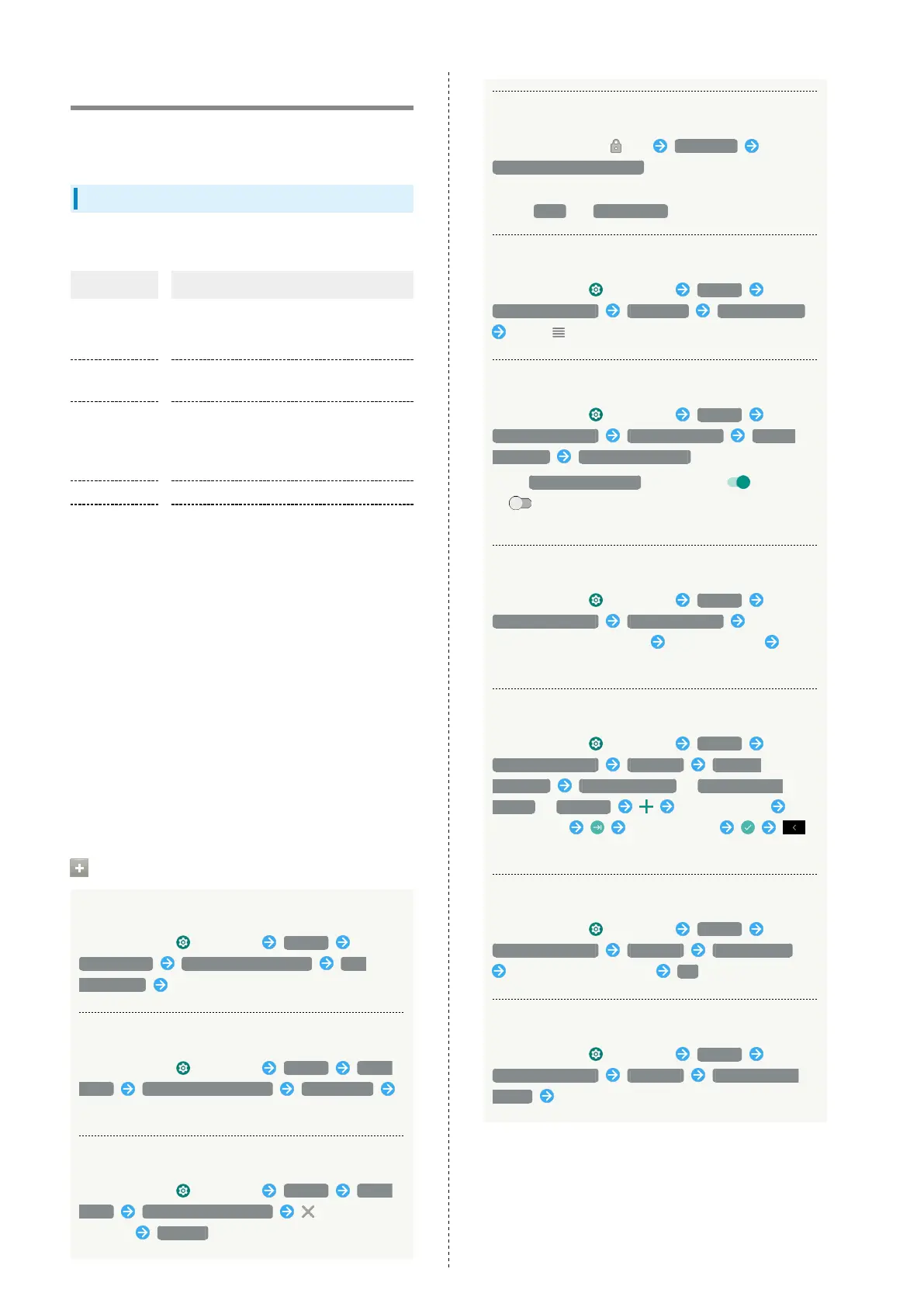
System Operations
Editing Emergency Information
In Home Screen, (Settings) System
About phone Emergency information Edit
information Set items
Saving or Adding New Emergency Contact
In Home Screen, (Settings) System About
phone Emergency information Add contact
Save new/Tap contact to add
Deleting Emergency Contacts
In Home Screen, (Settings) System About
phone Emergency information for contact
to delete REMOVE
Checking Emergency Information
In lock screen, Flick up Emergency Tap
EMERGENCY INFORMATION two times
・Available if Security unlock preference is setting other
than None or Touch/Swipe .
Changing to Japanese Language
In Home Screen, (Settings) System
Languages & input Languages Add a language
Drag for 日本語(日本) up
Setting Whether to Use Voice Input
In Home Screen, (Settings) System
Languages & input Virtual keyboard Manage
keyboards Google voice typing
・
Tap Google voice typing to toggle on ( )/off
( ).
・If confirmation appears, follow onscreen instructions.
Setting Keyboard/Voice Input
In Home Screen, (Settings) System
Languages & input Virtual keyboard Tap
keyboard/voice input to set Tap item to set
Follow onscreen instructions
Adding Words to Personal Dictionary
In Home Screen, (Settings) System
Languages & input Advanced Personal
dictionary For all languages / English (United
States) / Japanese Tap entry field
Enter phrase Enter shortcut
・Saved phrases are not applied to Super ATOK ULTIAS.
Setting Speed of Pointer for Mouse/Trackpad
In Home Screen, (Settings) System
Languages & input Advanced Pointer speed
Drag bar to adjust speed OK
Making Settings for Text-to-Speech
In Home Screen, (Settings) System
Languages & input Advanced Text-to-speech
output Follow onscreen instructions



 To Next Page