7
Getting Started
arrows U
Keys
Part Description
Power Key
Toggle Display on/off.
Long Press for power on/off.
Volume Up
Key
Raise volume.
Volume
Down Key
Lower volume.
Assistant
Key
Activate Google Assistant, etc.
Notification LED
Flashes for new mail and lights while charging.
Color and
Pattern
Indication
Lit red Charging
Flashing red Charging not normal
Lights green
once
Handset started up
Flashing white New mail
SIM Card
SIM Card is an IC card containing phone number and other
customer information.
Handling SIM Card
For SIM card handling, see following items.
IC chip
For SIM card handling, see SoftBank Website.
https://www.softbank.jp/mobile/support/protect/usim/
(Japanese)
・Always keep the IC chip clean.
・Wipe clean with a dry, soft cloth.
・Avoid applying labels. May damage SIM Card.
SIM Card Cautions
Observe the following when using SIM Card.
・Customer is responsible for any damage caused by
inserting SIM Card in an other-brand IC card reader, etc.
The company is not responsible in such case.
・SIM Card is the property of the company.
・SIM is replaceable (at cost) in case of loss/damage.
・Return SIM Card to the company when cancelling
subscription.
・Returned SIM Cards are recycled for environmental
purposes.
・Note that SIM Card specifications and performance may
change without notice.
・It is recommended that you keep a separate copy of
information that is stored on SIM Card. The company is
not responsible for damages from stored information
that is lost.
・Always follow emergency procedures to suspend service
if your SIM Card or handset (SIM Card inserted) is lost/
stolen. For details, contact Customer Service.
・Always power off handset before inserting/removing SIM
Card.
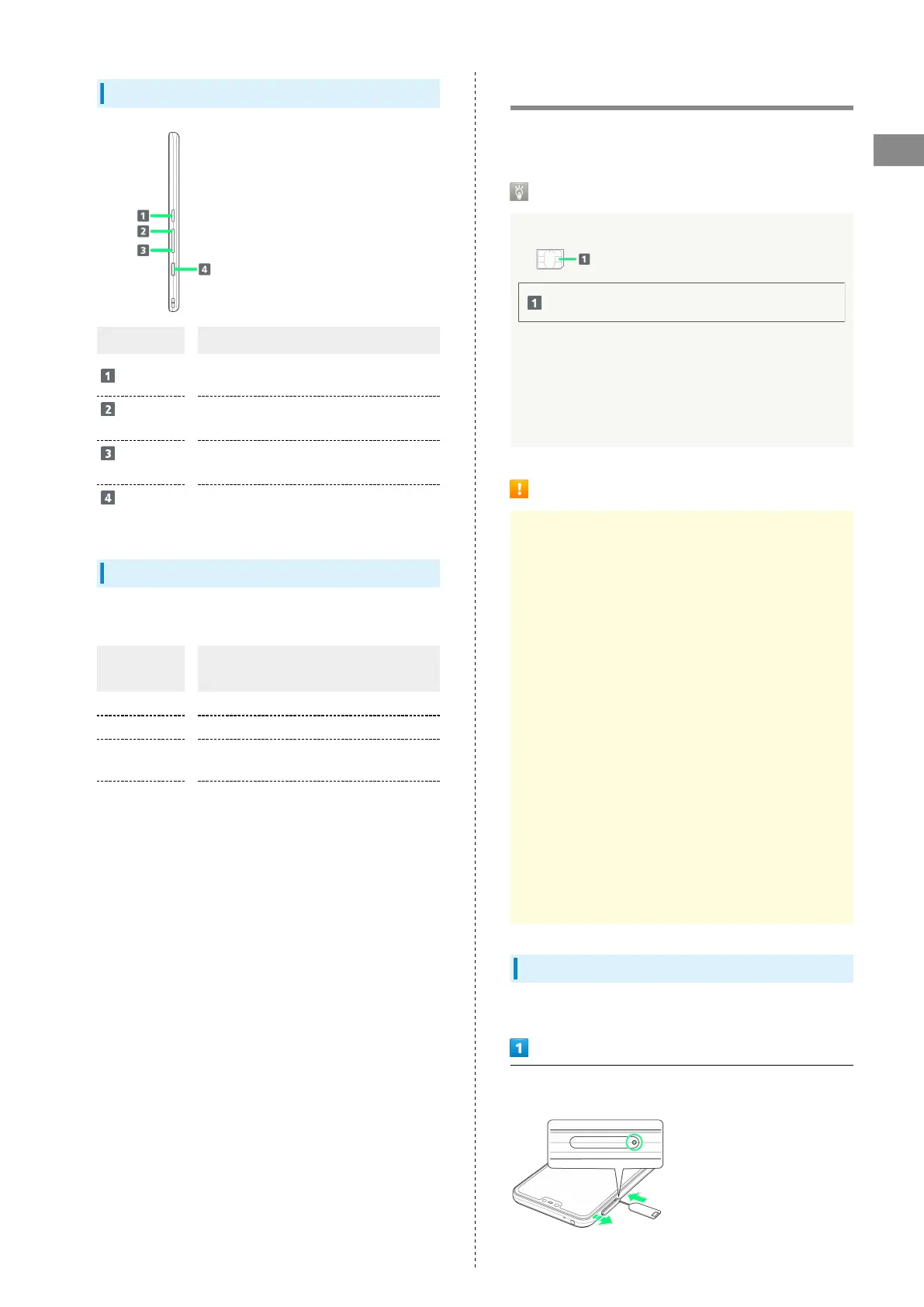
Inserting SIM Card
Always power off beforehand.
With Display upward, insert SIM Removal Pin in hole in Slot
Cap
・Insert firmly and straight until Slot Cap ejects.



 To Next Page