8-2
Chapter 8 Brachial Blood Pressure Examinations
Measurement Preparations
Check the following again before measuring.
Is the place of examination appropriate?
• Check for noise generating electrical devices such as x-ray equipment or ultrasonic instruments nearby.
If any, turn them OFF or change the place of examination to avoid adverse influence from such instruments.
• Select a location with low humidity.
• Make sure the selected location is quiet and not exposed to engine noise, noise from air conditioners, vibrations from
railroads, passing cars or treadmills.
How is the condition of the patient?
• Check if the patient is nervous.
If nervous, his/her blood pressure may be higher than normal. Reassure the patient by briefly explaining the examination
method to the patient.
• Also, instruct the patient not to move or speak.
Are the cuffs correctly attached to the patient?
Is the air hose of any cuff bent and are objects placed on any of the air hoses?
Let the patient rest for ten minutes or more before taking measurements.
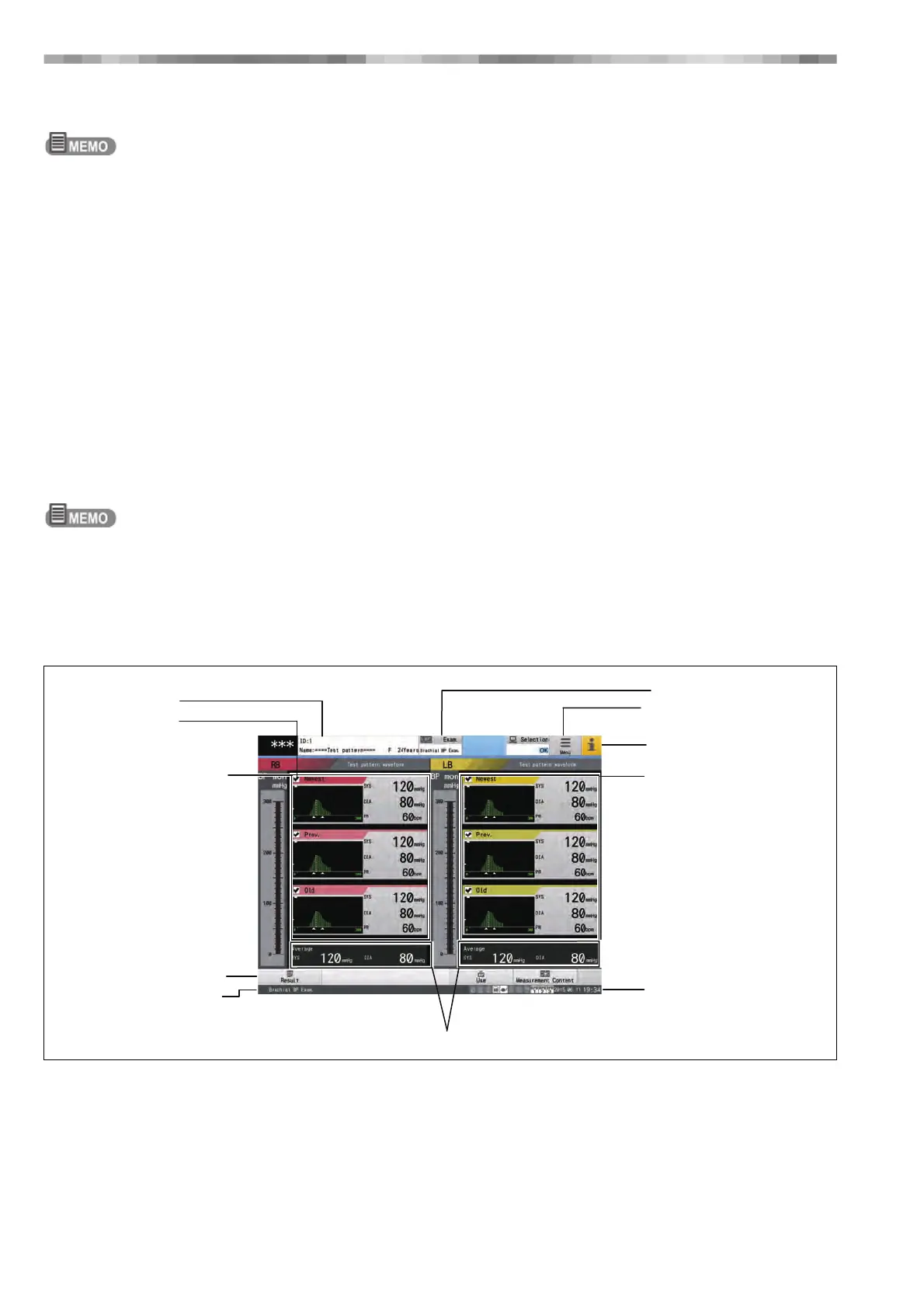
Home Display
1) ID Button (Patient Information Display Area)
Tap this to display a window for entering patient
information.
Information such as the ID, name and age of the patient are
displayed, and patient information can be added or edited.
2) Check Box for BP Selection
Use these to select whether to use each blood pressure
type when calculating the average blood pressure from
multiple measurements.
3) Right Brachial BP Display Area
Displays up to three blood pressure measurements for the
right brachium.
1) ID Button
2) Check Box for
BP Selection
3) Right Brachial BP
Display Area
4) Function Button
5) Examination Status
6) Examination Button
7) Menu Button
8) i Button
9) Left Brachial BP
Display Area
10) Date/Time
Display Area
11) Average BP Display Area



 To Next Page