4-8
Chapter 4 Entering Patient Information
Loading Information from the DMS (Master
ID)
Turn the ID number into a button and search for and load the patient information from the DMS.
For patient information settings, select [Extended] under [General/ID-A.C.] - [Input ID], and [Master ID] under [General/ID-
A.C.] - [Patient Information Reference] beforehand. (Refer to "General/ID-A.C." (P11-9).) Also, configure the
communication settings.
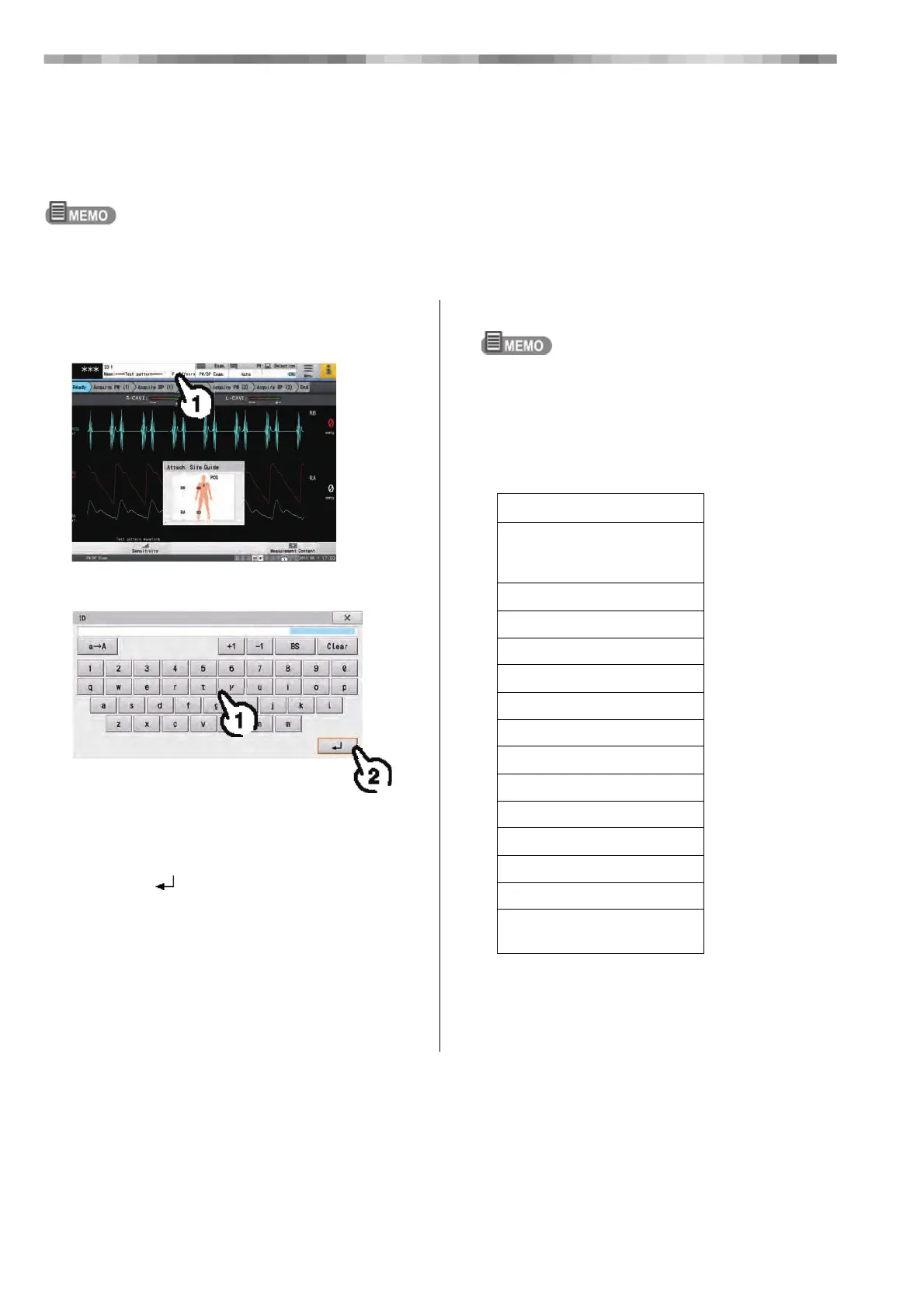
1 Touch the patient Information display
area.
2 Enter the ID number.
1) Touch the number buttons to enter the ID
number.
• [x]: Closes the "Input ID" window.
2) Touch [ ].
• The entered ID is reflected in the "Patient
Information" window.
The entered ID number is turned into a button and the
patient information is loaded from the DMS and
displayed in the "Patient Information" window.
• The message "No patient information was found for
the entered ID number" is displayed if there is no
patient information corresponding to the specified
ID number.
• The following information can be loaded using
Master ID.
Items that can be loaded
Name1
(maximum length: 10 double-byte
characters)
Birth Date
Age
Gender
Height
Weight
SYS
DIA
Department 1
Department 2
Med.1
Subjective symptoms
Comment
(maximum length: 22 single-byte
characters)



 To Next Page