4-7
Chapter 4 Entering Patient Information
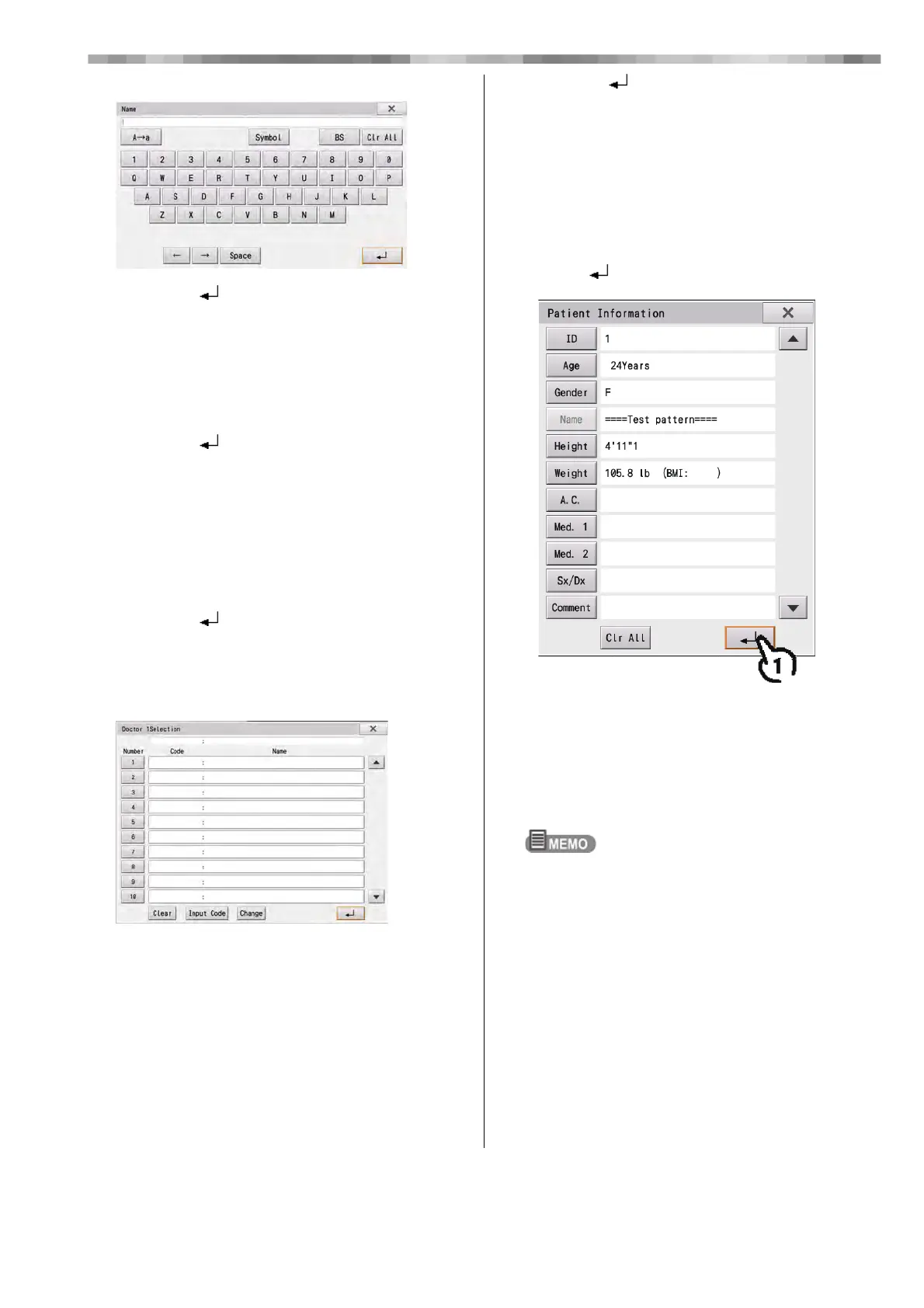
5) Enter the name of the department.
6) Touch [ ].
15
Enter Dept. 2, 3 and 4 in the same way.
16
Enter the body position.
1) Touch Supine, Sitting or Standing.
• [Clear]: The selected body position is cleared.
2) Touch [ ].
• The selected body position is reflected in the
"Patient Information" window.
17
Enter the respiration rate.
1) Touch the number buttons to enter the
patient's respiration rate.
• [x]: Closes the "Respiration Rate" window.
2) Touch [ ].
• The entered value is reflected in the "Patient
Information" window.
18
Enter the doctor and technician.
1) Touch the applicable code.
• [Clear]: All entered numbers are cleared.
• [x]: Closes the window.
2) Touch [ ].
• The selected content is reflected in the "Patient
Information" window.
3) The code and doctor/technician name can be
changed by touching the applicable doctor/
technician name and then touching
[Change].
19
Check the entered information and
touch [ ].
• The display will return to home display.
• The entered information will be displayed in the
patient information display area.
• [Clr All]: All entered information is cleared.
• [x] Saves the entered information and returns to the
home display.
If any information needs to be changed, touch the item
to display the input window and correct the
information.



 To Next Page