2
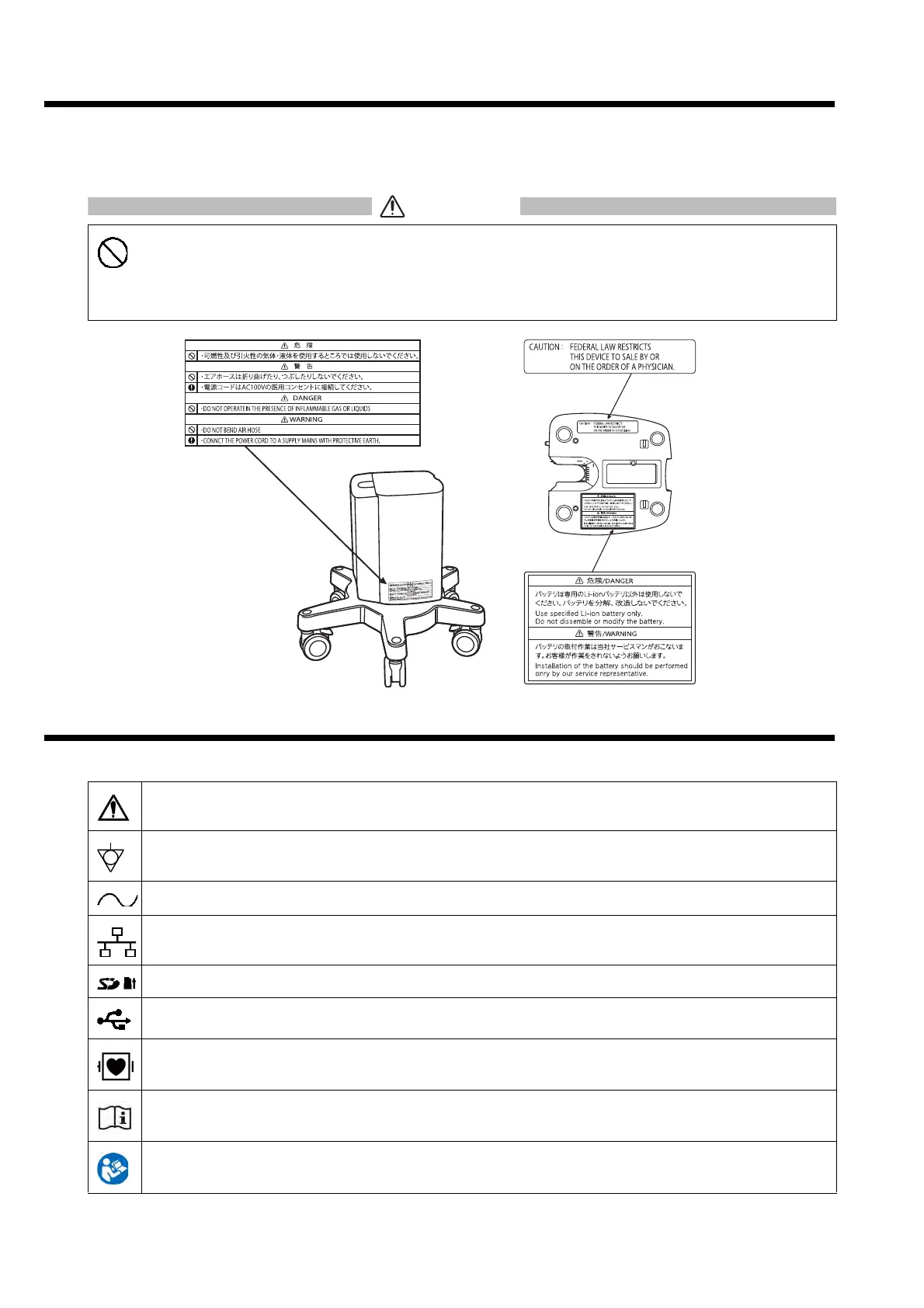
Safety Labels
Warning (safety) labels are attached to this device to indicate precautions that need to be followed to ensure proper and safe use
of the device. Make sure to follow the instructions of the warning labels attached to this device when operating the device. The
positions of the labels attached to this device are indicated below.
Symbols on the Device
Below is a list of symbols used on this device.
• Do not damage or erase the warning labels attached to the device.
These warning labels contain important information for handling and operating the device properly
and safely. If any of these labels are damaged, it may not be able to ensure safety when using the
device.
Caution: Explained in this manual.
Indicates the potential equalization terminal.
Indicates the alternating current (AC) power supply.
Indicates the LAN connector.
Indicates the SD card slot.
Indicates the USB port.
Indicates a defibrillation-proof type CF applied part.
Indicates an operation explained in this operating manual.
Refer to this operating manual.



 To Next Page