Questions? Call (315) 298-5121, or visit us online at www.fulton.com
SECTION 3 CAL-IOM-2012-1220 OPERATION
3-5
! WARNING
Non-Fulton product information is for
reference purposes only. No Fulton
document should substitute for full
review of documentation available
from the component manufacturer.
4 CAUTION
When making changes to the controls
pro le, a combustion analyzer is
required.
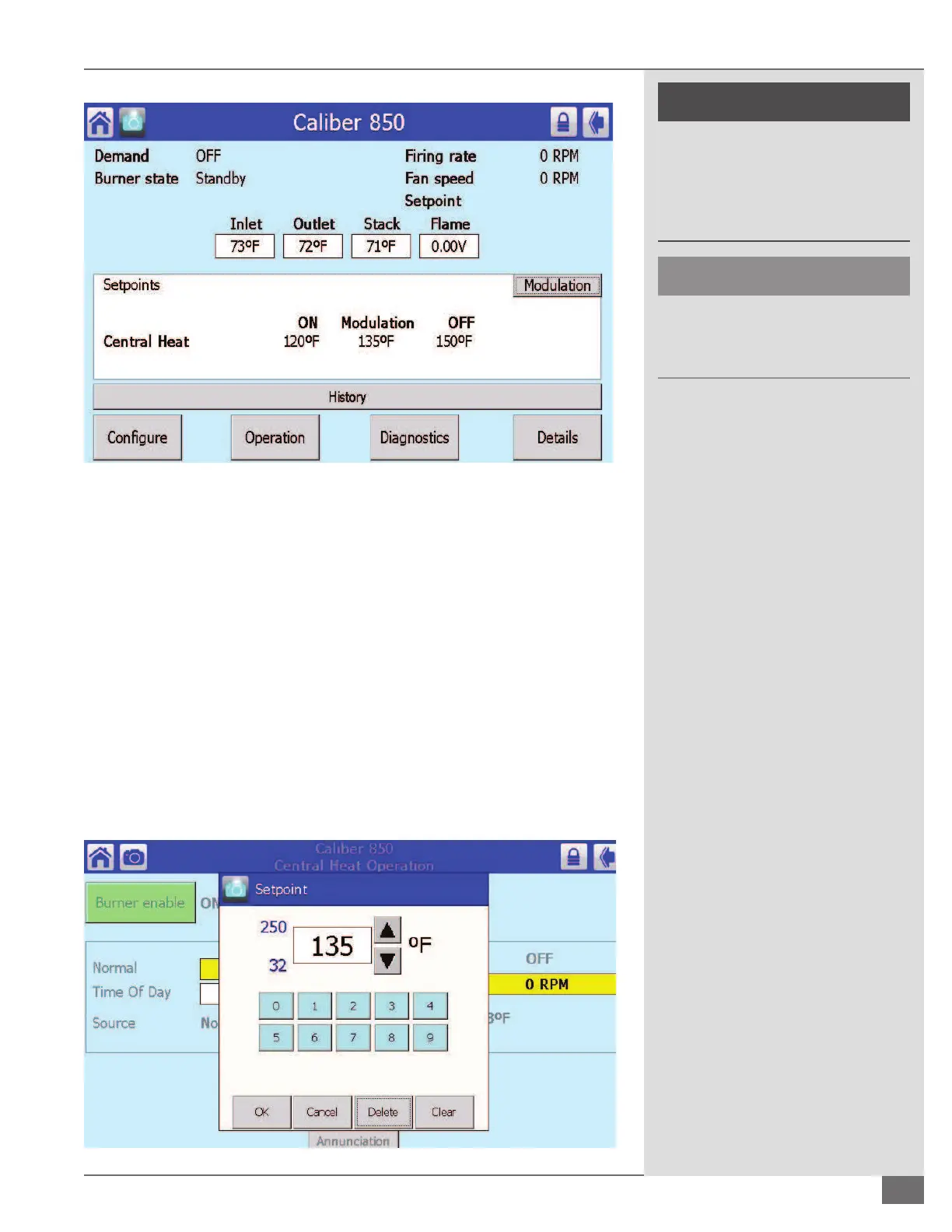
¡ CHANGING THE OPERATING SET POINT
From the main screen do the following:
1. Tap “Con gure.”
2. Tap “Central Heat Con guration.”
3. Tap “CH Set Point.”
4. Tap “Clear.”
5. Enter New Set Point.
6. Tap “OK.”
7. Tap the escape arrow in top right hand corner (see Figure 11).
FIGURE 10 SAMPLE SCREEN OF SOLA CONTROL
FIGURE 11 CHANGING THE OPERATING SET POINT







 To Next Page