Parameter
Description
Parameter
Description
Range
Default
Value
Default
Value
Contained
in
Contained
in
Basic
Function
Basic
F
unction
Parameter
Notation
Parameter
Notation
Display
Format
Display
F
ormat
:
:
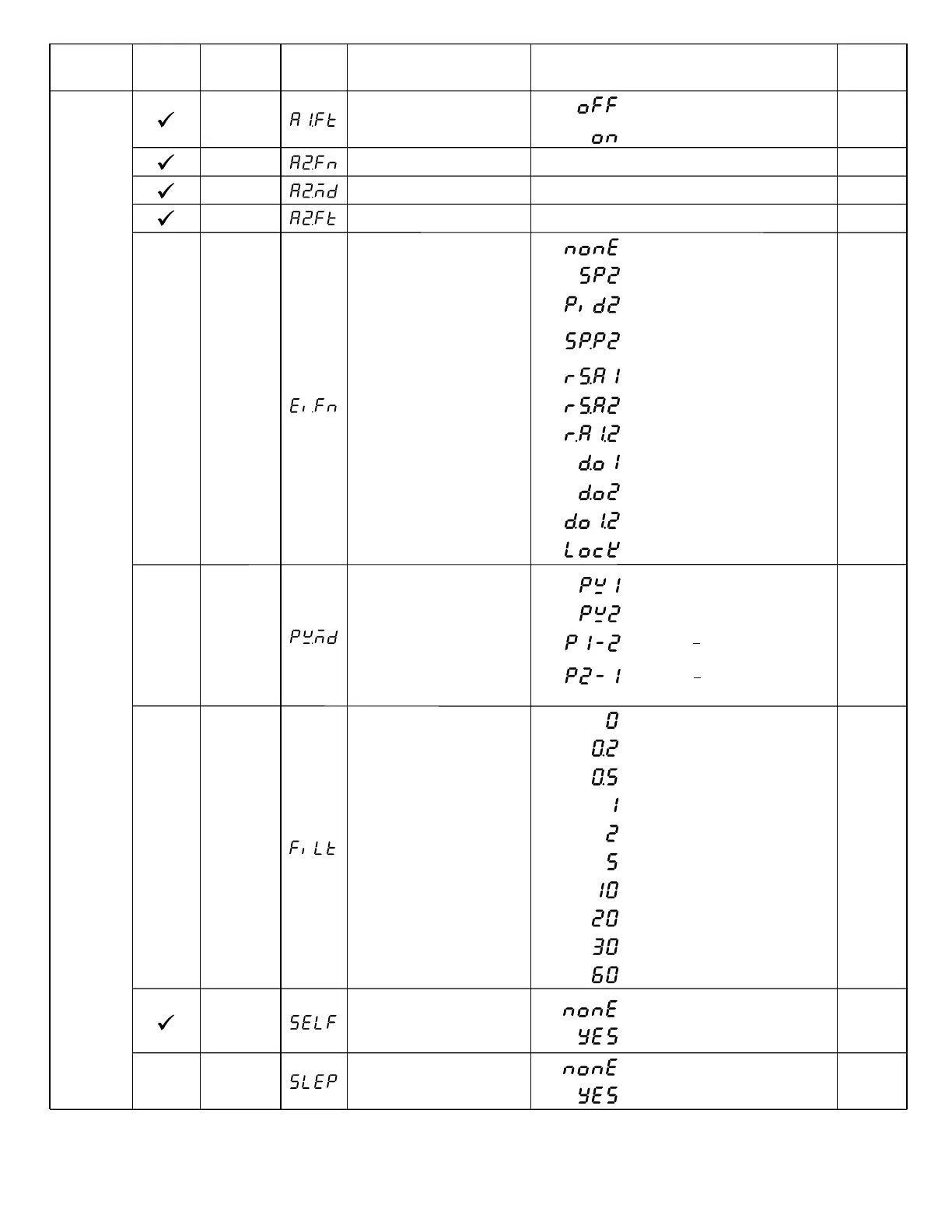
SELF
Self Tuning Function
Selection
:
:
0
1
Self tune function disabled
Self tune function enabled
SLEP
Sleep mode Function
Selection
0
Sleep mode function disabled
Sleep mode function enabled
1
0
0
:
:
A1FT
A2FT
A2FN
Alarm 1 Failure Transfer
Mode
Alarm 2 Failure Transfer
Mode
Alarm 2 Function
1
2
0
1
Alarm output OFF as unit fails
Alarm output ON as unit fails
Same as A1FN
Same as A1MD
Same as A1FT
A2MD
Alarm 2 Operation Mode
0
1
1
EIFN
Event Input Function
3
4
SP2, PB2, TI2, TD2 activated to
replace SP1, PB1, TI1, TD1
Reset alarm 1 output
9
10
Disable Output 1 & Output 2
Lock All Parameters
0
Event input no function
:
1 SP2 activated to replace SP1
:
2
PB2, TI2, TD2 activated to replace
PB1, TI1, TD1
:
:
:
5
Reset alarm 2 output
:
6
Reset alarm 1 & alarm 2
:
7
Disable Output 1
:
8
Disable Output 2
:
:
:
PVMD PV Mode Selection
:
:
0
1
Use PV1 as process value
Use PV2 as process value
:
2
Use PV1 PV2 (difference) as
process value
:
3
Use PV2 PV1 (difference) as
process value
0
0
1
2
3
4
0 second time constant
0.2 second time constant
0.5 second time constant
1 second time constant
2 seconds time constant
5 seconds time constant
10 seconds time constant
20 seconds time constant
30 seconds time constant
60 seconds time constant
5
6
7
8
9
:
:
:
:
:
:
:
:
:
:
FILT
Filter Damping Time
Constant of PV
2
Table 1.6 Parameter DescriptionTable 1.6 Parameter Description
Setup
Menu
UMA83001A-August-2024
12



 To Next Page