16
SEARCH
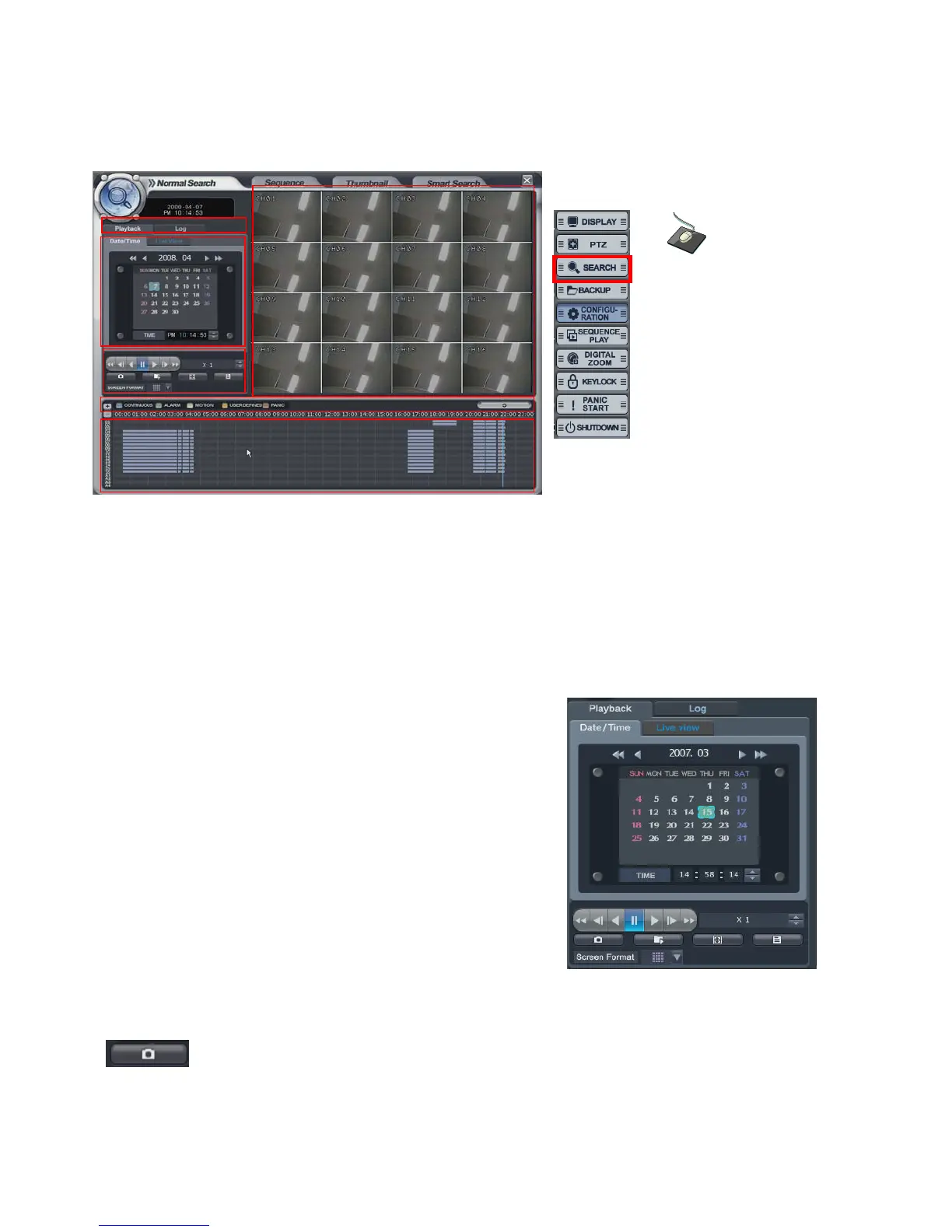
The operator can search the recorded data from Normal, Sequence, Thumbnail or Smart search folder.
Normal Search
Select the “SEARCH” icon and press the “SEARCH” button.
Logon display shows to input the password.
(A) It shows the backup display.
(B) Select either “Playback” or “Log”
(C) Select the date and time for searching
(D) The window would show the search in detail.
(E) Each recording configuration would show in different color.
(F) Shows the recorded data.
• Playback-> Date/time
- Select the date. When the date has recorded data, it would
show with color at (F).
Select the time. The operator can select the time from timer or
by drag the timeline bar from (F).
- Click the button for playback from (D),
- Playback speed is from 1X to 128X forward and backwards.
: Click the button for snapshot backup. Then it would show below screen.
During the playback, the operator can save the desired image.
Click the right mouse
button on the Live
Display screen and
click the
SEARCH menu.



 To Next Page