59
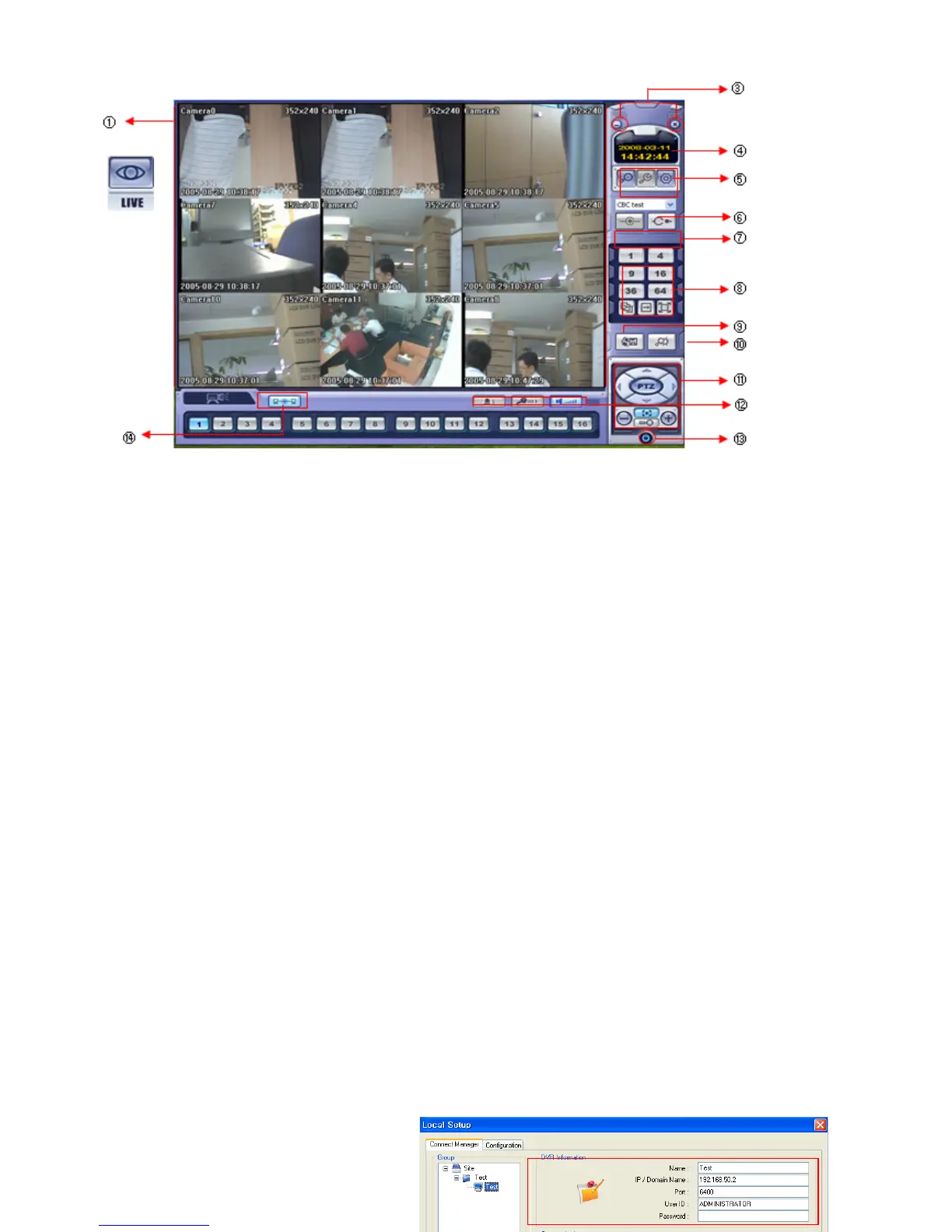
① Main Display : Shows single or multi-channel view of cameras connected to the DVR.
② Camera Selection Buttons : Indicates Camera #; click button to display a selected camera.
③ Minimize / Exit: Minimize DVR Client Window (to taskbar) or exit Remote Agent.
④ Date/Time Display : Shows current DVR System Date/Time
⑤ SEARCH: Enter Search Mode to Search and Playback Recorded Video
SETUP : Set up properties of Remote Agent, including the list of DVR units to connect to.
CONFIG : Allows Remote Configuration of a connected DVR unit.
⑥ DVR Selection : Choose a DVR to connect with the Remote Agent.
⑦ Connect : Connect to the selected DVR.
Disconnect: Disconnect from the selected DVR.
⑧ Screen Division Selection: Change Screen Division Mode (1/4/9/16/36,64 view, sequence, full screen)
Sequence/Manual Switch/Full screen
⑨ Begin Saving to AVI file: Begin Saving Live or Playback Images to the local PC in AVI format.
⑩ Event Log Viewer: Display Current Event Log & Jump to Event for Playback.
⑪ PTZ Control Button: Control Camera Pan, Tilt, Zoom, & Focus (for supported PTZ devices only)
⑫ Audio Button and Alarm: Control Bi-Directional Audio, Mute, and Toggle Alarm (On/Off).
⑬ Quit: Exit Remote Agent.
⑭ Connection Status: Indicates the Network Status of a connected DVR.
REMOTE SW LOCAL SETUP
①
②



 To Next Page