9
PRODUCT DESCRIPTION
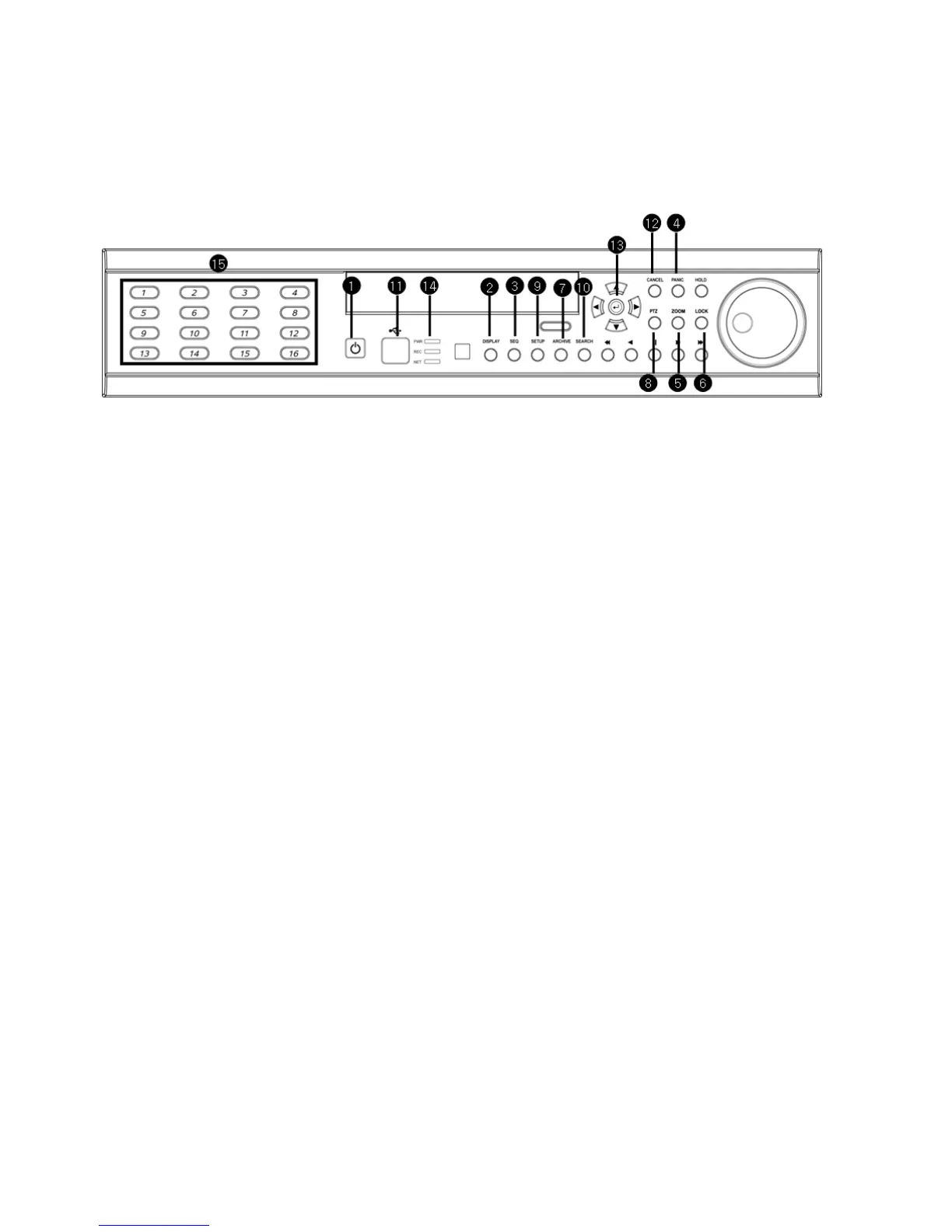
Front Panel
① Power : System Power On/Off
② DISPLAY : Select Screen Division Mode or Rotation Mode
③ SEQUENCE : Select Sequence Screen Mode
④ PANIC : Trigger Panic Recording Mode and Panic Relay Output
⑤ ZOOM : Digital Zoom on Live or Playback Image
⑥ LOCK : Front Panel Lock Button
⑦ ARCHIVE : Go to Archiving Menu
⑧ PTZ : Go to Camera PTZ Control
⑨ SETUP : Go to System Setup Menu
⑩ SEARCH : Go to Search Menu
⑪ USB PORT: USB Port for use of a USB Memory Stick and/or USB HDD Backup.
⑫ Mouse left Click
⑬ Mouse Right Click
⑭ LED Indicator : Indicates Present System Status. (POWER, REC, NETWORK)
⑮ Channel Selection Buttons (1~8/16) : Select Channel or Input Password
- Directional / Navigation Buttons (UP, DOWN, LEFT, RIGHT, ENTER)
- Remote Controller Input Sensor (IR)
- EJECT : Eject DVD-RW
- ◀ ◀ / ◀ : Focus Adjust (Near/Far) or Reverse Play / Rewind
- Ⅱ: Pause Playback
- ▶ / ▶ ▶ : Iris Adjust (Open / Close) or Forward Play / Fast Forward
- JOG / SHUTTLE : Outer wheel – variable REW or FF; Inner wheel – scroll frame-by frame while
PAUSE.
- HOLD : Hold Current JOG / SHUTTLE Position



 To Next Page