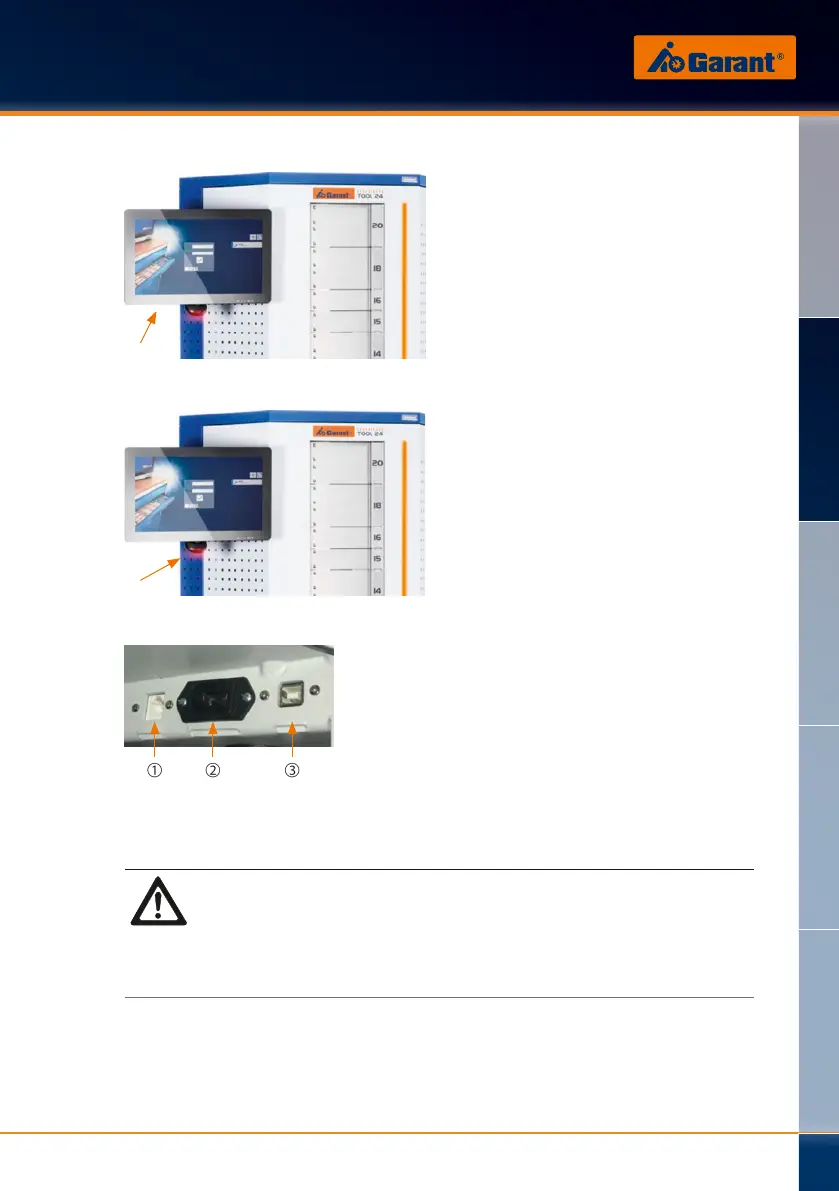
4.4.1 Touch monitor
The Tool24 PickOne goods issue
system is mainly operated using the
touch monitor. Here, items can be
stored away, managed, and removed
from the system.
4.4.2 Barcode scanner
To enable the fast and easy operation
of the system, you can scan items
using their printed-on barcode.
A barcode scanner is attached
beneath the touch monitor for this
purpose.
4.5 Connections
➁➀ ➂
➀ Network
➁ IEC 60320 C13
➂ USB-B
DANGER!
Risk of death due to unauthorized or uncontrolled activation!
The unauthorized or uncontrolled activation of the Tool24 PickOne goods
issue system can result in injury or even death.
The mains plug must be pulled out for all connection work
carried out on the Tool24 PickOne goods issue system.
A socket as per IEC 60320 C13 is installed on the Tool24 PickOne goods
issue system for the power supply. The external connections are beneath
the maintenance opening behind the base cover of the Tool24 PickOne
goods issue system.
DE
EN
FR
IT
ES
www.hoffmann-group.com
89


 To Next Page