13-9-653 Page 3
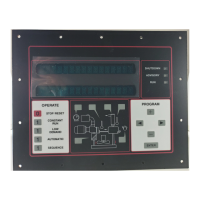
"AUTO SENTRY
®
-ES+" CONTROL DISPLAY
The display above the keypad is used to provide operating information to the user. If a shutdown has occurred, the
display will indicate the cause.
During normal operation, the display will show the system (plant) pressure, compressor discharge temperature, total
running hours, and operation mode. Alternate displays are available by pressing the keys on the diagram or the [<][>]
keypad keys, and will be identified on the display. These include:
1. Air/oil reservoir pressure
2. Separator differential pressure
3. Air/oil reservoir & separator temperature
4. System discharge pressure
5. Airend discharge temperature
6. Remaining blowdown time
7. Remaining auto time
8. Total running hourmeter
9. Loaded operation hourmeter
Remaining blowdown and auto times are only available in Low Demand, Automatic, and Sequence modes, as
appropriate.
Service information may also be displayed while the compressor is running. Press the [+][-] keys to display the
following:
1. Main motor current (optional)
2. Est. hours till next recommended oil change
3. Hours till next recommended oil filter change
4. List of any active advisory messages
If no keys are pressed for 5 seconds, the display will revert to its normal mode.
The display is also used as a service reminder for normal maintenance items. If service is recommended, the yellow
advisory light will be on, and a message will alternate with the normal lower line display. Yellow lights on the diagram
also indicate the area needing service. These messages are intended to advise of conditions which may lead to a
shutdown.
If a protective shutdown occurs, the red shutdown light will be on and the top line of the display will indicate
"SHUTDOWN". The lower line will indicate the cause of the shutdown. A red indicator on the diagram indicates the
area needing service.
SERVICE ADVISORIES
The controller turns on an advisory when it detects operation which needs service attention, but does not warrant
shutting down the compressor. Some of these are normal maintenance procedures, and are intended to serve as a
reminder to perform routine service. Others are conditions which can reduce the maximum compressor performance.
It will remain in effect until reset. Check the display during routine inspections, and perform maintenance as
suggested. Refer to the troubleshooting section for detailed information about each advisory.
Temperature advisories may be cleared while the unit is running by simply pressing the [ENTER] key. To reset the
service advisories, press the [STOP/RESET] key to stop operation of the compressor. After it has stopped,
disconnect power and service as required. After servicing, restore power and reset the board as indicated in the
programming / maintenance section below.






 To Next Page