Garmin G950 Pilot’s Guide for the Pilatus PC-6
190-00870-02 Rev. A260
FLIGHT MANAGEMENT
SYSTEM
OVERVIEW
FLIGHT
INSTRUMENTS
EIS
AUDIO PANEL
& CNS
FLIGHT
MANAGEMENT
HAZARD
AVOIDANCE
AFCS
ADDITIONAL
FEATURES
APPENDICESINDEX
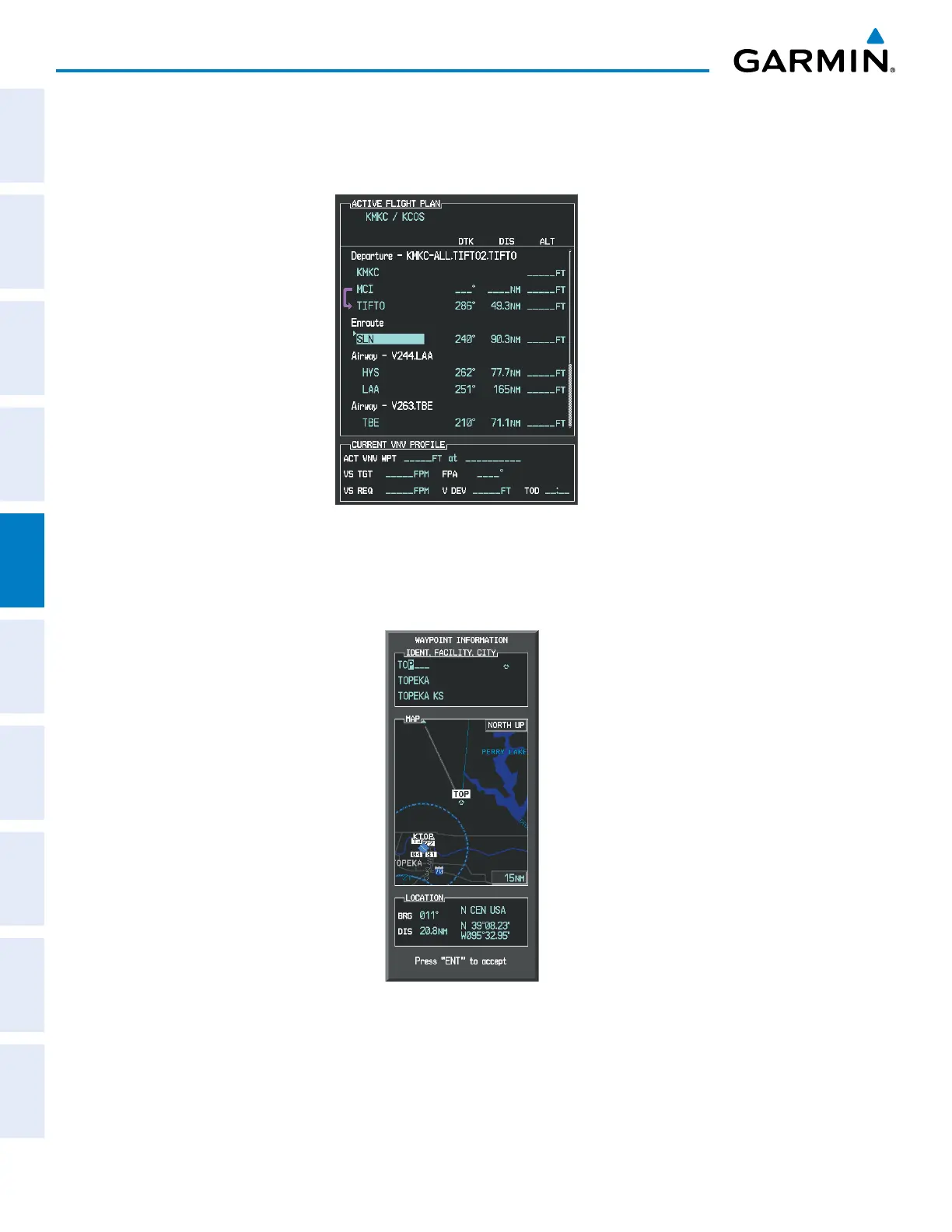
b) The desired entry point for V4 (TOP) must be entered. Turn the large FMS Knob to highlight the desired flight
plan insertion point (SLN) as shown in Figure 5-114. When the V4 entry point (TOP) is inserted, it is placed
immediately above the highlighted waypoint (SLN).
Figure 5-114 Begin Adding V4 to the Flight Plan
c) Turn the small FMS Knob to display the Waypoint Information Window. Enter the desired entry point for V4,
Topeka VOR (TOP), as shown in Figure 5-115.
Figure 5-115 Entering V4 Entry Point



 To Next Page