Garmin G950 Pilot’s Guide for the Pilatus PC-6
190-00870-02 Rev. A264
FLIGHT MANAGEMENT
SYSTEM
OVERVIEW
FLIGHT
INSTRUMENTS
EIS
AUDIO PANEL
& CNS
FLIGHT
MANAGEMENT
HAZARD
AVOIDANCE
AFCS
ADDITIONAL
FEATURES
APPENDICESINDEX
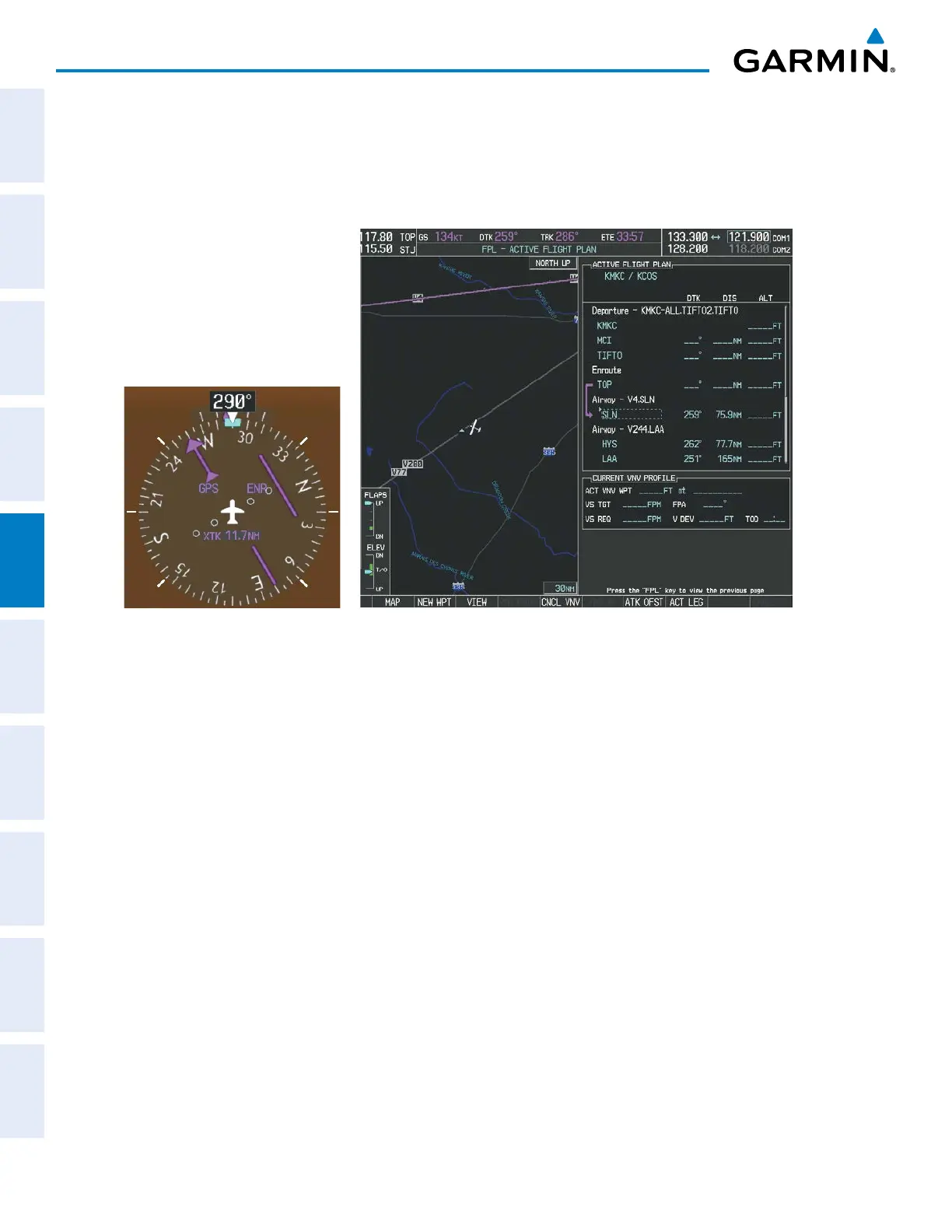
d) Verify the displayed leg is the desired leg and press the ENT Key. Note in Figure 5-122, the magenta arrow in
the flight plan window and magenta line on the map indicating V4 is now the active flight plan leg. Note the
phase of flight remained in Terminal (TERM) mode up to this point because a departure leg was active. Since a
leg after the departure is now active, the current CDI flight phase is ENR (Enroute) and CDI scaling has changed
to 2.0 nm.
Figure 5-122 V4 Now Active Leg
6) The aircraft continues on heading 290º. When crosstrack distance is less than 2.0 nm, the XTK disappears from
the HSI and the CDI is positioned on the last dot indicating a 2.0 nm distance from the centerline of the next
course.



 To Next Page