24 GPSMAP 62/62s Owner’s Manual
Customizing Your Device
EN
Customizing Your
Device
Customizing Data Fields
You can customize the data elds
displayed on each main page.
1. From a main page, press MENU.
2. Select Change Data Fields.
3. Select a data eld.
4. Follow the on-screen instructions.
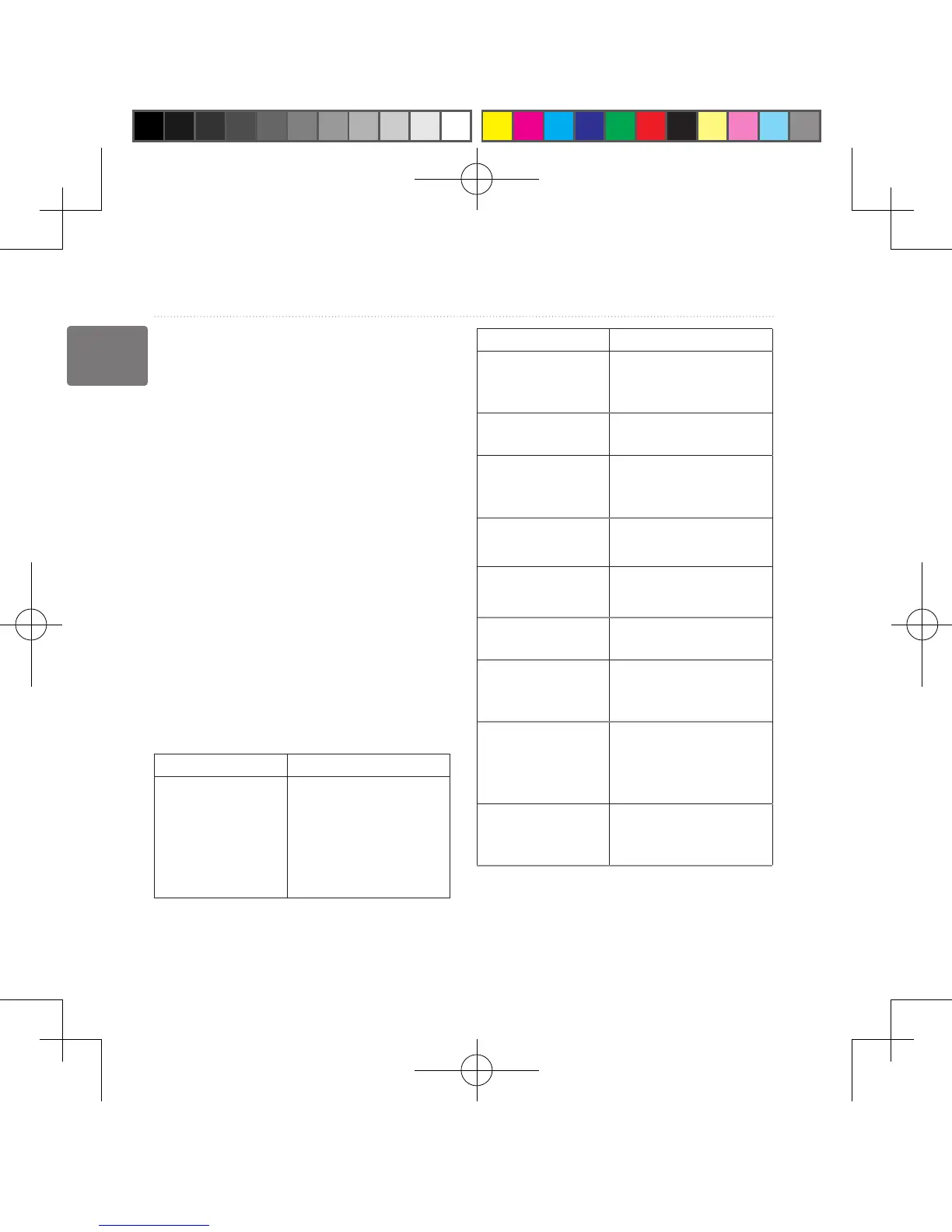
Data Field Options
** Available only with the
GPSMAP 62s.
Data Field Description
Accuracy of GPS The margin of error for
your exact location�
For example, your
GPS location is
accurate to within +/-
12 feet�
Data Field Description
**Ambient
Pressure
The uncalibrated
environmental
pressure�
**Ascent -
Average
The average vertical
distance of ascent�
**Ascent -
Maximum
The maximum ascent
rate in feet/meters per
minute�
**Ascent - Total The total elevation
distance ascended�
**Barometer The calibrated current
pressure�
Battery Level The remaining battery
power�
Bearing The direction from your
current location to a
destination�
**Cadence
(cadence
accessory
required)
Revolutions of the
crank arm or strides
per minute�
Course The direction from your
starting location to a
destination�
190-01215-25_0A.indd 24 2011/3/22 下午 03:12:42













 To Next Page