4 GPSMAP 620 Owner’s Manual
Getting Started
• If the device will not be used for an extended time (longer than
one week), remove the battery pack.
CAUTION: The GPSMAP 620 is waterproof to the IPX7 standard
only when the battery is connected and locked in place. Use
extreme caution around water when removing the battery from the
device.
Inserting and Removing a Secure Digital
(SD) Card
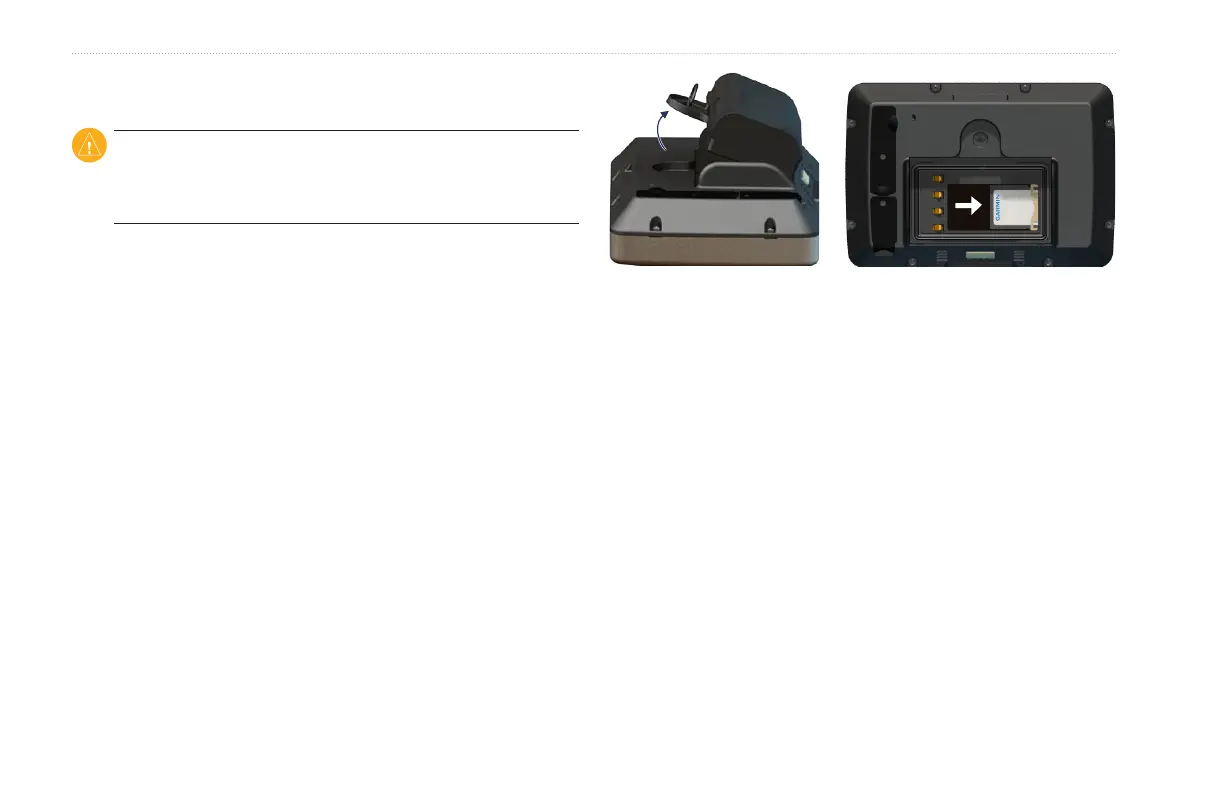
To preserve the IPX7 water resistance of the GPSMAP 620, the SD
card slot is located under the battery.
To insert an SD card:
1. Remove the battery pack. The SD card slot is in the bottom of
the battery compartment, on the opposite side from the battery
contacts.
2. Place an SD card into the opening, label out, with the SD card
contacts facing away from the battery contacts.
3. Slide the SD card into the SD card slot, and press until it clicks
softly and locks in place.
4. Insert the battery pack.
Inserting an SD Card
To remove an SD card:
1. Remove the battery.
2. Press in on the SD card until it clicks softly and releases from
the SD card slot.
3. Remove the SD card.














 To Next Page