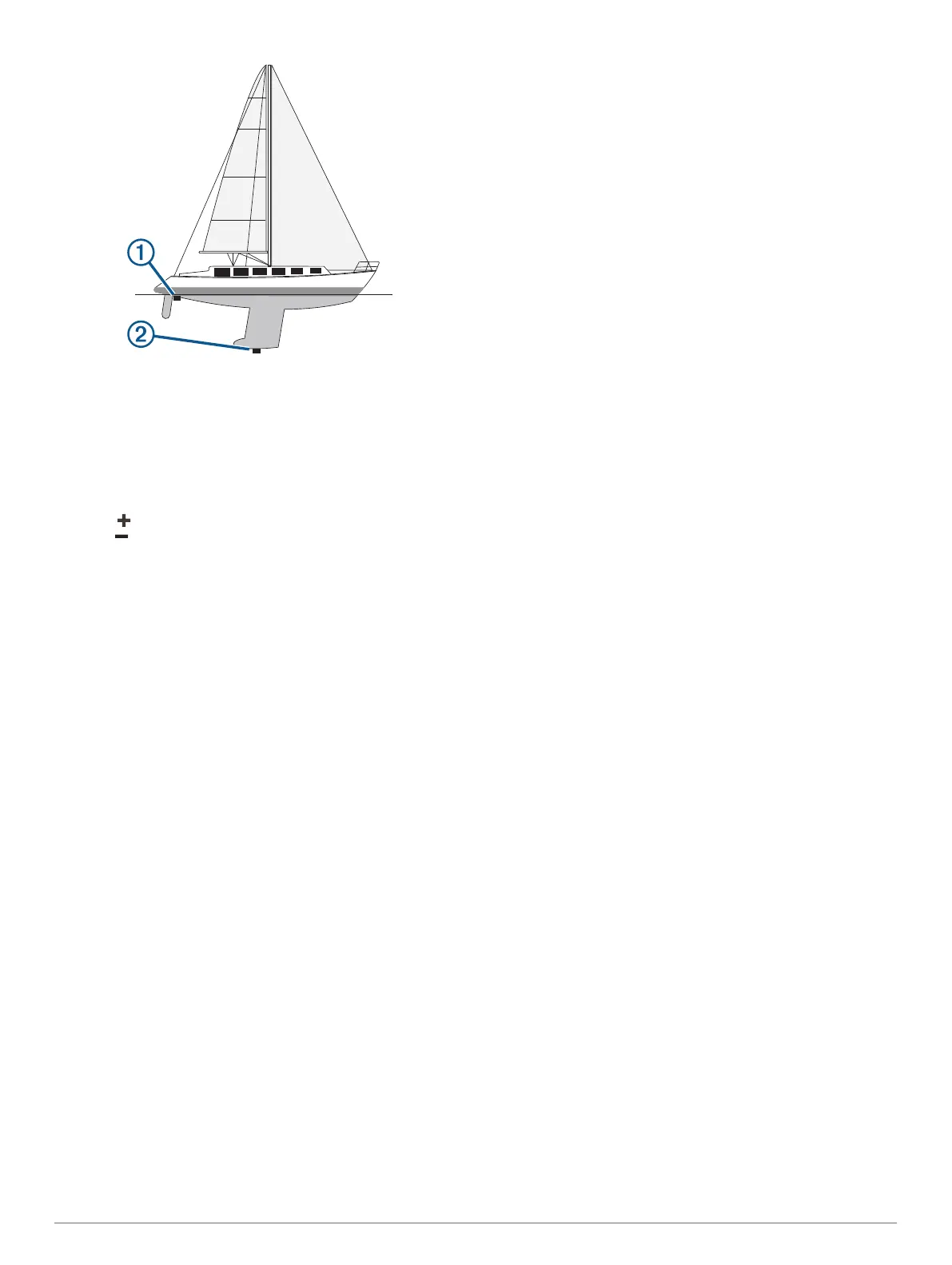
2
Complete an action:
• If the transducer is connected to the chartplotter or a
sonar module, select Settings > My Vessel > Depth and
Anchoring > Keel Offset.
• If the transducer is connected to the NMEA 2000 network,
select Settings > Communications > NMEA 2000 Setup
> Device List, select the transducer, and select Review >
Keel Offset.
3
Select if the transducer is installed at the water line, or
select if the transducer is installed at the bottom of the
keel.
4
Enter the distance measured in step 1.
Setting the Water Temperature Offset
The temperature offset compensates for the temperature
reading from a temperature sensor or temperature-capable
transducer.
1
Measure the water temperature using the temperature sensor
or temperature-capable transducer that is connected to the
network.
2
Measure the water temperature using a different temperature
sensor or a thermometer that is known to be accurate.
3
Subtract the water temperature measured in step 1 from the
water temperature measured in step 2.
This value is the temperature offset. Enter this value in step 5
as a positive number if the sensor measures the water
temperature as being colder than it actually is. Enter this
value in step 5 as a negative number if the sensor measures
the water temperature as being warmer than it actually is.
4
Complete an action:
• If the sensor or transducer is connected to the chartplotter
or a sonar module, select Settings > My Vessel > Temp.
Offset.
• If the sensor or transducer is connected to the NMEA
2000 network, select Settings > Communications >
NMEA 2000 Setup > Device List, select the transducer,
and select Review > Temp. Offset.
5
Enter the temperature offset value calculated in step 3.
Calibrating a Water-Speed Device
If you have a speed sensor or a speed-sensing transducer
connected, you can calibrate that speed-sensing device to
improve the accuracy of water-speed data displayed by the
chartplotter.
1
Complete an action:
• If the sensor or transducer is connected to the chartplotter
or a sonar module, select Settings > My Vessel >
Calibrate Water Speed.
• If the sensor or transducer is connected to the NMEA
2000 network, select Settings > Communications >
NMEA 2000 Setup > Device List, select the transducer,
and select Review > Calibrate Water Speed.
2
Follow the on-screen instructions.
If the boat is not moving fast enough or the speed sensor is
not registering a speed, a message appears.
3
Select OK, and safely increase the boat speed.
4
If the message appears again, stop the boat, and ensure the
speed-sensor wheel is not stuck.
5
If the wheel turns freely, check the cable connections.
6
If you continue to get the message, contact Garmin product
support.
Other Vessels Settings
When your compatible chartplotter is connected to an AIS
device or VHF radio, you can set up how other vessels are
displayed on the chartplotter.
Select Settings > Other Vessels.
AIS: Enables and disables AIS signal reception.
DSC: Enables and disables digital selective calling (DSC).
Collision Alarm: Sets the collision alarm (Setting the Safe-Zone
Collision Alarm, page 11).
AIS-EPIRB Test: Enables test signals from Emergency Position
Indicating Radio Beacons (EPRIB).
AIS-MOB Test: Enables test signals from man overboard (MOB)
devices.
AIS-SART Test: Enables test transmissions from Search and
Rescue Transponders (SART).
Settings that are Synced on the Garmin
Marine Network
The following devices sync certain settings when connected to
the Garmin Marine Network.
• ECHOMAP
™
70 series
• GPSMAP 507 series (software version 3.0 or later)
• GPSMAP 701 series (software version 3.0 or later)
• GPSMAP 702 series
• GPSMAP 800 series
• GPSMAP 902 series
• GPSMAP 1000 series
• GPSMAP 1002 series
• GPSMAP 1202 series
• GPSMAP 7400/7600 series
• GPSMAP 8400/8600/8700 series
The following settings are synced, if applicable, to the device.
Alarm Settings (also syncs alarm acknowledgment):
• Arrival
• Anchor Drag
• Off Course
• GPS Accuracy
• Shallow Water
• Deep Water (Not available in the GPSMAP 8400/8600
series)
• Water Temp.
• Contour (Not available in echoMAP 70s and GPSMAP
507/701 series)
• Fish
• Collision Alarm
General Settings:
Device Configuration 61




 To Next Page