Introduction
WARNING
See the Important Safety and Product Information guide in the
product box for product warnings and other important
information.
All route and navigation lines displayed on the chartplotter are
only intended to provide general route guidance or to identify
proper channels, and are not intended to be precisely followed.
Always defer to the navaids and conditions on the water when
navigating to avoid groundings or hazards that could result in
vessel damage, personal injury, or death.
NOTE: Not all features are available on all models.
The Garmin
®
website at support.garmin.com presents up-to-date
information about your product. The support pages will provide
answers to frequently asked support questions, and you can
download software and chart updates. There is also contact
information to Garmin support should you have any questions.
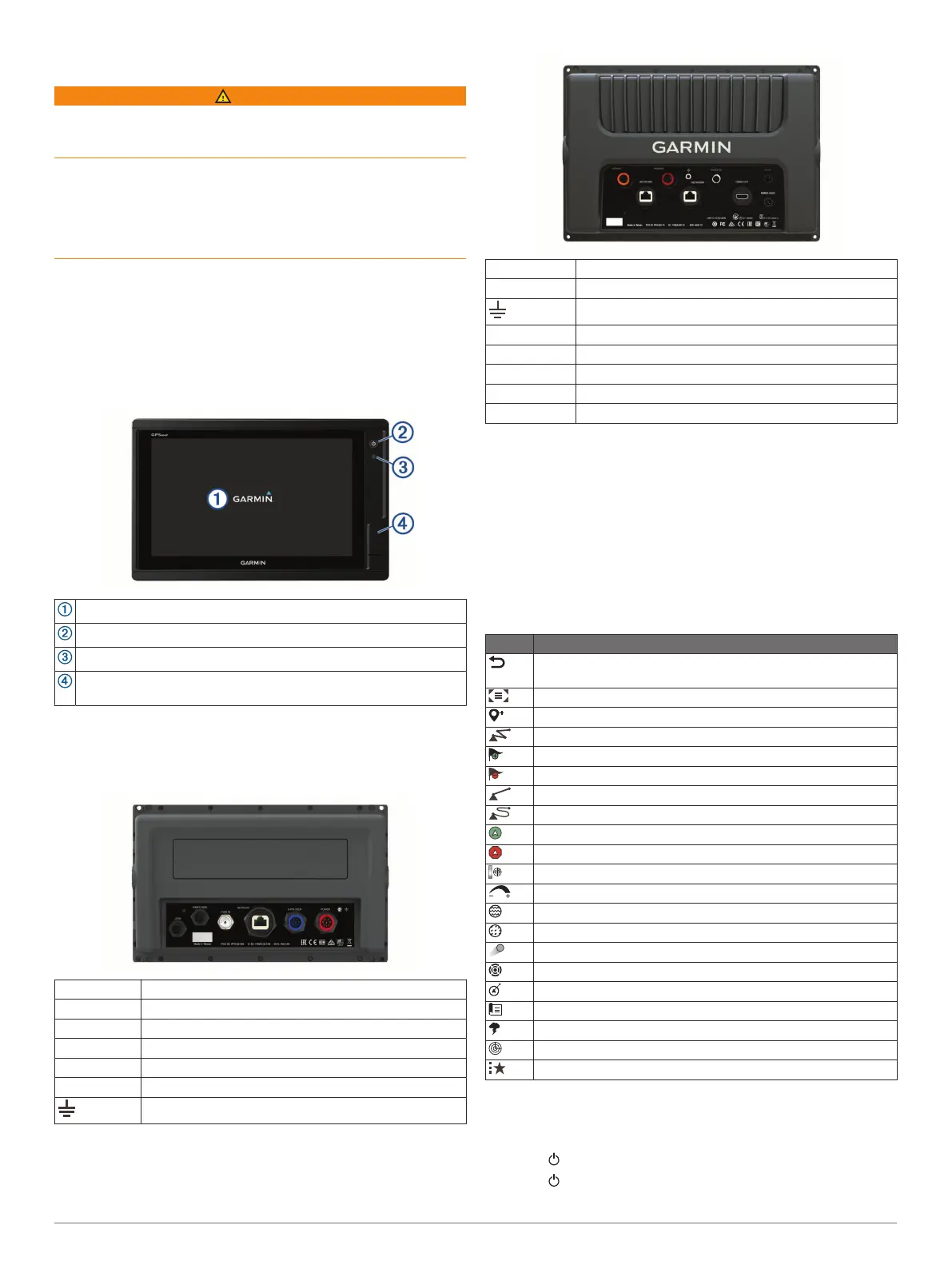
Device Overview
Touchscreen
Power key
Automatic backlight sensor
12x2/A12 models: 2 SD
®
memory card slots. 7x2/9x2 models: 2
microSD
®
memory card slots. 32 GB max. card size.
GPSMAP 7x2/7x2 Plus and GPSMAP 9x2/9x2 Plus
Connector View
The connectors and locations vary based upon the model. This
image and table represent a GPSMAP 922xs Plus model.
J1939 J1939 engine network (Not available on all models)
NMEA 2000 NMEA 2000
®
network
CVBS IN Composite video in
ETHERNET Garmin Marine Network
8-PIN XDCR 8-pin transducer (Not available on all models)
POWER Power and NMEA
®
0183 network
Ground screw
GPSMAP 12x2 Touch/A12/12x2 Plus Connector View
The connectors and locations vary based upon the model.
SONAR 12-pin transducer (Not available on all models)
POWER Power and NMEA 0183 network
Ground screw
CVBS IN Composite video in
J1939 Engine or J1939 network
ETHERNET Garmin Marine Network
HDMI OUT HDMI
®
video out
NMEA 2000 NMEA 2000 network
Using the Touchscreen
• Tap the screen to select an item.
• Drag or swipe your finger across the screen to pan or scroll.
• Pinch two fingers together to zoom out.
• Spread two fingers apart to zoom in.
On-Screen Buttons
These on-screen buttons may be displayed on some screens
and functions. Some buttons are accessible only in a
combination page or SmartMode
™
layout or when accessories,
such as a radar, are connected..
Button Function
Clears the on-screen icons and re-centers the screen on the
boat
Opens a full-screen view of the item
Creates a new waypoint
Creates a route, with turns, to the destination
Adds a turn to the route at the selected location
Removes the last added turn from the route
Creates a direct route, without turns, to the destination
Creates an Auto Guidance route to the destination
Begins navigation
Ends navigation
Stops and starts radar transmission
Opens the radar gain adjustment menu
Opens the radar sea clutter adjustment menu
Opens the radar rain clutter adjustment menu
Turns on and off the radar echo trails
Acquires a radar target and begins tracking it
Shows and sets the VRM/EBL line
Opens the menu for the page or function
Opens the Weather menu for the page or function
Opens the Radar menu for the page or function
Opens the Presets menu for the page or function
Locking and Unlocking the Touchscreen
You can lock the touchscreen to prevent inadvertent screen
touches.
1
Select > Lock Touchscreen to lock the screen.
2
Select to unlock the screen.
Introduction 1












 To Next Page