EasyManua.ls Logo

GCC Technologies LaserPro X252RX - Page 51

GCC Technologies LaserPro X252RX
115 pages
Print Icon
To Next Page IconTo Next Page
To Previous Page IconTo Previous Page
Loading...
- 40 -
232001240G(08)
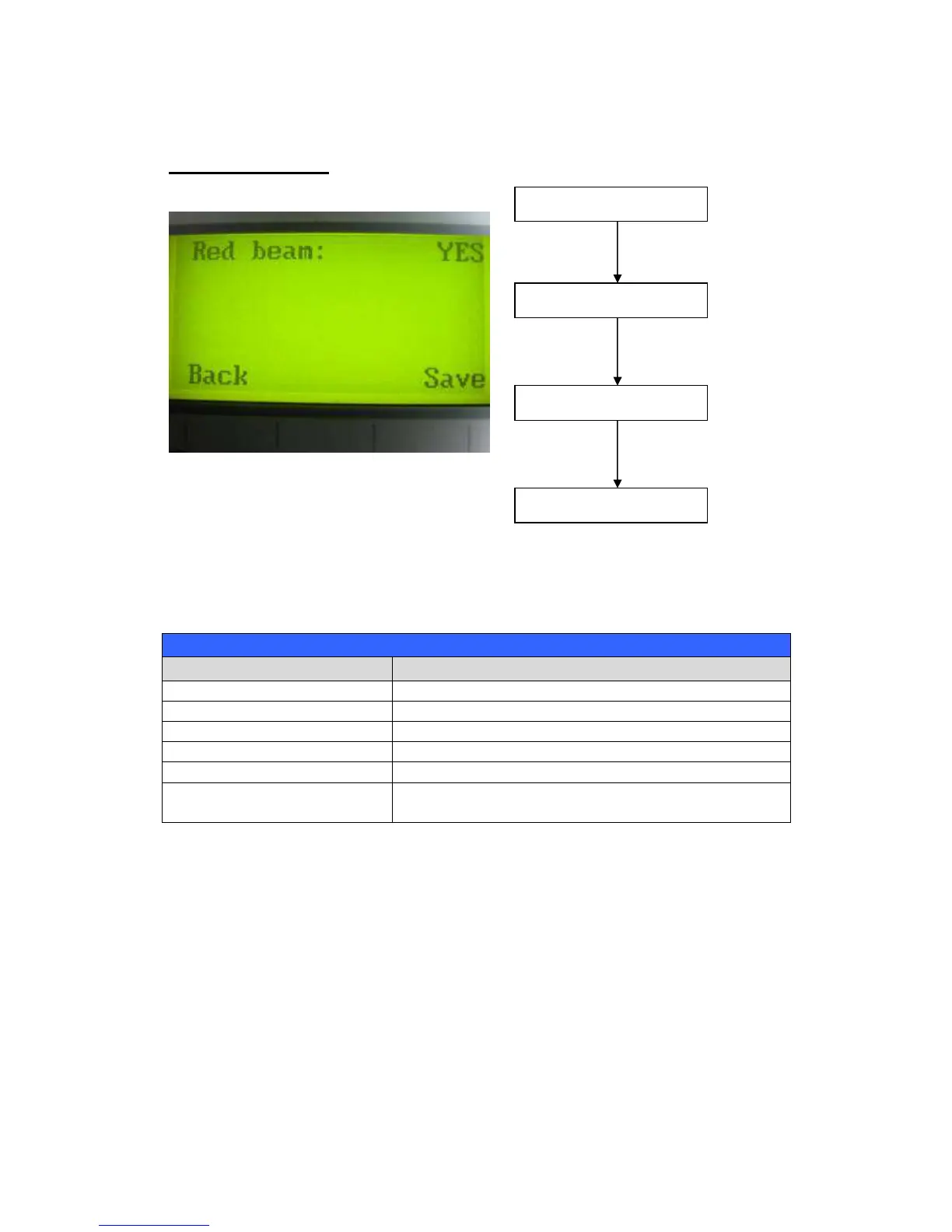
Set Red Beam Page
The Set Beam Page allows you to turn on or off the red dot laser pointer on the laser carriage.
Enabling this function will indicate the exact location where the laser will fire upon.
Red Beam YES / NO
Set Red Beam Page
Relevant Buttons
Function
F1 (Back)
Back to previous page
F4 (Save)
Save your current settings
/
Directional
Cycle Red Beam between YES / NO
Start / Stop Back to Main Work Page
Auto Focus Initiate the auto focus function
▲ / ▼
Manual Focus
Buttons
Manually adjust the height of the work table (Z-
axis)
Main Work Page
Press
F4
☼
Navigating to this page:
Functions Page
Select <
Machine Setting
>
from the menu
Machine Setting Page
Select <
Set Red Beam
>
from the menu
Set Red Beam Page

Table of Contents