Installing the Phone
Desktop Installation
CAUTION: To reduce risk of personal injury, fire, or damage use
i, only the 5-2806 (white) or 5-2807 (black) power adaptor listed in
the user's guide. This power adaptor is intended to be correctly
orientated in a vertical or floor mount position.
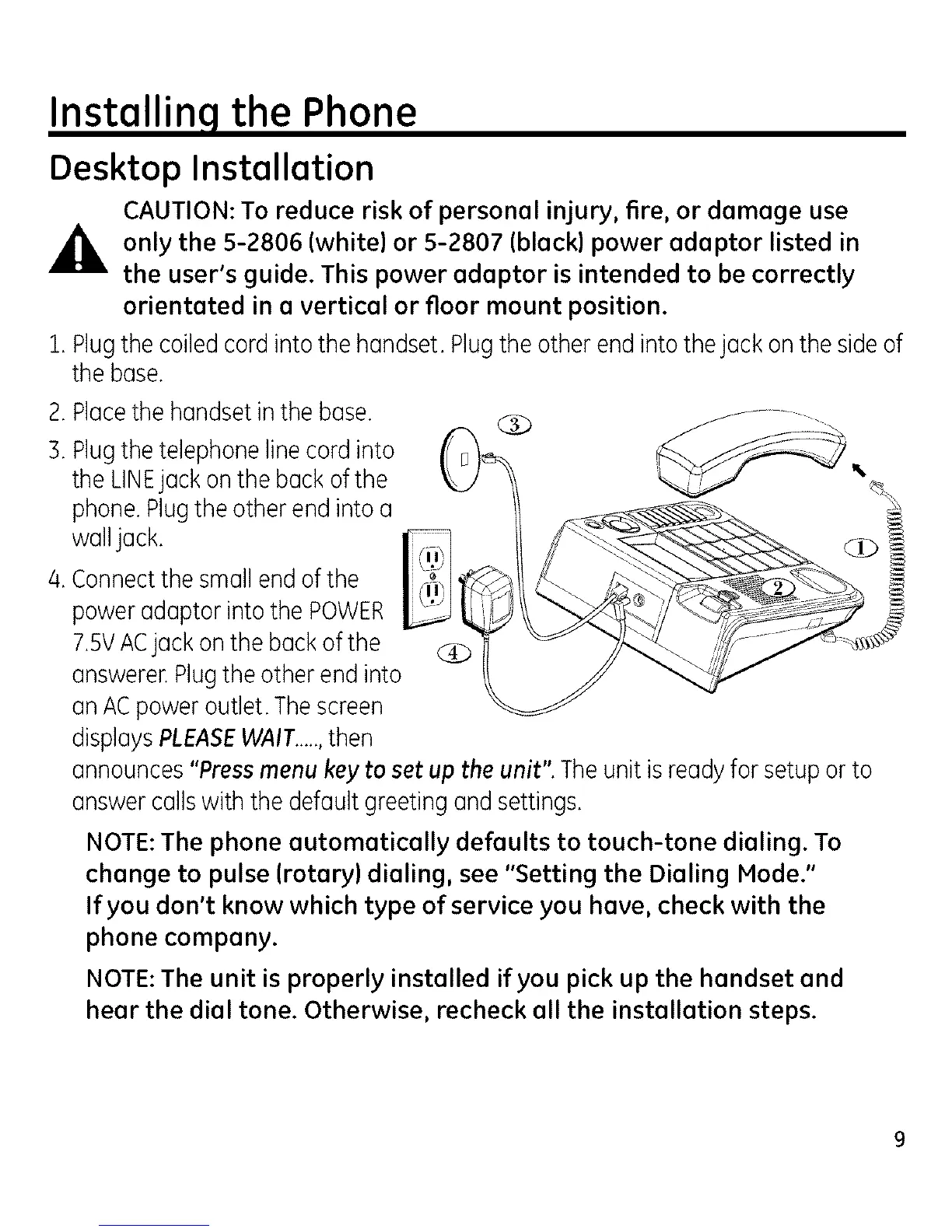
1. Plug the coiled cord into the handset. Plug the other end into thejack on the side of
the base.
2.Placethe handsetinthe base.
B.Plugthe telephonelinecordinto
the LINEjack onthe backofthe
phone.Plugthe otherend into a
walljack.
/4.Connectthe smallend of the
poweradaptor into the POWER
7.5VACjack onthe backof the
answerer.Plugtheother end into
an ACpoweroutlet. Thescreen
displaysPLEASEWAIT.....,then
announces"Pressmenukey to set up the unit". Theunit is readyfor setup orto
answercallswith the defaultgreeting and settings.
NOTE: The phone automatically defaults to touch-tone dialing. To
change to pulse (rotary) dialing, see "Setting the Dialing Mode."
If you don't know which type of service you have, check with the
phone company.
NOTE: The unit is properly installed if you pick up the handset and
hear the dial tone. Otherwise, recheck all the installation steps.



 To Next Page