GEAppliances.com
Oven Control, Clock and Timer Features and Settings onsomemo e s;
Automatic Oven Light (onsome models)
Thislights anytime the oven has been
programmed usingthe Cooking Time
or Start Timefunctions.
Oven Light On/Off Pad
Touchthis pad to turn the oven light on or off.
- Pad
Shorttaps to this pad will decrease the time
or temperature by small amounts. Touch
and hold the pad to decreasethe time
or temperature by larger amounts.
+ Pad
Shorttaps to this pad will increasethe time
or temperature by small amounts. Touch
and hold the pad to increase the time
or temperature by larger amounts.
Self Clean Pad
Touch this pad to select the self-cleaning
function. Seethe Usingthe self-cleaning oven
section.
Clean Light
Flasheswhilein edit mode-you can change
the lengthoftime for the self-cleancycleat this
point. Glowswhen the ovenisinthe self-clean
cycle.After theself-cleancycle,the light will
turn off.Unlatchthe door.
Clear/Off Pad
Touch this pad to cancel ALL oven operations
except the clock and timer.
Broil Hi/Lo Pad
Touch this pad to select the broil function.
Broil Light
Flasheswhilein edit mode-you can switchfrom
Hito Lo Broil at this point. Glowswhen the oven
isin broil mode.
Indicator Lights (on some pads)
EDITmodelasts severalsecondsafter the last
pad press.Start Timeand Cooking Time will be
the onlypadslit ifeitherofthese optionsis
selected.(Example:Start Time isselectedwith
Bake-the Start Timepadwill remain lituntil the
clockreachesthe programmed time,at which
point itwillturn off and the Bake/remp Recall
pad lightwill light up.)
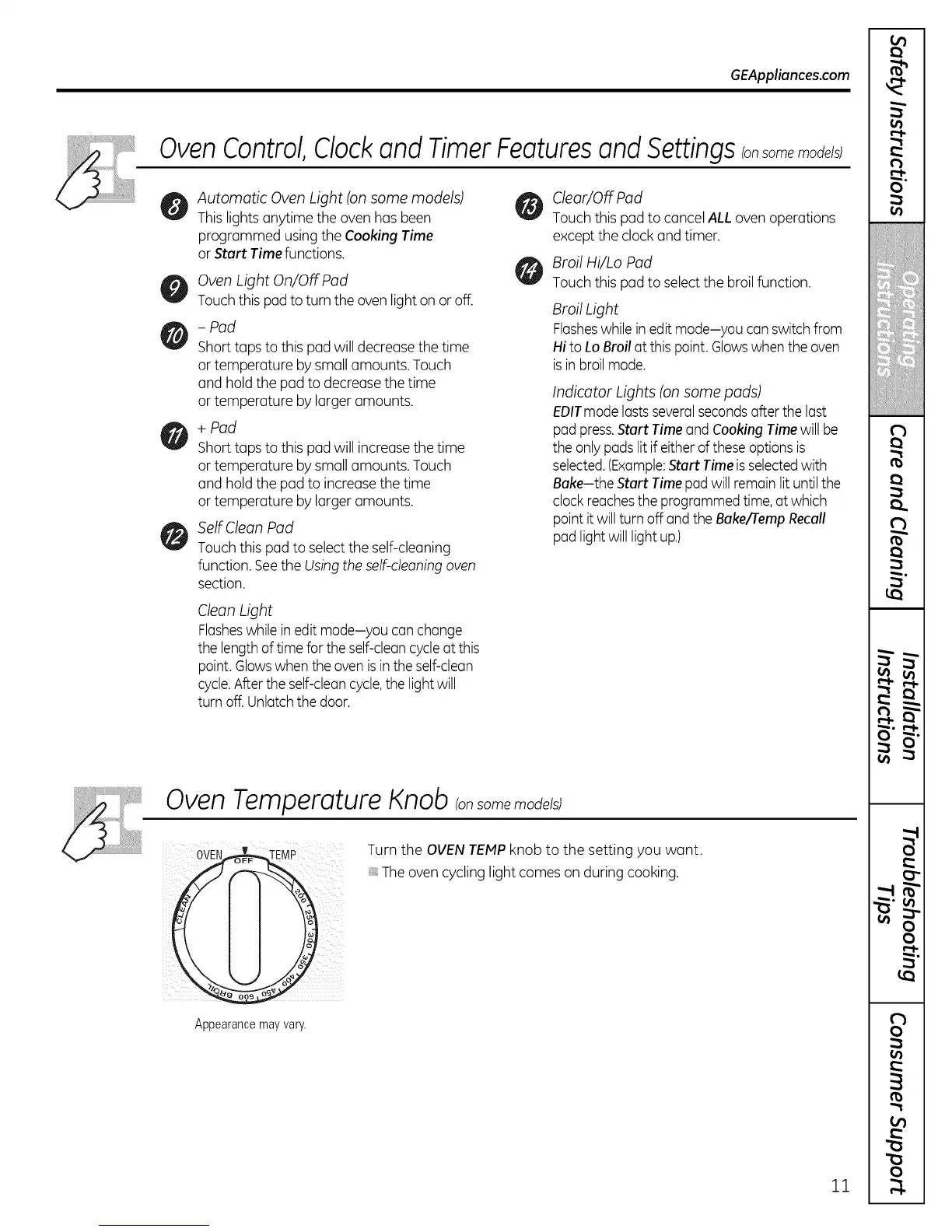
Oven Temperature Knob Ion some models)
0vE /
\
Appearance may vary.
Turn the OVEN TEMPknob to the setting you want.
Theoven cycling light comes on during cooking.
11
m
€
i
€
!
!
€
€
]
#'f];
i: i
m
(
(
r_
O'
(
€
(
€
f



 To Next Page