Appendix B - Settings and Signals
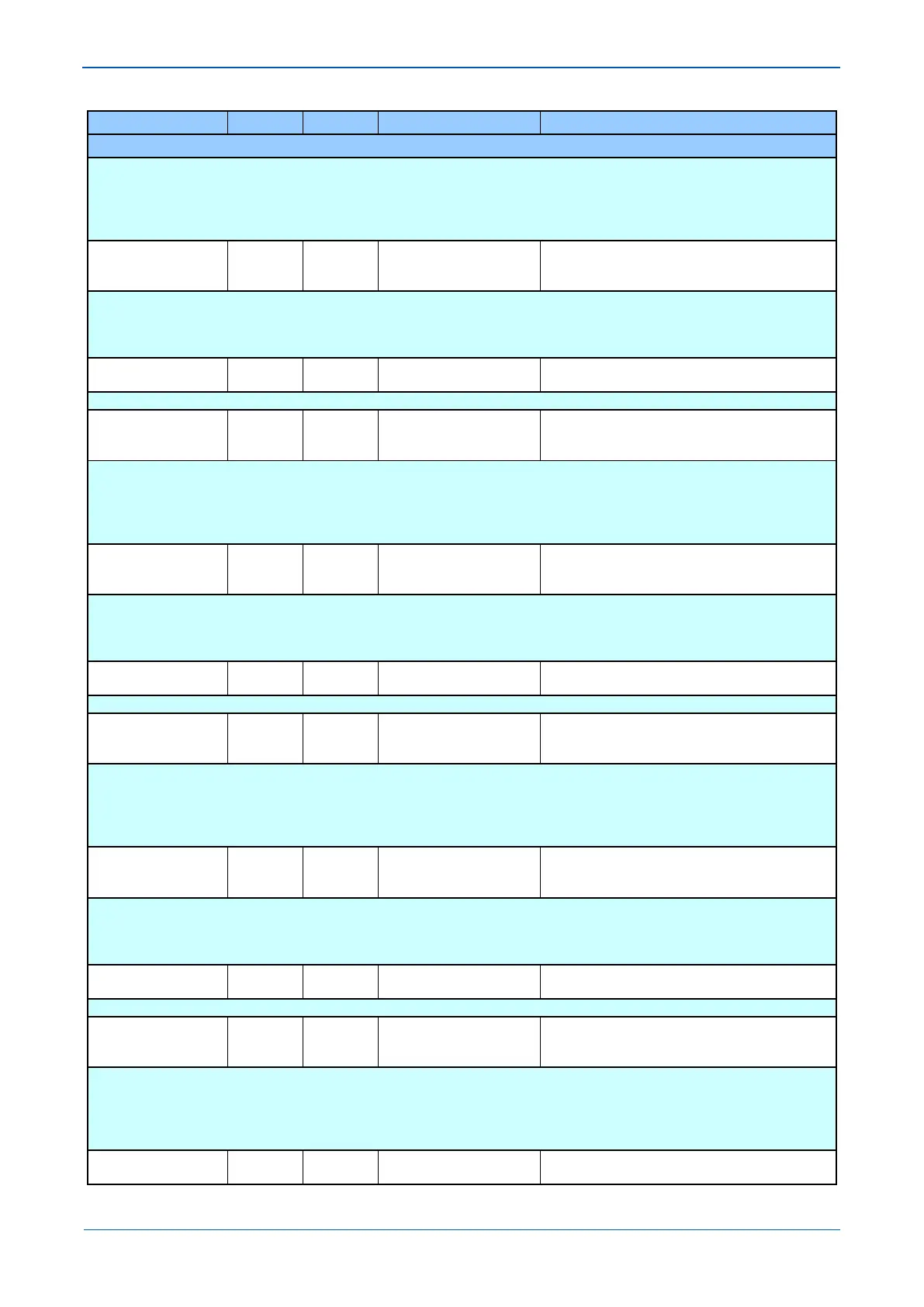
MENU TEXT COL ROW DEFAULT SETTING AVAILABLE OPTIONS
DESCRIPTION
Setting that defines the operative mode of the received InterMiCOM_4 signal.
When ‘Direct’ tripping is chosen, for security reasons 2 consecutive valid messages have to be received before a change in the signal status
will be acknowledged. That will impose an additional 1-2 ms delay comparing to ‘Permissive’ mode.
Set ‘Direct’ in Direct Transfer Tripping (Intertripping) applications.
Set ‘Permissive’ to accommodate any Permissive or Blocking scheme.
IM4 FallBackMode 20 8C Default
Latched
Setting that defines the status of IM4 signal in case of heavy noise and message synchronization being lost.
If set to Latching the last valid IM4 status will be maintained until the new valid message is received.
If set to Default, the IM4 status, pre-defined by the user in IM4 Default Value cell will be set. A new valid message will replace IM4 Default
Value, once the channel recovers.
IM4 DefaultValue 20 8D 0
0 or 1
[Unsigned Integer(16 bit)]
Setting that defines the IM4 fallback status.
IM5 Cmd Type 20 8E Permissive
Permissive
Setting that defines the operative mode of the received InterMiCOM_5 signal.
When ‘Direct’ tripping is chosen, for security reasons 2 consecutive valid messages have to be received before a change in the signal status
will be acknowledged. That will impose an additional 1-2 ms delay comparing to ‘Permissive’ mode.
Set ‘Direct’ in Direct Transfer Tripping (Intertripping) applications.
Set ‘Permissive’ to accommodate any Permissive or Blocking scheme.
IM5 FallBackMode 20 8F Default
Latched
Setting that defines the status of IM5 signal in case of heavy noise and message synchronization being lost.
If set to Latching the last valid IM5 status will be maintained until the new valid message is received.
If set to Default, the IM5 status, pre-defined by the user in IM5 Default Value cell will be set. A new valid message will replace IM5 Default
Value, once the channel recovers.
IM5 DefaultValue 20 90 0
0 or 1
[Unsigned Integer(16 bit)]
Setting that defines the IM5 fallback status.
IM6 Cmd Type 20 91 Permissive
Permissive
Setting that defines the operative mode of the received InterMiCOM_6 signal.
When ‘Direct’ tripping is chosen, for security reasons 2 consecutive valid messages have to be received before a change in the signal status
will be acknowledged. That will impose an additional 1-2 ms delay comparing to ‘Permissive’ mode.
Set ‘Direct’ in Direct Transfer Tripping (Intertripping) applications.
Set ‘Permissive’ to accommodate any Permissive or Blocking scheme.
IM6 FallBackMode 20 92 Default
Latched
Setting that defines the status of IM6 signal in case of heavy noise and message synchronization being lost.
If set to Latching the last valid IM6 status will be maintained until the new valid message is received.
If set to Default, the IM6 status, pre-defined by the user in IM6 Default Value cell will be set. A new valid message will replace IM6 Default
Value, once the channel recovers.
IM6 DefaultValue 20 93 0
0 or 1
[Unsigned Integer(16 bit)]
Setting that defines the IM6 fallback status.
IM7 Cmd Type 20 94 Permissive
Permissive
Setting that defines the operative mode of the received InterMiCOM_7 signal.
When ‘Direct’ tripping is chosen, for security reasons 2 consecutive valid messages have to be received before a change in the signal status
will be acknowledged. That will impose an additional 1-2 ms delay comparing to ‘Permissive’ mode.
Set ‘Direct’ in Direct Transfer Tripping (Intertripping) applications.
Set ‘Permissive’ to accommodate any Permissive or Blocking scheme.
IM7 FallBackMode 20 95 Default



 To Next Page