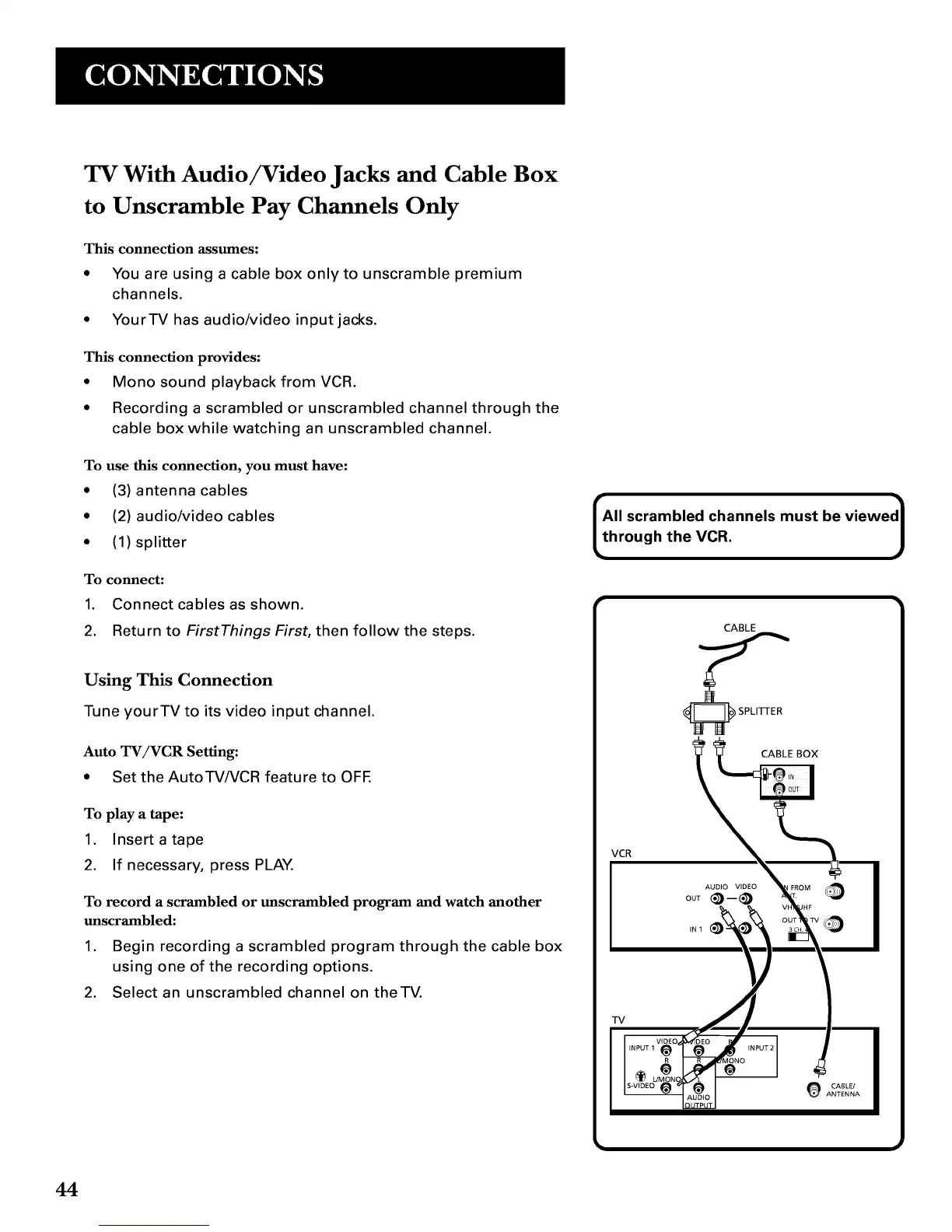
TV With Audio/Video Jacks and Cable Box
to Unscramble Pay Channels Only
This connection assumes:
• You are using a cable box onlyto unscramble premium
channels.
• YourTV has audio/video input jacks.
This connection provides:
• Mono sound playback from VCR.
• Recording a scrambled or unscrambled channel through the
cable box while watching an unscrambled channel.
To use this connection, you must have:
• (3) antenna cables
• (2) audio/video cables
• (1) splitter
To connect:
1. Connect cables as shown.
2. Return to First Things First, then follow the steps.
Using This Connection
Tune yourYV to its video input channel.
Auto TV/VCR Setting:
* Set the AutoTV/VCR feature to OFE
To play a tape:
1. Insert a tape
2. If necessary, press PLAY.
To record a scrambled or mlscrambled program and watch another
mlscrambled:
1. Begin recording a scrambled program through the cable box
using one of the recording options.
2. Select an unscrambled channel on theTV.
Ahllscrambled channels must be viewed1
rough the VCR.
CABLE
CABLE BOX
VCR
AUDIO VIDEO
OUT@-@
IN1
TV
O CASL_
ANTENNA
44



 To Next Page