EasyManua.ls Logo

Gefen EXT-AVCINEMAAA - A;V Cinema Scaler Pro Configuration Menu; Main Features Menu Structure

Gefen EXT-AVCINEMAAA
60 pages
Print Icon
To Next Page IconTo Next Page
To Previous Page IconTo Previous Page
Loading...
21
A/V CINEMA SCALER PRO - CONFIGURATIO
N
M
AIN FEATURES MENU
O
nce all connections have been made and a valid video input si
g
nal is detected,
th
e
M
ain Features Menu will become available. The
f
ollowin
g
video
/
audio
ad
j
ustment menus will also become available. From an
y
o
f
the in
f
ormation panes
o
n th
e
M
ain LCD
s
creen, press the
M
enu
bu
tt
o
n t
o
e
nt
e
r th
e
M
ain Features
M
enu
.
U
se the
a
n
d
buttons to c
y
cle throu
g
h the
M
ain Features Menu
.
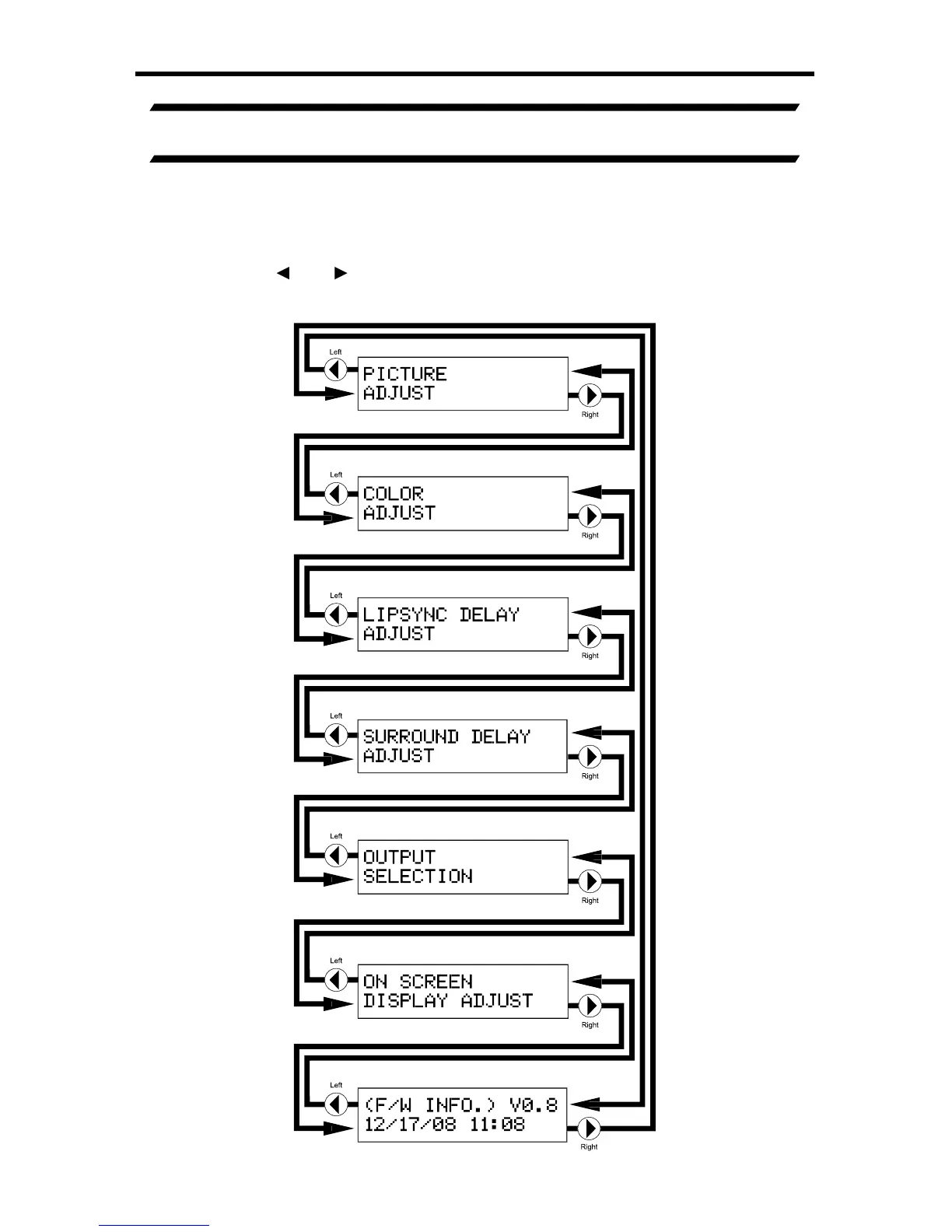
Th
e
f
ollowin
g
illustrates the order o
f
the
f
eatures and the c
y
clin
g
order.

Table of Contents

Related product manuals