EasyManua.ls Logo

Gefen EXT-AVCINEMAAA - Product Specifications - Audio Section; Audio Input;Output Connectors and Formats

Gefen EXT-AVCINEMAAA
60 pages
Print Icon
To Next Page IconTo Next Page
To Previous Page IconTo Previous Page
Loading...
48
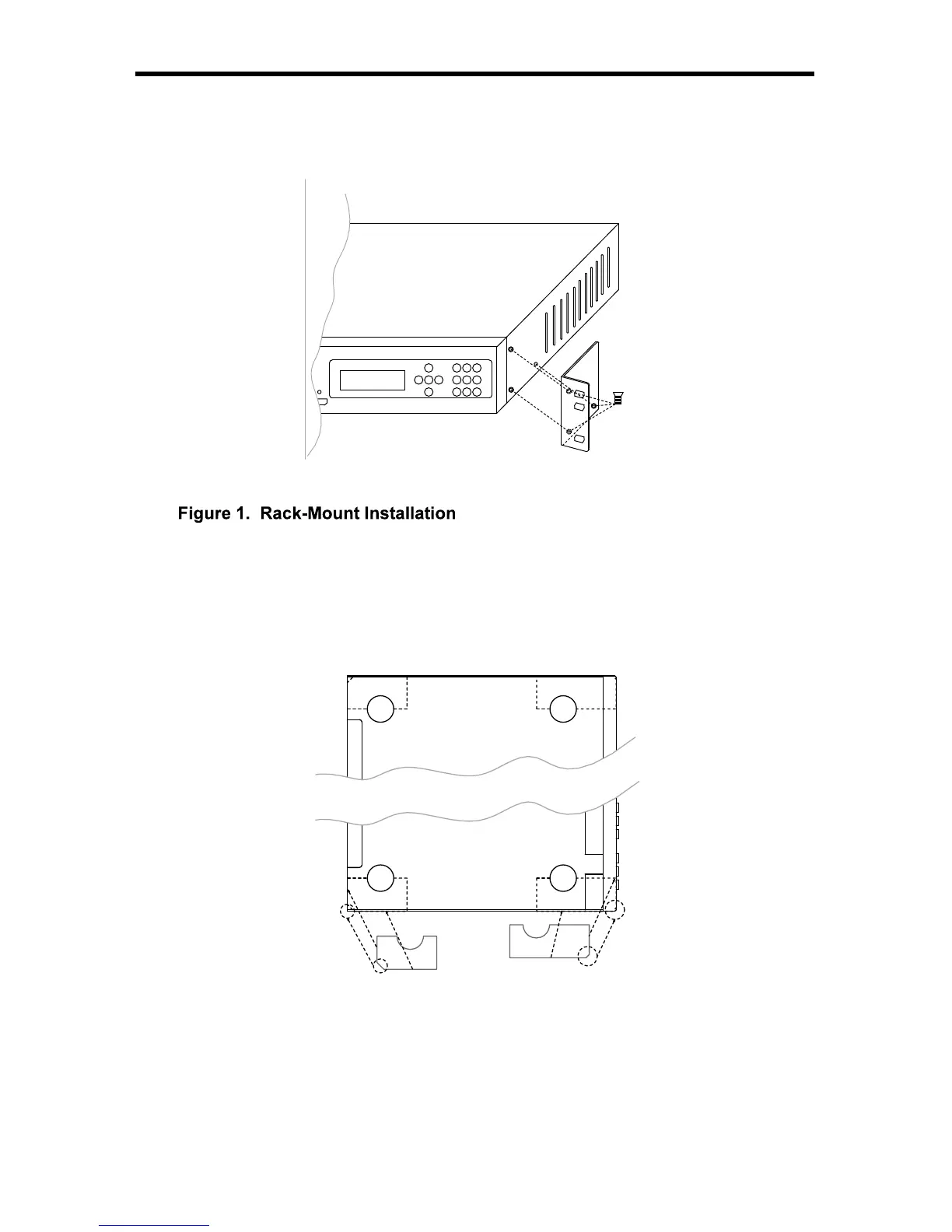
RACK MOUNT / TABLETOP INSTALLATIO
N
R
ack mount ears are provided
f
or installation o
f
this unit into an equipment rack.
Please re
f
er to Fi
g
ure 1 below. When usin
g
the product in a tabletop con
g
uration,
p
lease install the provided rubber
f
eet as shown in Fi
g
ure 2.
*3PCS
BB
B
AA
A
1. L
oca
t
e
th
e
s
i
de
sc
r
e
w
s
o
n th
e
u
nit.
2.
R
emove the
f
ront
3
screws that are located closest to the
f
ront o
f
the unit.
3
.
U
sin
g
the removed screws, screw the rack mountin
g
bracket into the unit.
4.
R
epeat the procedure on the opposite side of the unit.
Fi
g
ure 2. Desktop Installation
1. Turn the unit upside down.
2. A
f
x rubber
f
eet to the unit, makin
g
sure
y
ou match up the correct shapes as
s
hown in the dia
g
ram above.

Table of Contents

Related product manuals