10 / 40
3030
mFlow
10 Confi guration menu (Setup)
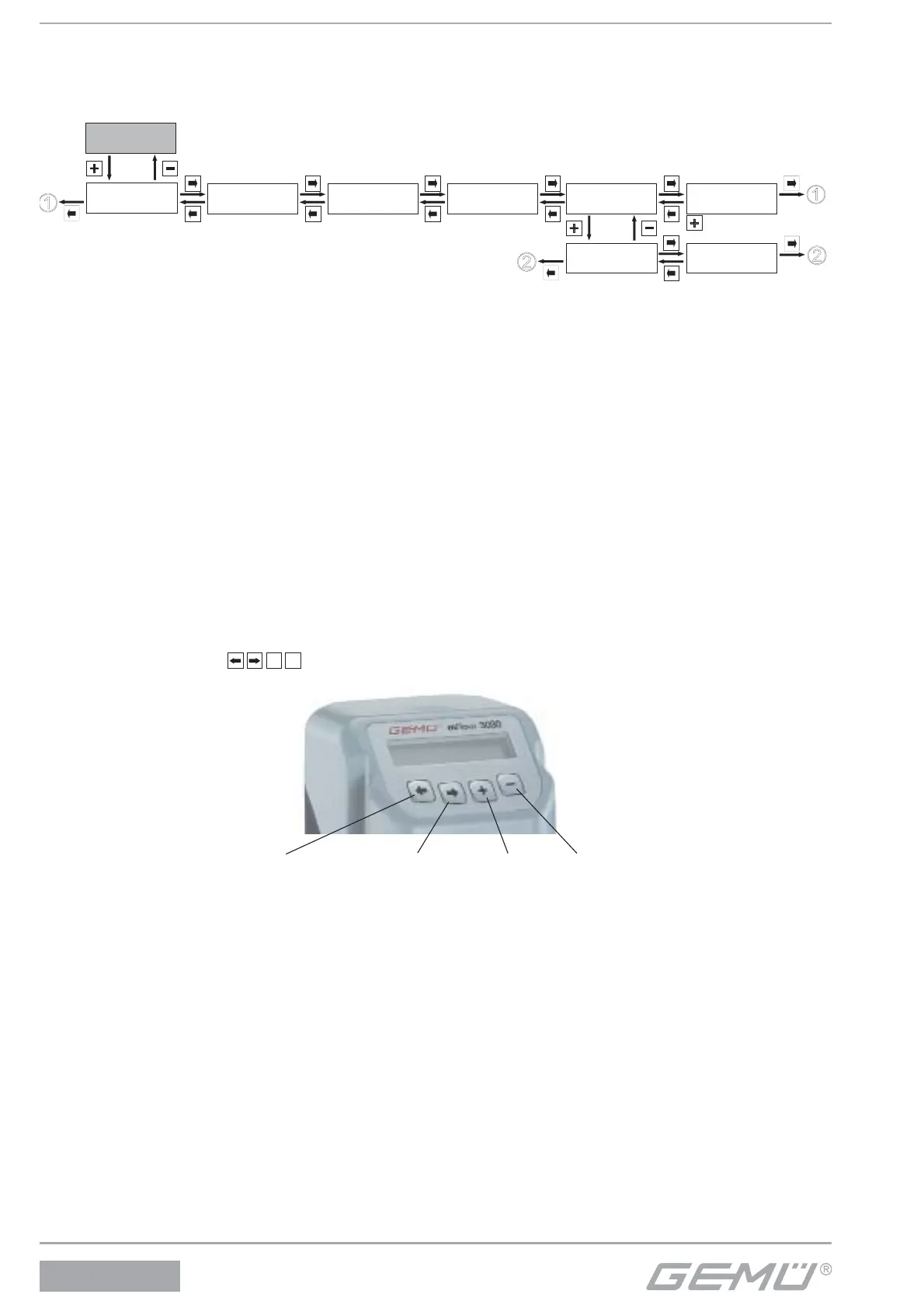
Various parameter values of the GEMÜ 3030 mFlow can be changed in the confi guration menu. The parameter name appears in
the top left line of the display and the parameter value on the right.
To enable immediate use of the GEMÜ 3030 mFlow, the most common values were entered as factory settings.
Service
1
SetBasics
2
SetFunction
3
SetCalibration
4
Return
6
SETUP
Communication
5
Fieldbus
5.2
IR-Port
5.1
The confi guration menu consists of fi ve submenus with the following functions:
1. Service
This menu is used to read out all information/diagnostics regarding the fl owmeter, the connected signals and any errors that occur.
2. SetBasics
SetBasics is used to set the basic settings for the GEMÜ 3030 mFlow, such as the selection of the measuring range, display
settings and resetting to factory settings.
3. SetFunction
SetFunction is used to set general functions, such as functions of the digital outputs, setting the analogue output, etc.
4. SetCalibration
SetCalibration is used to change the settings required to calibrate the GEMÜ 3030 mFlow.
5. Communication
Communication is used to set the fi eldbus and infrared interface.
10.1 Changes in the confi guration menu
Changes can be made to the factory settings according to the menu overview below.
Before making changes in the confi guration menu, familiarise yourself with the operation of the GEMÜ 3030 mFlow (see chapter
7).
In this case, the small squares
+
represent the GEMÜ 3030 mFlow keys that must be pressed to reach the next menu
item or within the menu to the various settings.
Back key Forwards key Plus key Minus key
10.2 Access authorisation in the confi guration menu
In order to prevent unwanted changes to the parameter values, the confi guration level of the GEMÜ 3030 mFlow is secured with
three di erent access codes.
The factory code setting is as follows:
Code 1: Password 0 ( New Code: 1)
Code 2: Password 0 ( New Code: 2)
Code 3: Password 0 ( New Code: 3)
After entering the factory codes, these codes can be changed by the operator at any time.
The access priorities needed are marked in the confi guration menu.
In order to change the access codes, please refer to 12.1.2. Activating or deactivating the user access.


 To Next Page