20 / 40
3030
mFlow
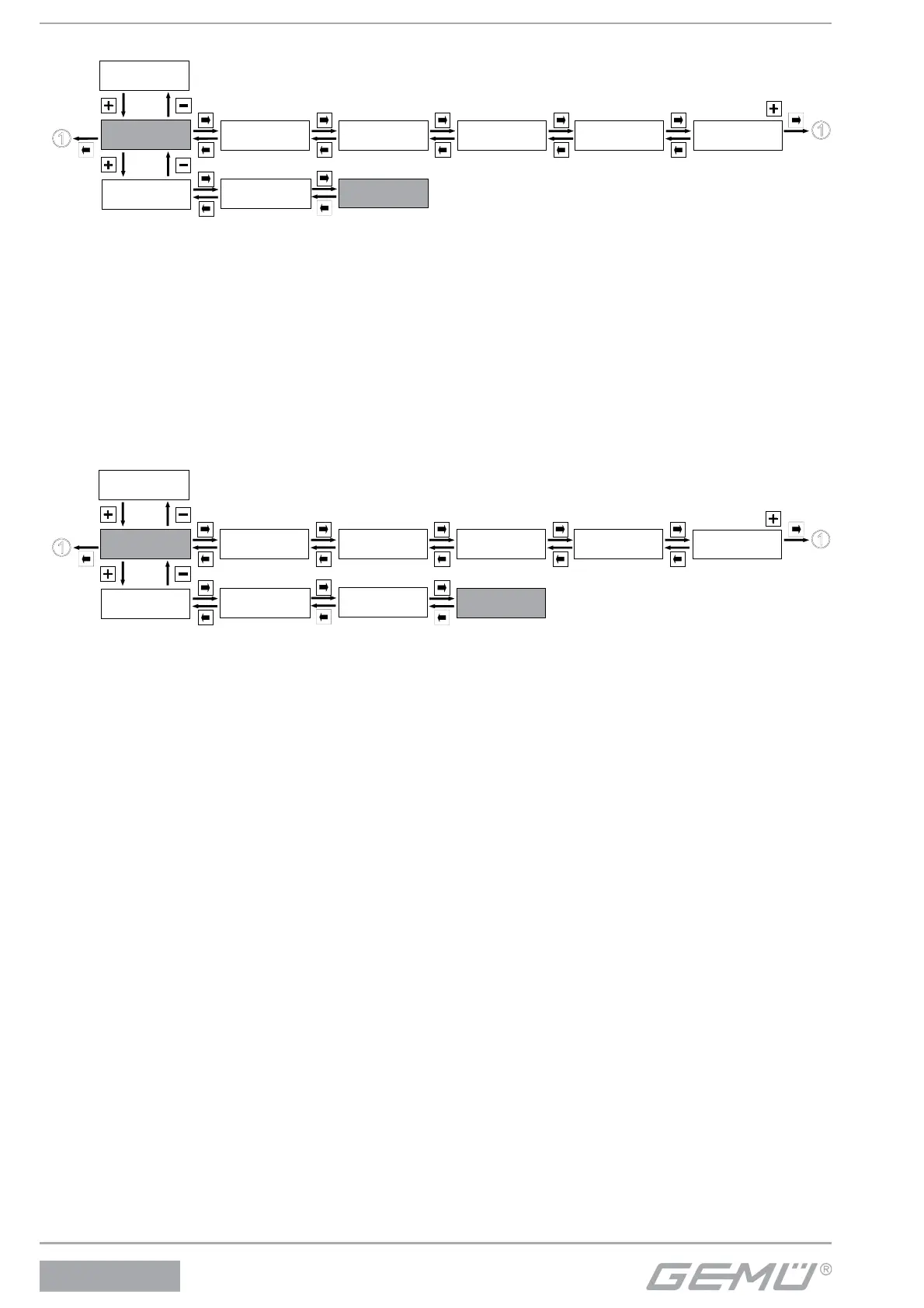
12.1.3 Reading out, deleting and deactivating error messages
Service
1
SetBasics
2
SetFunction
3
SetCalibration
4
Return
6
SETUP
Communication
5
I / O Status
1.1
Login
1.2
Diagnosis
1.3
ErrorList:
The fl owmeter stores all error messages in this menu.
hrs:
The fl owmeter operating hours are counted here.
Warnings:
The warning messages can be masked or displayed.
The fl owmeter continues normal operation when a warning is given. Messages are stored in the ErrorList (see chapter 14 Error
messages).
ClearErrorList:
Use + to delete the fl owmeter error list.
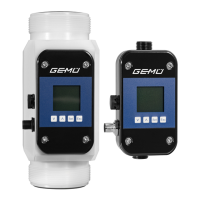
12.1.4 Display serial number, software version and ID, and enter TAG number
Service
1
SetBasics
2
SetFunction
3
SetCalibration
4
Return
6
SETUP
Communication
5
I / O Status
1.1
Login
1.2
Diagnosis
1.3
Gemü specific
1.4
V:X.X.X.X:
Displays the current software release.
S/N:
Displays the fl owmeter serial number.


 To Next Page