Need help?
Do you have a question about the Gemini 952N and is the answer not in the manual?
Details the functions of the two remote control buttons and the status LED.
Instructions on how to arm the alarm system using the remote control.
Explains the warning signal for open topcase or seat during arming.
Describes the 20-second arming delay countdown and its implications.
How to exclude the siren during the arming delay using Button 2.
Procedure to temporarily exclude the tilt sensor via ignition key and Button 2.
Details the system's state when fully armed and ready to detect alarms.
Lists the conditions and sensors that trigger an alarm event.
Explains why the siren may be limited for consecutive alarm cycles.
Describes the 5-second period after an alarm cycle where events are ignored.
How to disarm the system and confirmation signals.
How alarm memory is signaled upon disarming and identifying the cause.
Table showing factory settings for programmable features like Panic Alarm.
Explanation of how operations are signaled and option to exclude them.
How to activate the panic alarm using remote control button '2'.
Details the tilt sensor's function when the system is armed and exclusion.
How the system automatically arms after ignition is turned OFF.
Instructions to activate the anti-hijack feature while the engine is running.
Methods to deactivate the anti-hijack mode using PIN or button.
How the siren sounds during pre-alarm condition for different cycles.
System automatically rearms 35 seconds after accidental disarming.
System enters sleep mode 72h after disarming or engine off.
Procedure to manually activate sleep mode before the 72h period.
System automatically enters sleep mode 72h after arming.
How to make turn indicators flash as hazard warning lights.
Steps to disarm the system using the PIN code if remotes are lost.
Step-by-step example of entering a PIN code for system override.
Procedure to change the default 4-digit PIN code.
Instructions for replacing batteries in the remote controls.
Details on power supply, current absorption, and sound level.
Specifications for relay capacity and turn indicator output.
Information regarding the WEEE directive and the product's scope.
Recommendations for proper use and maintenance of the alarm system.
Details the 24-month warranty period and conditions for validity.
Read and understand all instructions before starting installation.
Instructions on how to properly seal the alarm unit housing.
Recommendations for positioning the alarm unit to prevent water ingress.
Guide for installing the status LED for visibility and deterrence.
How to fit an optional contact switch for seat or topcase protection.
Connecting the optional anti-hijack button to the White-Violet wire.
Table mapping wire colors to functions for the generic wiring harness.
Specific connections for the immobilizer wire joint.
Connections for the immobilizer grounded wire.
Diagram illustrating the overall wiring connections for the alarm system.
Wiring diagram for the engine immobilizer using a grounded wire.
Wiring diagram for the engine immobilizer using a cut wire.
How to determine if a diode is needed for turn indicator circuits.
Diagram showing the correct in-line diode installation.
Procedure for adding additional remote controls to the system.
Steps to learn new devices by grounding the BROWN/GREEN wire.
Steps to learn new devices without grounding the BROWN/GREEN wire.
General procedure to enable or disable programmable features.
How to enable or disable acoustic signals.
How to enable or disable the panic alarm feature.
How to enable or disable the tilt sensor feature.
How to enable or disable the passive arming feature.
How to enable or disable the anti-hijack feature.
How to enable or disable the pre-alarm feature.
How to enable or disable the self-rearming feature.
Step-by-step example of programming acoustic signals, panic alarm, and pre-alarm.
Procedure to adjust the tilt/shock sensor sensitivity levels.
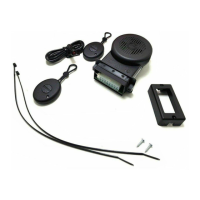
The provided document is a user and installer manual for the Gemini 952N alarm system, designed and manufactured in Italy for 2-wheeled vehicles. It is supplied with two remote controls and does not use a backup battery. The alarm system is factory programmed, but its features can be customized, and the tilt/shock sensor sensitivity can be adjusted.
The Gemini 952N is a vehicle alarm system primarily designed to deter theft and signal irregularities. It offers various protection features and can be controlled via remote controls or an emergency PIN code override.
Core Functions:
Programmable Features (Factory Presets):
Energy Saver Feature (Sleep Mode):
Hazard Warning Flashers: Can be activated when the system is disarmed by cycling the ignition key and pressing remote control button "1." Disabled by turning ignition ON/OFF or arming the system.
PIN Code Override: Allows emergency disarming if remote controls are lost or inoperative. The PIN code is entered using the vehicle's ignition key. The factory default PIN code is 1-1-1-1 and can be customized.
Warranty Conditions: The product is guaranteed for 24 months from the date of purchase. The warranty is void if labels are missing/torn, the certificate is incomplete, or the sales receipt is missing. The manufacturer is not responsible for installation, after-sales service, or technical support, and declines responsibility for malfunctions or damages caused by improper installation, use, or tampering. The alarm system is solely intended as a theft-deterrent device.
 General
| Brand | Gemini |
|---|---|
| Model | 952N |
| Category | Security System |
| Language | English |

 To Next Page