17
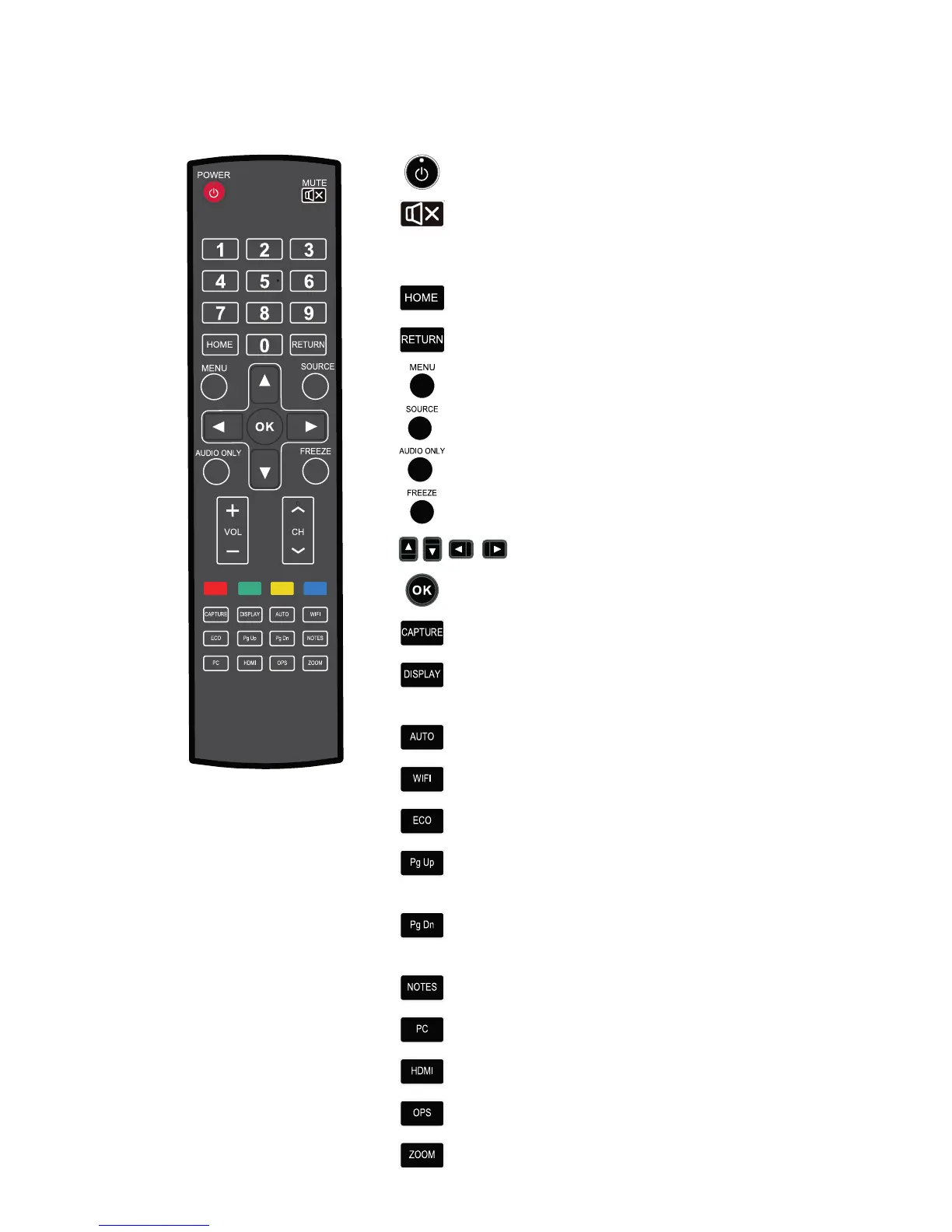
Functions of the Remote Controller
1. On or standby
2.
Mute
3. 0--9 Select TV channel or enter number
4.
Open the Android home page.
5.
Go back or return to the parent menu.
6.
Show or hide menu.
7.
Show or exit from the list of signal sources.
8.
Enable audio only mode.
9.
Freeze.
10.
Up/Down/Left/Right direction buttons
11.
Confirm.
12.
Capture screen shots.
13.
Show the current signal source. You cannot show it
in Android.
14.
Adjust screen displaying.
15.
Open WIFI on the computer.
16.
Change the display mode.
17.
Switch to the previous page on whiteboard
software and PPT.
18.
Switch to the next page on whiteboard software
and PPT.
19.
Open whiteboard software.
20.
Switch over to VGA signal source.
21.
Switch over to HDMI signal source.
22.
Switch over to OPS signal source.
23.
Zoom in and out.
2 INTRODUCTION



 To Next Page