1-11
Inserting the Ribbon Cartridge
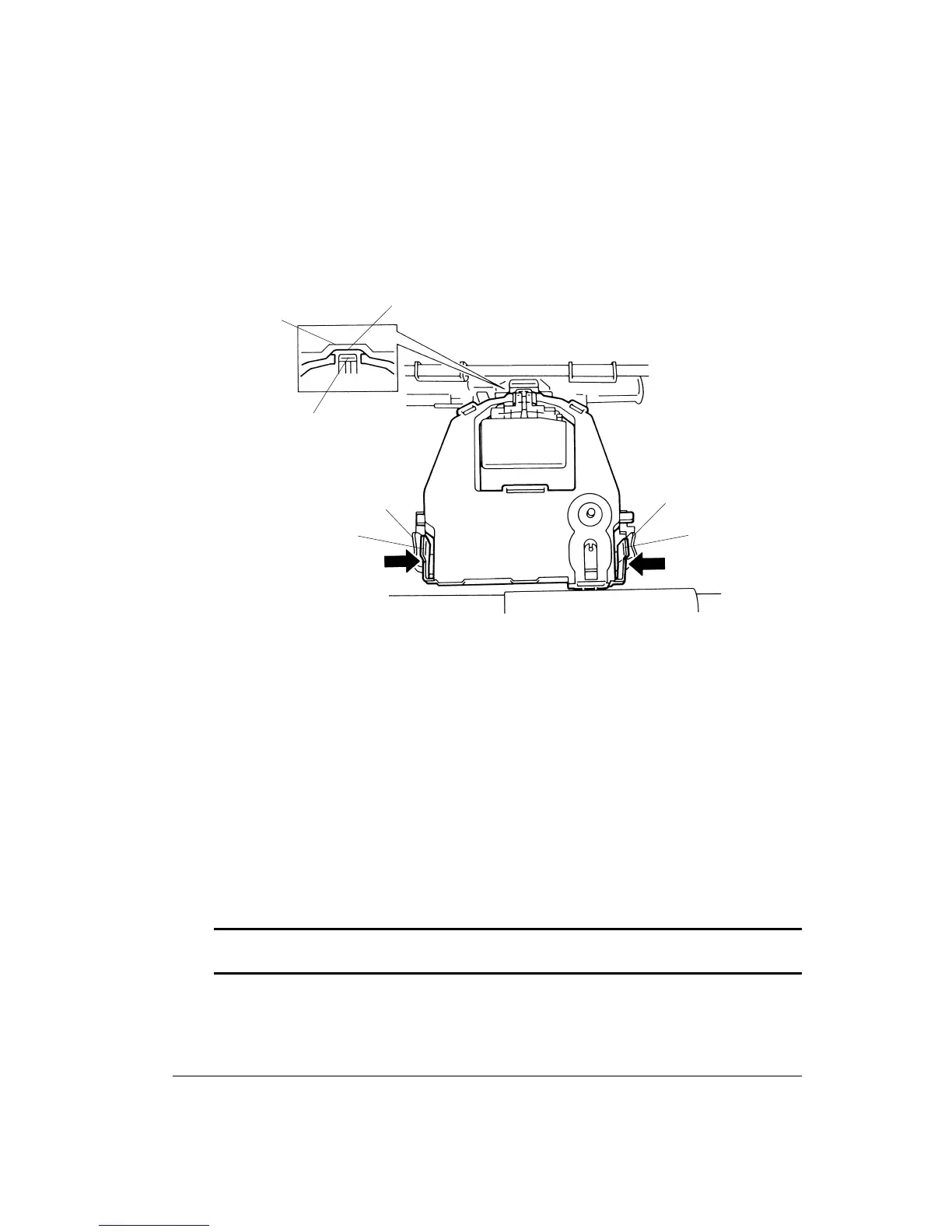
1. Place the mounting pins 1 of the ribbon cartridge on the support brackets 2 of the print
head carriage.
Inserting the Ribbon Cartridge
2. Insert ribbon 3 so that it falls between the metallic nose 4 of the print head and the
plastic print guide 5 .
3. Press the ribbon cartridge release levers inward until the mounting pins 1 snap into the
holes of the support brackets 2. Gently pull on the cartridge to be sure that the pins are
secure in the holes.
4. Turn the ribbon feed knob clockwise to take up any slack in the ribbon.
5. Move the paper thickness lever back to position
11
11
1, which is the correct setting for
printing most single sheets.
6. Close the front cover and the acoustic cover.
Warning: Only use GENICOM's LA36 ribbon cartridge P/N LA 30R-KA. If other cartridges
are used, operating problems or print head damage may occur.
5
3
4
1
2
2
1



 To Next Page