45NRR 2-52, NRR 2-53, URB 55 - USA- Installation & Operating Manual - 850698-00
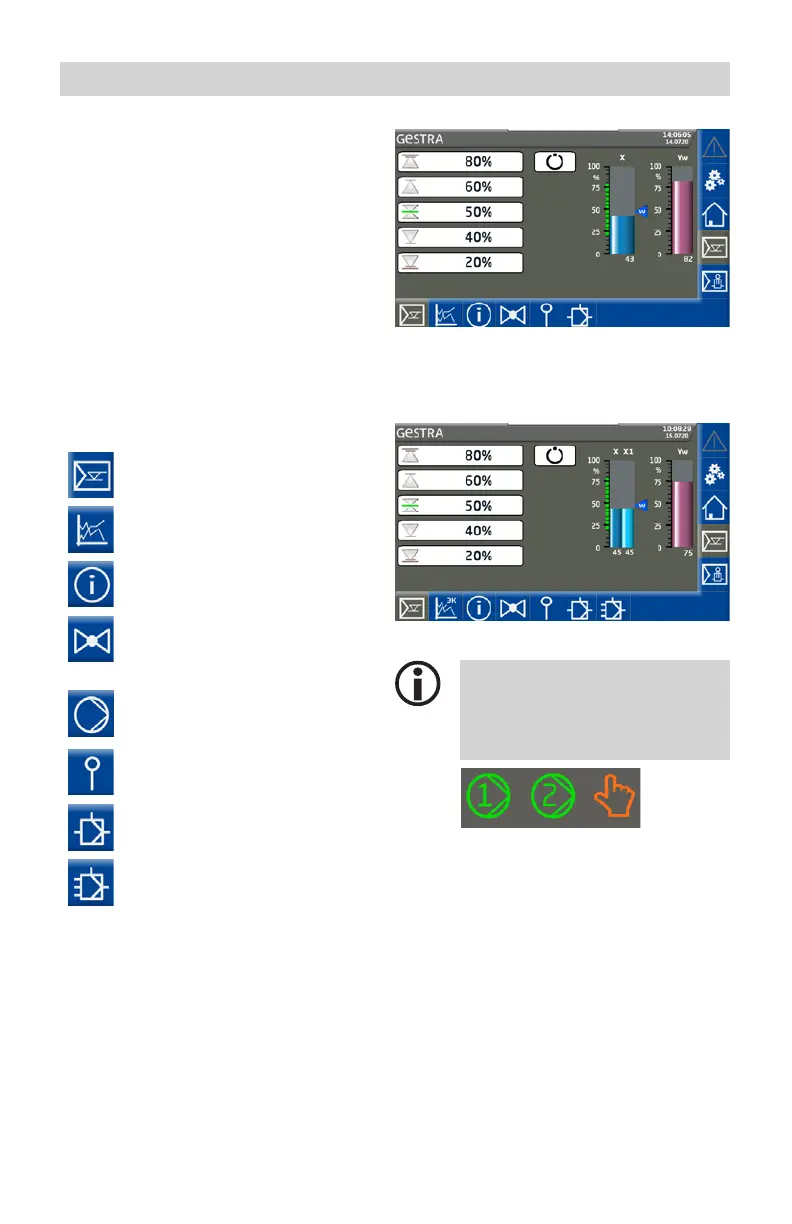
Home screen of NRR 2-52, NRR 2-53 level controllers
The home screen provides an overview of the
controller status and parameters. Bar charts
display current readings and change color
depending on their status. This enables you to
rapidly assess the plant status.
Icons on the bar charts indicate the status of
the connected electrode.
In the lower part of the screen, buttons are
shown or hidden depending on the current
configuration.
Opening the parameter screens:
Use the following buttons to open the control-
ler parameter screens:
Switchpoints,
see page 45
Trend,
see page 45
Test/Controller information
see page 45
Valve control,
see page 45
or
Pump control
see page 45
Boiler level calibration,
see page 45
Set controller parameters,
see page 45
Set 3E controller parameters,
see page 45
Home screen of a 3-element (3E) controller
(example)
Further icons appear below the bar
charts, depending on the configu-
ration. These are explained in the
sections below.
A B C
A Pump 1 On
B Pump 2 On
C Manual (mode)



 To Next Page