58 NRR 2-52, NRR 2-53, URB 55 - USA- Installation & Operating Manual - 850698-00
Configuring the level controller
Calibrate the boiler level (for NRG2.-.. ONLY)
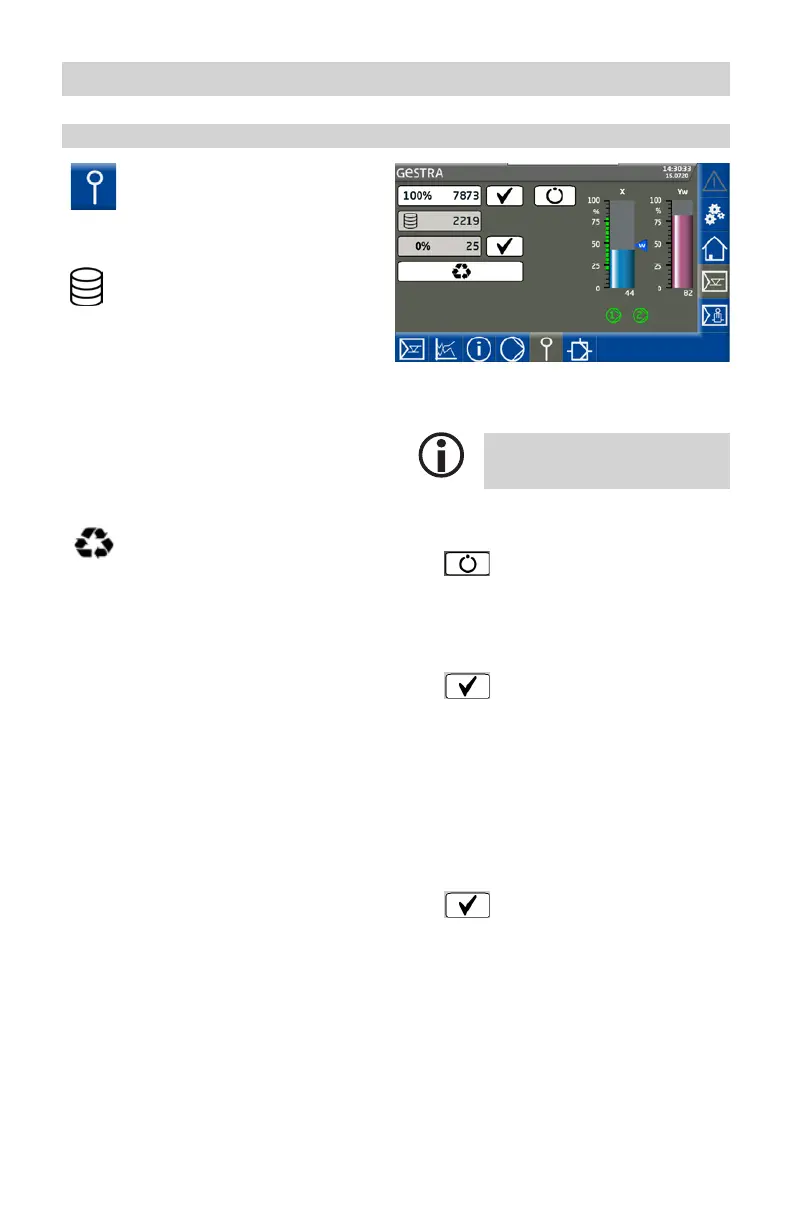
Open the “Electrode” menu.
Description of parameters:
Raw data
Indicates the current digital boiler
level.
100% (calibration point) / 0%
Calibrated boiler levels.
The calibrated raw data is shown
in both fields, 100% and 0%.
Calibration point
The desired calibrated level can be
set between > 25% and 100%.
Replacing a level controller
If a level controller needs to be
replaced, this function can be used
to transfer level calibration values
to the new controller. To do this,
enter the data in the 0% and 100%
fields.
Only applies if you are using the
NRG 2.. as the electrode.
If you are using the NRGT 26-2,
calibration takes place on the NRGT
26-2. In this case, the electrode
icon is not visible.
Performing calibration:
Go to or calibrate the 0% range.
Calibration may be performed in
any order.
1.
Press the Automatic
button and switch to
manual mode.
2. 0% Reduce the boiler level to
0%.
3.
When this level is reached,
confirm it.
The raw data is automatically
entered in the 0% field.
4. 100% Fill the boiler up to the
defined calibration point xxx%.
The calibration point can be
defined within the limits > 25%
to 100% using interpolation.
5.
When this level is reached,
confirm it.
The raw data is automatically
entered in the 100% field.


 To Next Page