EasyManua.ls Logo

GGM VH-2600A-230 - User Manual

Default Icon
29 pages
Print Icon
To Next Page IconTo Next Page
Loading...
GGM
Respiratory Gas Humidifier
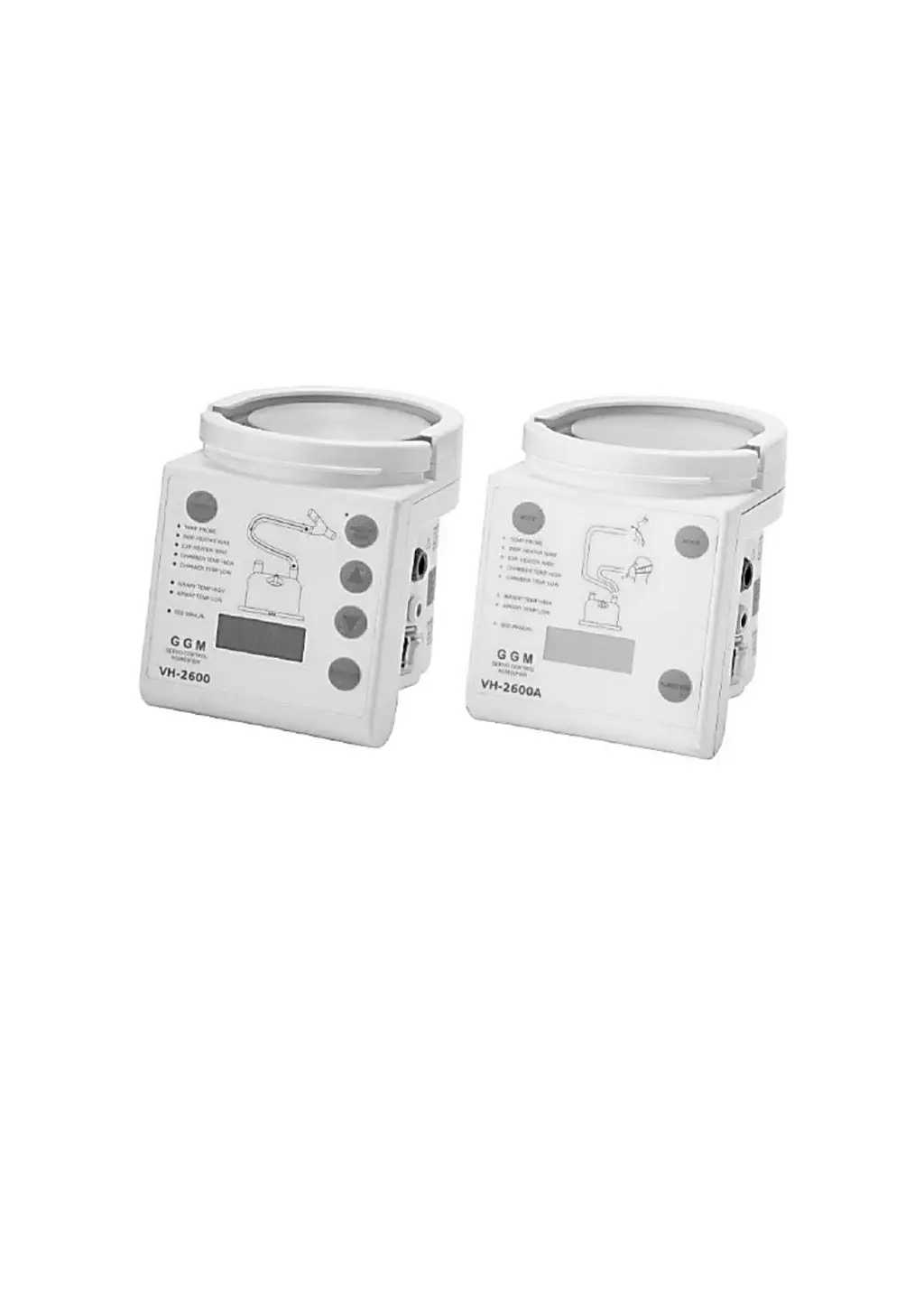
VH-2600/VH-2600A
Respiratory Gas Humidifier
Technical Manual
REV A 2017/06/09
Manufacturer: Great Group Medical Co., Ltd.
Address: No.168, Xingong 2
nd
Rd., Tianzhong Township,
Changhua County 52046, Taiwan (R.O.C.)
Tel: +886.4.8758181 Fax: +886.4.8756161
E-mail: info@greatgroup.com.tw
Web: www.greatgroup.com.tw
ISO 13485 / CE 2460 / GMP

Table of Contents

Questions and Answers

Summary

3. Explanation of Controls and Indicators

3.3. Front Panel

Describes the controls and indicators on the front panel of the VH-2600.

4. Maintenance Schedule

4.1. Maintenance Schedule

Details necessary checks and cleaning procedures for the humidifier.

4.1.5. Electrical Safety

Discusses electrical safety and earth resistance requirements.

5. Alarm and Troubleshooting

5.1. Alarm Indicator

Lists and explains various alarm conditions and their corresponding indicators.

5.2. Troubleshooting

Provides guidance on diagnosing and resolving common problems.

5.2.1. Low Temperature Issues

Details causes and actions for low temperature conditions.

5.2.2. High Temperature Issues

Lists causes and actions for high temperature alarms.

5.2.4. Excessive Water in Circuit

Discusses causes and solutions for water in the inspiratory/expiratory circuit.

5.2.6. Error Code Explanations

Explains specific error codes and their meanings.

5.2.8. Breathing Circuit Leak

Explains how to troubleshoot leaks in the breathing circuit.

5.2.9. External Water Leak

Addresses issues related to external water leaks from the chamber.

6. Servicing Procedures

6.2.2. Replacing Fuses

Instructions on how to identify and replace fuses.

6.2.5. Replacement of Printed Circuit Boards (PCBs)

Guide for replacing internal circuit boards.

6.2.7. Checking the Heater Plate Element

Steps to check the resistance of the heater plate element.

6.2.8. Replacing the Thermal Cutout

Procedure for replacing the thermal cutout component.

7. Performance Testing

7.2. Humidifier Warm-up and Control Check

Detailed test for heater control systems and temperature stability.

7.3. Temperature Accuracy Calibration

Procedure for calibrating temperature accuracy using an external thermometer.

Overview

This document describes the GGM Respiratory Gas Humidifier, models VH-2600 and VH-2600A, a medical device designed to add heat and moisture to respiratory gases for patients in an Intensive Care Unit (ICU). The humidifier passes gas through a humidification chamber where it is warmed and humidified. It monitors the gas temperature at the chamber outlet using a chamber probe and controls the power delivered to the heater plate to maintain a set chamber temperature.

Function Description:

The primary function of the GGM Respiratory Gas Humidifier is to provide humidity to breathing circuits or masks for patients. It features two heating systems: a heater plate that warms the water in the humidification chamber and, in certain modes, a heater wire within the breathing circuit to further heat respiratory gases. The device includes various probes to monitor temperatures at different points in the system, ensuring optimal and safe humidification.

Important Technical Specifications:

Mechanical:

  • Dimensions: W135mm x D170mm x H156mm (without chamber fitted)
  • Weight: 2.9 kg (without a chamber fitted)

Electrical Rating:

  • Supply Frequency: 50 / 60 Hz
  • Heater Plate Capacity: 150W, maximum temperature 110°C
  • Heater Wire: 60W Max
  • Heater Wire Supply: 22 ±3 V~
Model Number Supply Voltage Supply Current
VH-2600-115 AC 115 V 2.0 A Max
VH-2600-230 AC 230 V 1.0 A Max
VH-2600A-115 AC 115 V 2.0 A Max
VH-2600A-230 AC 230 V 1.0 A Max

Safety Protection:

  • Over current protection: 115V/3A (fast burn type); 230V/1.5A (fast burn type).
  • Over heat protection: 115±3°C thermostat (manual reset type).
  • Electric Shock Protection: Class I
  • Applied Part type BF
  • Water proof and Drip proof: IPX1

Temperature Control Range:

  • Display: 4 digit 14 segment LED
  • Range: 5.0 to 80.0°C
  • Accuracy: ±0.3°C (in 25.0 - 45.0°C temperature range)

VH-2600 Airway/Chamber Set Points:

  • Airway set Point: 31 - 40°C (default 39°C)
  • Chamber set Point: 31-40°C (default 37°C, limited to Airway set Point -5 to +2°C)

VH-2600A Heater Wire Circuit Set Points:

  • Invasive mode: Airway Set Point: 36~40°C (default: 40°C), Chamber Set Point: 36~40°C (default: 37°C) (ver1.00) or 34~40°C (default: 37°C) (ver1.01)
  • Non-Invasive: Airway Set Point: 31~35°C (default: 34°C), Chamber Set Point: 31~35°C (default: 31°C)

VH-2600A Non-Heater Wire Circuit Set Points:

  • Invasive mode: Airway Set Point: 36~38°C (default: 37°C) (chamber temperature limited to 66°C)
  • Non-Invasive: Airway Set Point: 30~32°C (default: 31°C) (chamber temperature limited to 66°C)

Alarm Parameters (Heater Wire Circuit):

  • High Airway Alarm: Immediate, audible alarm at 41°C or if airway temperature exceeds 42°C.
  • Low Airway Alarm: Audible alarm between 10 minutes @29.5°C and 60 minutes @34.5°C.
  • High Humidity Alarm: Audible alarm if humidity temperature exceeds 41°C.
  • Low Humidity Alarm: Audible alarm between 10 minutes @26°C.

Alarm Parameters (Non-Heater Wire Circuit):

  • High Airway Alarm: Audible alarm if temperature exceeds 41°C.
  • Low Airway Alarm: Audible alarm if temperature descends @29.5°C in invasive mode, or @26°C in non-invasive mode.
  • High Humidity Alarm: Light will twinkle but no alarm if humidity temperature exceeds 66°C.
  • Low Humidity Alarm: Audible alarm between 10 minutes @26°C.

Performance:

  • Recommended ambient temperature range: 18-26°C.
  • Recommended Flow Range: Invasive Mode: up to 60 L/min, Noninvasive Mode: up to 120 L/min.
  • Humidity Performance: Invasive Mode: > 33 mg/L, Noninvasive Mode: > 10 mg/L.
  • Warm-up time: Less than 30 minutes.
  • Maximum Operating Pressure: 20 kPa, gas leakage at max. pressure < 50 mL/minute.

Operating, Transport and Storage Environment:

Operating Transport Storage
Temperature 18-26°C (64.4-78.8°F) -10-50°C (14-122°F) -10-50°C (14-122°F)
Relative humidity 30%-75% 30%-95% 30%-95%
Atmospheric pressure 70kPa-106kPa 50kPa-106kPa 50kPa-106kPa
Altitude 0-3000m (9000ft) 0-3000m (9000ft) 0-3000m (9000ft)

Usage Features:

Front Panel Controls (VH-2600):

  • HEATER WIRE button: Turns power to the heater wire on/off. Green indicator light illuminates when on. An alarm sounds if the heater wire function is turned off while a heated wire circuit is connected.
  • Up/Down arrows: Adjust the set temperature by 0.5°C with each press.
  • FUNCTION button: Selects the parameter to display ("Airway" or "Chamber").
  • MUTE button: Mutes all audible alarms for 3 minutes. Alarm condition indicator lights continue to flash until the condition is rectified.

Front Panel Controls (VH-2600A):

  • Locked / Unlock: The panel automatically locks after 60 seconds of power-on. Hold FUNCTION for 3 seconds to unlock or lock. The system relocks automatically after 60 seconds of inactivity.
  • Exchange Temperature: Automatically switches to "Heater Wire Mode" if a heater wire is equipped. Hold MODE for 3 seconds to switch to "Non-Heater Wire Mode".
  • Patient Mode: Locks after 60 seconds of power-on. Defaults to "Invasive" Mode. Hold FUNCTION for 3 seconds + Push MODE once to switch to "Non-Invasive" Mode.
  • MUTE button: Silences all alarm sounds for 3 minutes. The alarm indicator continues flashing until the alarm situation improves.

Display Symbols:

  • A40.0: Airway temperature
  • A=40: Airway temperature set point
  • C37.0: Chamber temperature
  • C=37: Chamber temperature set point
  • H100: Heater plate temperature
  • ER.01: When heater wire short.
  • LOCK: Button is locked
  • UNL.K: Button is unlocked
  • A.OPEN: Airway probe abnormal (opening)
  • A.SHT: Airway probe abnormal (disconnection)
  • C.OPEN: Chamber probe abnormal (opening)
  • C.SHT: Chamber probe abnormal (disconnection)
  • H.OPEN: Heat plate probe abnormal (opening)
  • H.SHT: Heat plate probe abnormal (disconnection)
  • N-HW: Without heat wire mode
  • R<55: Sum of Insp. & Exp. Heater wire resistance <5.5Ω.
  • OPEN: Airway and chamber probe abnormal (opening)
  • A-CS: Airway or Chamber temperature
  • AHI: Airway temperature too high
  • ALO: Airway temperature too low
  • CHI: Chamber temperature too high
  • CLO: Chamber temperature too low
  • HHI: Heater plate temperature too high
  • HLO: Heater plate temperature too low

Power On Self-check:

Upon power-on, the unit performs an internal inspection, checking:

  1. Heater wire fuse integrity.
  2. Heater plate overheat condition.
  3. Heater plate temperature probe (open or short).
  4. Heater wire adapter (open or short).
  5. Airway temperature probe (open or short).
  6. Chamber temperature probe (open or short).
  7. Heater wire (open or short). A visual/audio test sequence follows, where LEDs light up, the 15-segment display flashes, and the buzzer emits a "Be-Be" sound.

Maintenance Features:

Routine Maintenance:

  • Regular checks of facilities and parts are necessary to avoid pollution.
  • Suggested contact with local service for maintenance every 12 months.
  • Always ensure safety for continuous usage.

Cleaning:

  • Turn off power before cleaning.
  • Clean the humidifier with recommended disinfectants (e.g., 75% Isopropyl Alcohol) using a damp cloth.
  • DO NOT use antiseptic liquid or sharp objects for cleaning the outer case.
  • DO NOT immerse the humidifier in any liquid.
  • Wipe clear of any cleaning residues before use.

Temperature Probe Cleaning:

  • Remove all visible contaminants physically.
  • Sterilize using solutions like Sporicidin™, Sporox™, Cidex™, Cidex™ OPA, or Ethylene Oxide sterilization.
  • Sterilization at 55°C (131°F) and 80 kPa, allowing 15 hours for ETO to evaporate.
  • DO NOT immerse the connector plug in disinfectant.
  • DO NOT use autoclaves, detergent, or solvent.
  • Wipe the patient end temperature probe before use.
  • Store in a clean environment.

Heater Wire Adapter Cleaning:

  • Clean with recommended disinfectants (e.g., Isopropyl Alcohol, normal dishwashing detergent) using a damp cloth.

Mains Plug:

  • If detachable, check that the screw is locked.

Servicing Procedures (General Precautions):

  • Disconnect the unit from the power supply before servicing, even if the display is not illuminated.
  • All servicing procedures must be followed by a humidifier performance test and an electrical safety test.
  • DO NOT use excessive force when re-locking.
  • Comply with anti-static procedures.

Disassembly (Opening the Case):

  1. Disconnect power supply.
  2. Remove four screws at the back.
  3. Slide the two halves of the case apart.
  4. Un-clip three fasteners holding the front control PCB to the front case.

Replacing Fuses:

  1. Open the case and remove the power PCB.
  2. The unit uses four fuses with specific ratings:
    • For 230V: F1: 1.5A 250V Fast Blow, F2: 1.5A 250V Fast Blow, F3: 1A 250V Fast Blow, F4: 4A 250V Fast Blow.
    • For 115V: F1: 3A 250V Fast Blow, F2: 3A 250V Fast Blow, F3: 1A 250V Fast Blow, F4: 4A 250V Fast Blow.
  3. Replace with the correct type of fuse.
  4. Close the case.

Resetting the Thermal Cutout:

  1. Open the case.
  2. Push the reset button on the thermal cutout (located on the heater plate) with a pen or small screwdriver.
  3. If it "clicks," it has been reset. Allow the heater plate to cool if hot before resetting.
  4. Close the case.

Replacing the Mains Cable:

  1. Open the case.
  2. Remove mains cable terminals from the power supply board and cut the cable tie.
  3. Remove the fixed plate.
  4. Remove earth, live, and neutral wires.
  5. Attach new mains cable wires to the terminal block, ensuring correct polarity, and attach a new cable tie.
  6. Fix the power cord.
  7. Close the case.

Replacement of Printed Circuit Boards (PCBs):

  1. Open the case.
  2. Disconnect all harnesses, mains, and protective earth wires from the power PCB.
  3. Remove and replace the power PCB.
  4. Connect harnesses from the transformer and heater plate.
  5. Close the case and perform a full performance test.

Replacing the Thermistor:

  1. Open the case.
  2. Disconnect mica cable, thermistor, and thermal cutout harnesses from the power PCB.
  3. Remove three screws holding the heater plate.
  4. Remove the three screws holding the heater plate.
  5. Place the new thermistor and attach with a screw.
  6. Replace the fixing screw.
  7. Place the heater plate back, ensuring springs are in place, and attach to the case with long screws.
  8. Connect mica cable, thermistor, and thermal cutout harnesses to the power PCB.
  9. Close the case.

Checking the Heater Plate Element:

  1. Open the case.
  2. Disconnect mica cable, thermistor, and thermal cutout harnesses from the power PCB.
  3. Remove three screws holding the heater plate.
  4. Measure resistance between the 2 contacts on the mica connector.
    • 230V: 353.0 ± 18.0 Ω
    • 115V: 88.0 ± 4.0 Ω
  5. If resistance is outside range, replace the mica.
  6. Remove six screws holding the mica, remove the heater element, and attach six screws holding the fixed plate.
  7. Place heater plate assembly back, ensuring springs are in place, and attach to the case with long screws.
  8. Connect heater plate element, thermistor, and thermal cutout harnesses to the power PCB.
  9. Close the case.

Replacing the Thermal Cutout:

  1. Open the case.
  2. Disconnect mica cable, thermistor, and thermal cutout harnesses from the power PCB.
  3. Remove three screws holding the heater plate.
  4. Remove two screws holding the thermal cutout.
  5. Place new thermal cutout and fasten with screws.
  6. Attach the screws holding.
  7. Place heater plate back, ensuring springs are in place, and attach to the case with long screws.
  8. Connect mica cable, thermistor, and thermal cutout harnesses to the power PCB.

Closing the Case:

  1. Ensure all harnesses are reconnected and mains polarity is correct.
  2. Slide the power PCB into position, ensuring side panel slides into slots.
  3. Place the control PCB back into position, ensuring clips are located properly.
  4. Slide the case together and replace the four screws.

Performance Testing:

  • Humidifier Display Check: Verify display window and LED indicators light up on power-on.
  • Humidifier Warm-up and Control Check:
    1. Ensure calibration and display checks pass.
    2. Set up the humidifier as instructed.
    3. Connect chamber inlet to gas supply (10±5 LPM) and turn on.
    4. Wait ~30 minutes for stabilization.
    5. Airway and Chamber end temperatures should be within ±2.0°C of the set value, with no alarms. Refer to troubleshooting if alarms occur or temperature is out of range.

Temperature Accuracy Calibration:

  • Temperature probe must be checked every 12 months by a specialist technician.
  • Procedure:
    1. Obtain an accurate thermometer.
    2. Place airway and chamber probes in 32~40°C water with the thermometer.
    3. Turn on humidifier, compare its readings with the thermometer.
    4. If the temperature margin of error is > ±0.5°C, the probe should be replaced.

A checklist is provided to record annual maintenance, including:

  • Visual Checks: Mains Cable, Heater Plate, Heater Wire Adaptor, Temperature Sensor.
  • Performance Checks: Calibration Check, Display Check, Temperature Accuracy.
  • Electrical Safety: Earth Resistance, Insulation Resistance, Earth Leakage, Other tests as required.

GGM VH-2600A-230 Specifications

General IconGeneral
BrandGGM
ModelVH-2600A-230
CategoryHumidifier
LanguageEnglish

Related product manuals