Operating console
Giesen W6A Coffee Roaster - Version 1.0 26
10.4 F4 screens
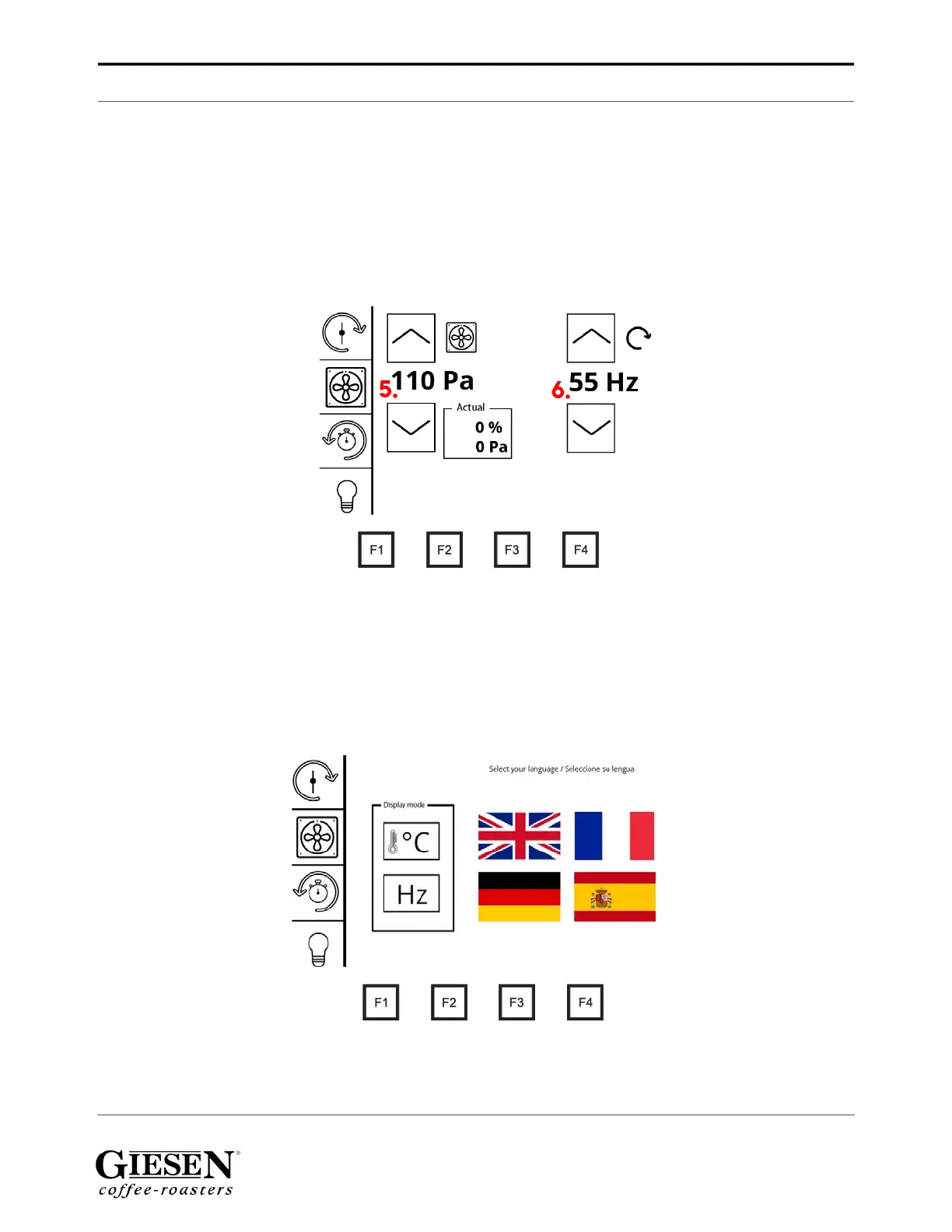
You can use the F4 button to reach several menu’s; the underpressure / drumspeed
menu, temperature unit / languages menu, running time / software version menu
and the PLC info. Scroll through the F4 menu’s by pressing the F4 button multiple
times until you have reached your wanted menu.
10.4.1 Underpressure / drum speed
1. Stirrer on / off
2. Cooling fan on / off
3. Timer / stopwatch
4. Light on / off
5. With the arrows you can adjust the underpressure up / down
6. With the arrows you can adjust the drum speed up / down
10.4.2 Temperature unit / languages
1. Set the temperature display to Celsius or Fahrenheit
2. Select the drum speed to be displayed in Hertz (Hz) or RPM
3. Select your preferred language
1.
2.
3.
4.
5.
6.
1.
2.
3.


 To Next Page