Cleaning and maintenance
Giesen W6A Coffee Roaster - Version 1.0 33
11.3 Cleaning mode
Only featured in version 7.54!
The cleaning mode is a function that has been added to allow the user that controls
the machine to clean the machine in-between the different roasting sessions. When
the cleaning mode is activated the burner will shut off and the machine will cool
down to 180 °C. Up until then, the cooling fan and stirrer motor can be turned on
and off. When the machine has reached 180 °C all parts of the machine, except the
drum motor, will be shut off.
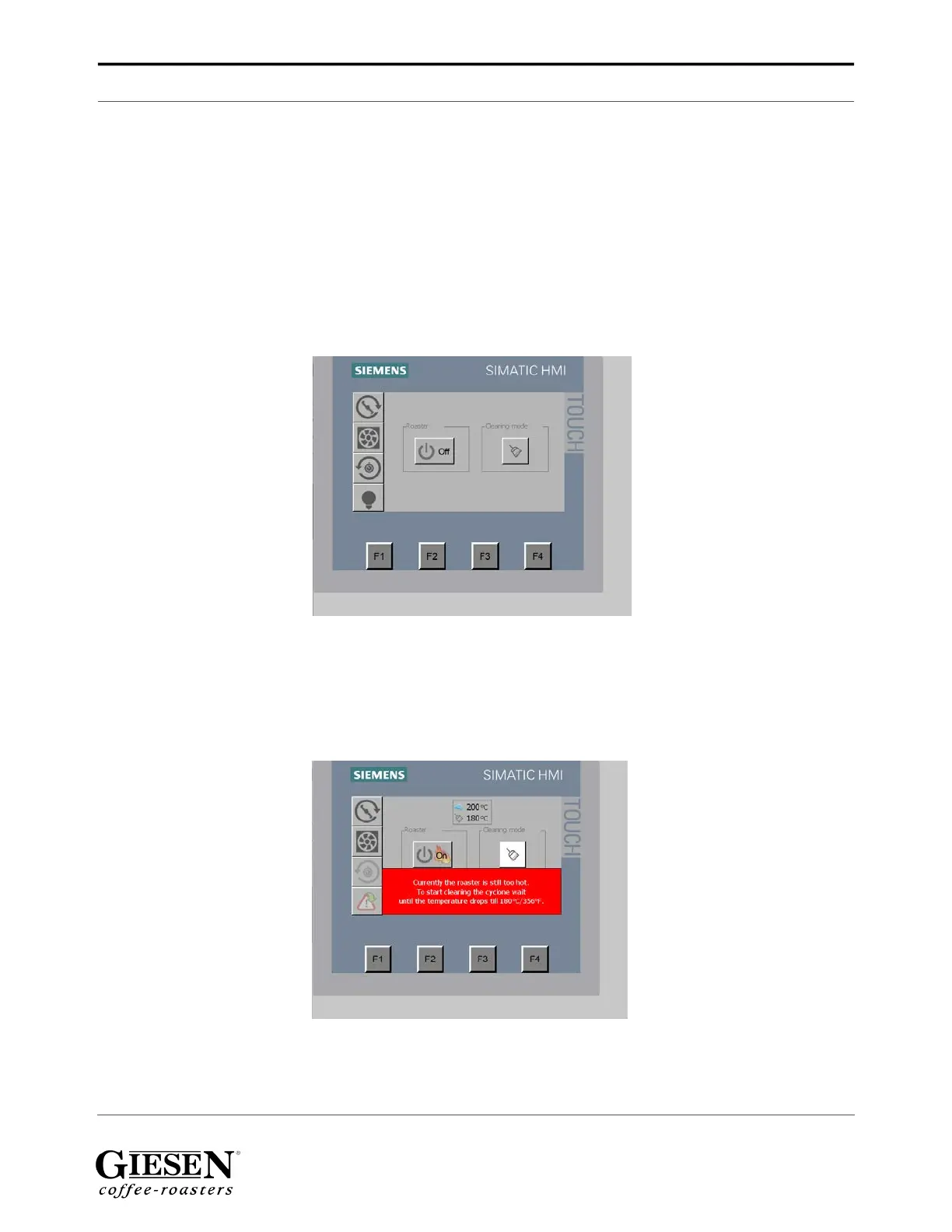
In the screenshot above you can see the maintenance button which is referred to as
‘Cleaning mode’. Clicking this button activates this mode as described above.
The cyclone and cooling motor will be shut off which makes sure no under-pressure
will be created and the chaff won’t be sucked up. The stirrer will be shut off which
ensures there won’t be any moving parts working, except for the drum motor.
In this screenshot you see that Cleaning mode has been activated, but the machine
indicates that it is still too hot for you to start cleaning. Wait until the temperature has
dropped to 180 °C / 356 °F.


 To Next Page