General Information
2500A Series Operation Manual, 34172 Revision C, March 2008
The safety ground is connected directly to the chassis. If a 3-to-2 wire adapter is to be used, be sure
to connect the ground lead from the adapter to earth ground. Failure to do this poses a shock haz-
ard.
DO NOT position the equipment so that it is difficult to remove the AC line cord.
1.2.5 Line Fuse
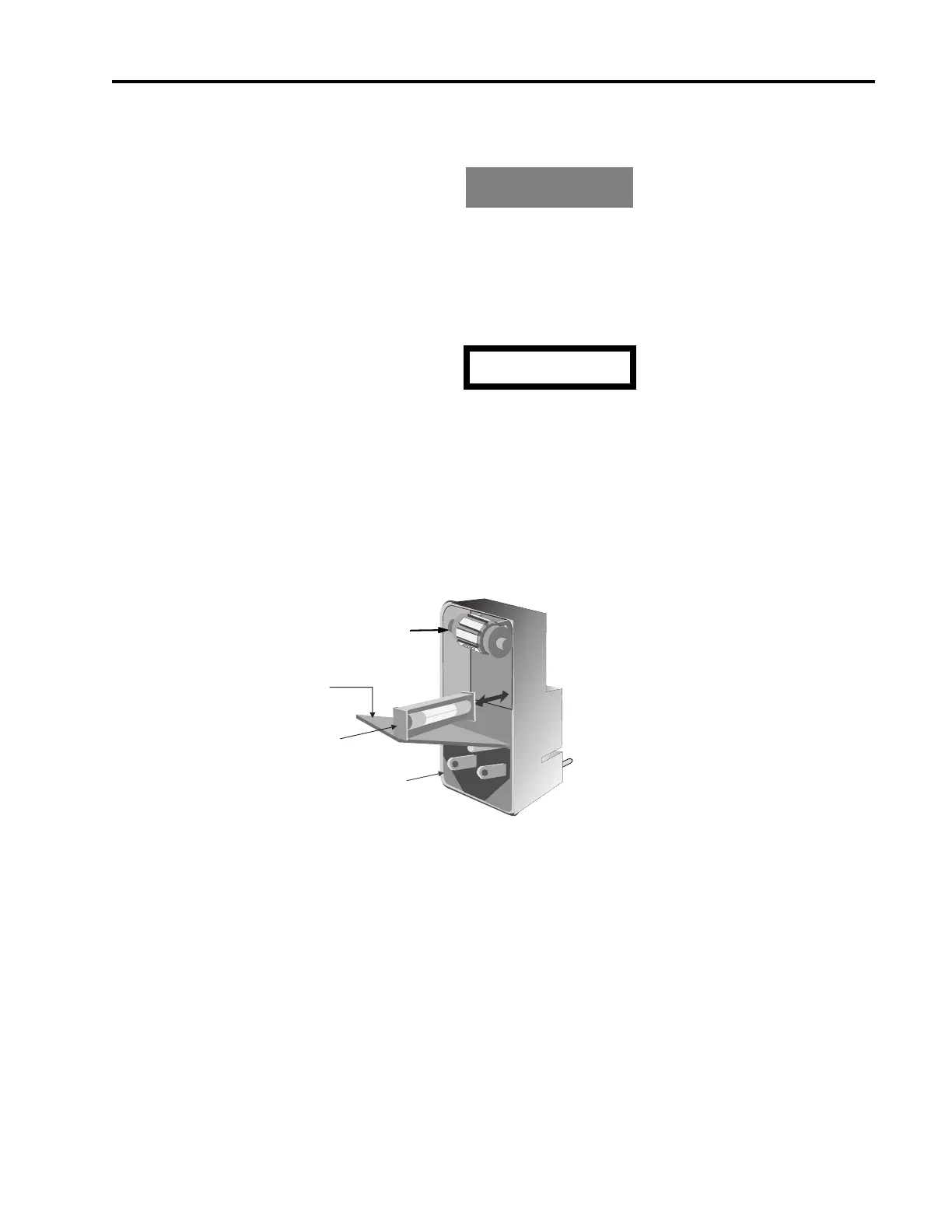
All 2500A Series models have a line fuse holder on the rear panel. The power line fuse is 2A, Slow-
Blow, 250V, Type T. See Figure 1-1 below for the location of the line fuse.
Figure 1-1: Fuse Holder
1.2.5.1 Line Fuse Replacement
Open the housing cover. Pull out the small drawer on the right side of the housing (marked with an
arrow) and remove the old fuse. Replace with a new fuse, insert the drawer and close the housing cover,
see Figure 1-1, above.
WARNING
WARNING
CAUTION
1
1
0
1
2
0
COVER
FUSE AND
FUSE HOLDER
AC POWER
INPUT
Not Used



 To Next Page