2500A Menus
2500A Series Operation Manual, 34172 Revision C, March 2008
2.3.1 Menu System Overview
2.3.1.1 Menu Buttons
Most 2500A features and functions are accessed through a series of menus. The menus are accessed by
pressing one of the menu buttons that are on the front panel of the instrument. As an example, to access
the System menus, press the SYSTEM button:
The following menu buttons are available:
CW, RAMP, SYSTEM, PM, LOCAL.
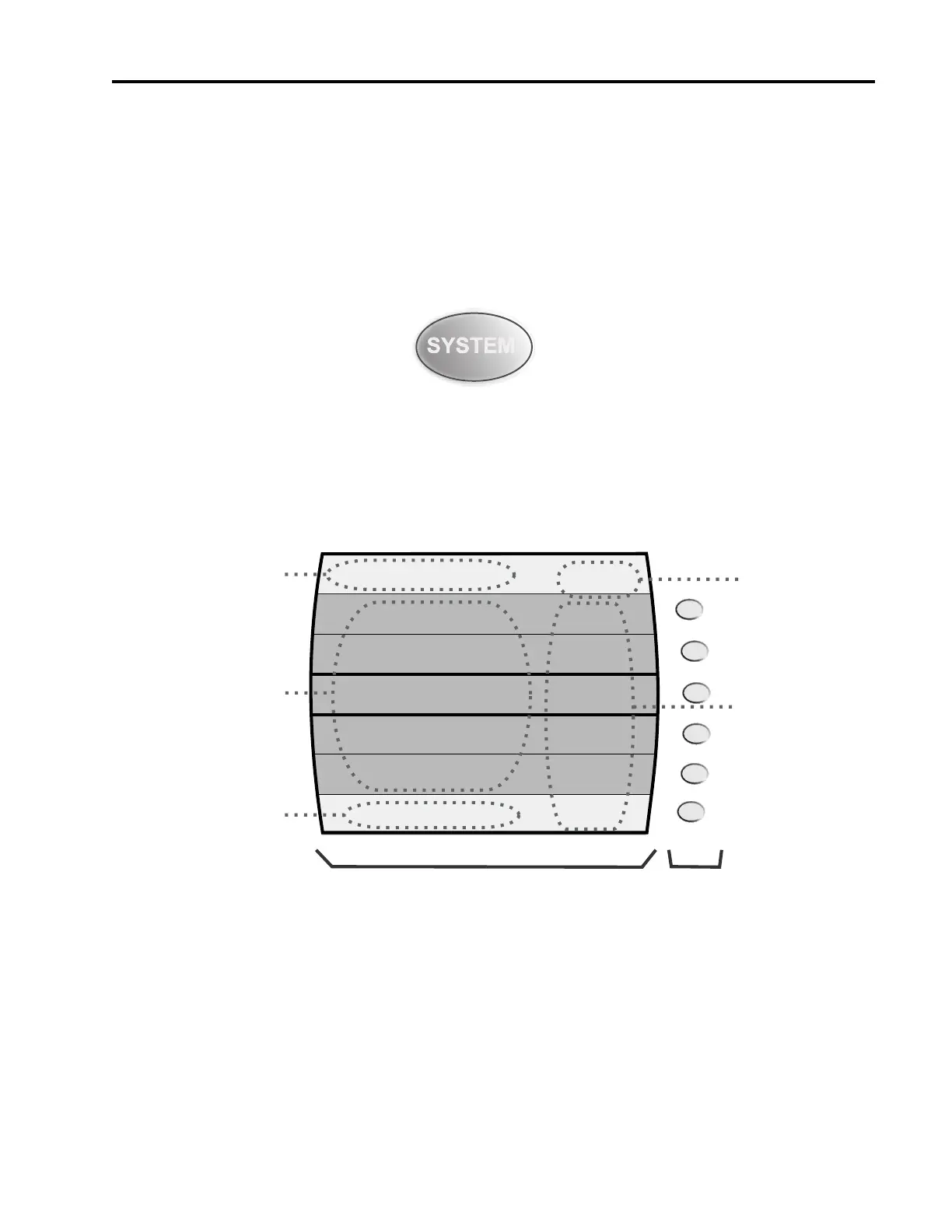
The 2500A’s front panel display is divided into several functional areas, as shown in Figure 2-2:
Figure 2-2: Functional Areas of the 2500A Display
The following explains each of the functional areas of the display shown in Figure 2-2:
Menu Name. This is the name of the menu that is currently shown in the front panel display. The menu
that is currently shown is called the active menu.
Menu Area. This area displays the various menu choices that are available in the active menu. The row
containing the menu item and parameter that is currently selected is surrounded by bold lines.
SYSTEM 1
OFS SLP
To Register (0-9)
No register has been saved
8
ON
Save
Recall
Sound
Contrast
Auto
Attenuation
System 2
Menu
AM FM PM
Contrast must be <= 15
Menu Area
Mode Indicators
Menu Name
Parameter Area
Error/Step Size Area
Display
Interactive
Softkeys



 To Next Page