44
Template Go, Version 1, 01.07.2014 / ModuleVersion 1.0
Protection against unwanted calls
Gigaset E370A / LUG UK-IE en / A31008-M2841-L101-1-7619 / applications_1_A.fm / 9/14/17
Protection against unwanted calls
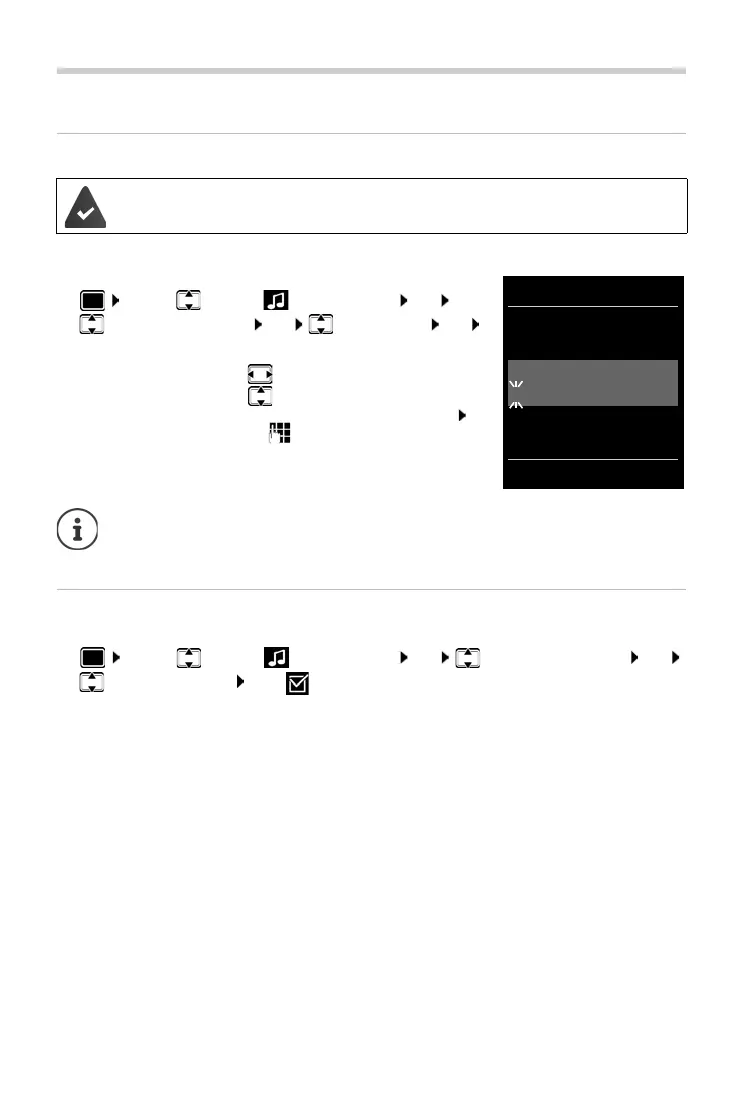
Time control for external calls
Enter a time period during which the handset should suspend
ringing to indicate external calls e.g. during the night.
¤ . . . use to select Audio Settings OK
Ringtones (Handset) OK Time Control OK
. . . then
Protection from anonymous callers
The handset will not ring if callers' numbers are not revealed.
¤ . . . use to select Audio Settings OK Ringtones (Handset) OK
Anon.
Calls Silent Edit ( = on) . . . the call is only signalled on the display
Date and time have been set.
Switch on/off:
¤ use to select On or Off
Enter time:
¤ use to switch between Suspend
ring. from an
d Suspend ring. until
. . . use to enter start and end in
4-digit format
Save:
¤ Save
The time control only applies to the handset for which the setting is configured.
The telephone will continue to ring for numbers that ha
ve been assigned to a VIP
group in the directory.
Time Control
For external calls:
On
Suspend ring. from:
22:00
Suspend ring. until:
07:00
Back Save
Example



 To Next Page