3
Gigaset E370A / LUG UK-IE en / A31008-M2841-L101-1-7619 / overview_1_A.fm / 9/14/17
Template Go, Version 1, 01.07.2014 / ModuleVersion 1.0
Overview
Overview
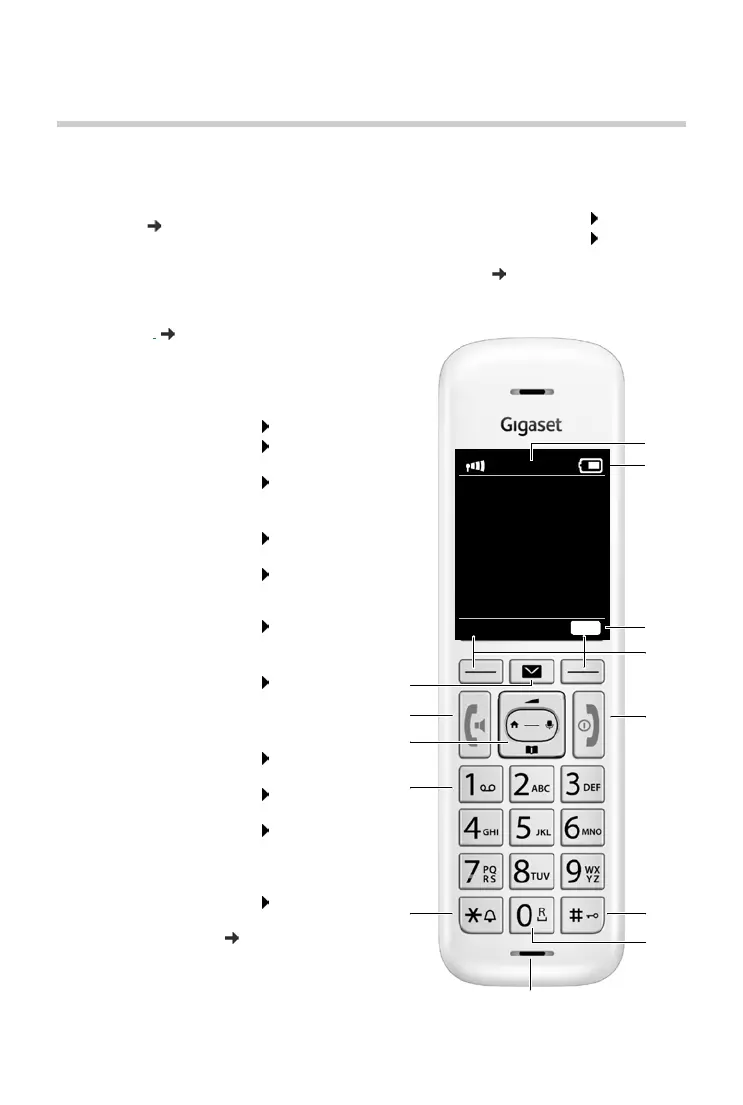
Handset
1 Display
2 Status bar ( p. 66)
Icons display current settings and
operating
status of the telephone
3 Emergency call display key
Set up emergency call function,
trigger an emergency call
4 Display keys
( p. 12)
Various functions, depending on the operating
situa
tion
5 End call key, On/off key
End call; cancel function;
Go back one menu level Press briefly
Return to idle status Press and
hold
Switch the handset on and off
(in i
dle status)
Press and
hold
6 Hash key / Lock key
Lock/unlock the keypad
(in idle status)
Press and
hold
Toggle between upper/lower
case
and digits
(when inputting text)
Press br
iefly
Insert a dialling pause Press and
hold
7 Recall key
Consultation call (flash) Press and
hold
8 Microphone
9 Star key
Switch the ringtone on/off
(in idle status)
Press and
hold
Open special characters table
(when inputting text)
Press br
iefly
Switch from pulse dialling to
ton
e dialling
(for an existing connection)
Press briefly
10 Key 1
Select answer machine/
ne
twork mailbox
Press and
hold
11 Control key / Menu key ( p. 11)
Open a menu; navigate in menus and entry
fiel
ds; access functions (depending on the
situation)
12 Talk key / Handsfree key
Accept call; dial number displayed; switch
be
tween receiver and handsfree mode
Open the redial list Press b
riefly
Start dialling Press and
hold
13 Message key ( p. 27)
Access to the call and message lists;
Flashes:
new message or new call
2
4
10
1
6
9
8
5
11
12
13
7
INT 1
Calls
SOS
3



 To Next Page