1
Gigaset E560A / LUG GBR en / A31008-M2708-L101-1-7619 / overview_E560A_LUG.fm / 7/14/16
Template Go, Version 1, 01.07.2014 / ModuleVersion 1.0
Handset
Overview
Handset
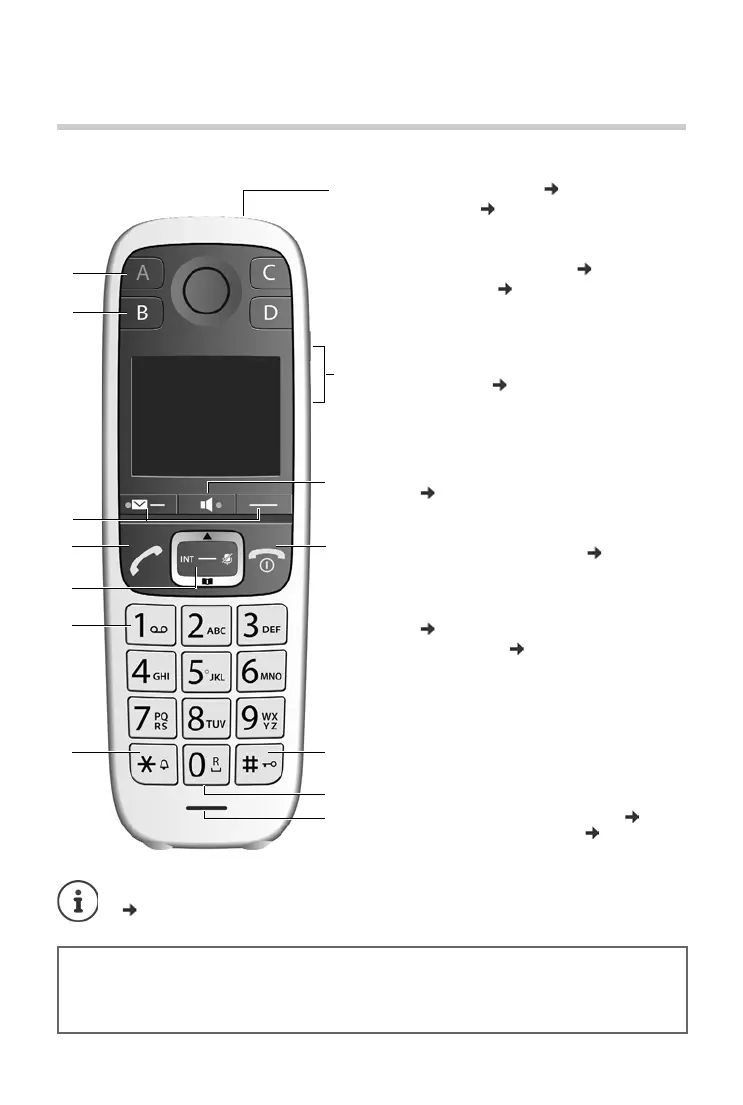
1 Direct dialling key A ( p.12)
("SOS key", p. 24)
Illuminated: Emergency function
Flashes: Emergency call started
2 Direct dialling keys B to D ( p.12)
3Display keys ( p. 13)
4 Talk key
Accepting call; selecting displayed number;
opening redial list
Flashes: Accepting a call
5 Control key ( p. 11)
Opening a menu; navigating in menus and
entry fields; accessing functions (depending on
the situation)
6Key 1
Answer machine/Call the network mailbox
( p. 33)
7Star key
Ringers on/off (press and hold
8 Torch and signal light (LED) ( p. 38)
9Volume keys
for ringtone, receiver/headset, speaker
Upper key: Setting "extra-loud" during a call
( p. 18)
10 Handsfree key ( p.17)
Switch between earpiece and handsfree mode;
Lights up: handsfree activated
11 End call key, On/Off key
End call; cancel function; go back one menu
level (press briefly); back to idle status (press
and hold); activate/deactivate handset (press
and hold in idle status)
12 Hash key
Keypad lock on/off (press and hold, p. 11);
upper/lower case and digits ( p. 15)
13 Recall key
Consultation call (flash): press and hold
14 Microphone
Changing the display language:
p. 42
Gigaset service contact numbers:
For personal advice on our range of products and for repairs or guarantee/warranty claims call:
Service Centre UK: 020 369 53111 (local call cost charge)
Please have your proof of purchase ready when calling.



 To Next Page