Template Module, Version 2, 20.02.2020,
Getting to know your telephone
Gigaset E720-E720A / LUG_Kombi CH en / A31008-M2903-F101-1-2X19 / operating.fm / 4/21/20
16
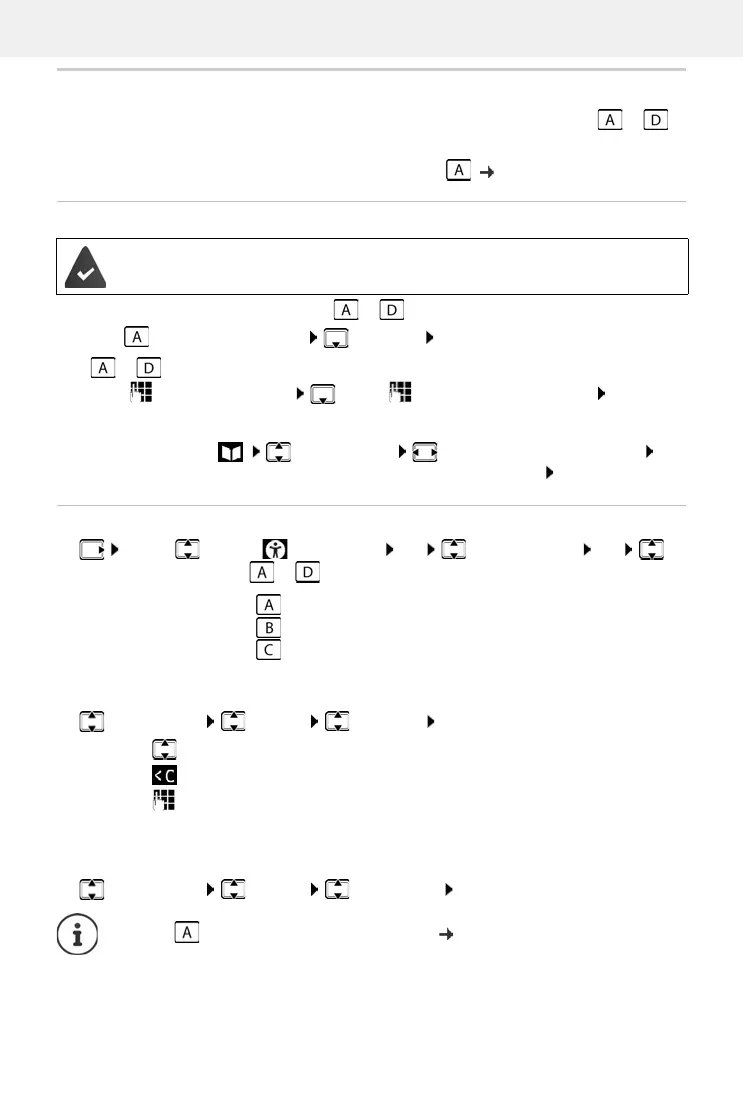
Direct dial keys A to D
You can store particularly important phone numbers on the four direct dial keys ( to ).
To dial these saved numbers, press the corresponding direct dialling key.
You can also assign the SOS function to the di
rect dial key ( p. 45).
Assigning phone numbers to direct dial keys
¤ In idle mode, press the direct dial key ( to ) to which you want to assign a function.
Using the key as a direct dial key: Edit entry OK
Keys to :
¤ . . . use to enter the number . . . use to enter the first/last name Save
or select from the directory:
¤ Press the display key Select an entry Select the number as required OK
. . . Call number, first name and last name are taken from the directory Save
Changing and deleting direct dial key assignments
¤ . . . use to select Accessibility OK Direct Dial Keys OK
Select the direct dial key ( to ) . . . the current key assignment is displayed, e.g.:
Changing the assignment:
¤ Select the key Options Edit entry OK
Deleting the current key assignment:
¤ Select the key Options Delete entry OK
The direct dialling key in question is not already assigned a function.
A: – – – = Key is not yet assigned
B: Smith, John = Key is assigned the phone number of the subscriber displayed
C: 12345678 = Key is assigned the phone number displayed, the name is not
known
¤ . . . use to switch between the entry fields
¤ . . . use to delete existing characters
¤ . . . use to enter the new name and new number
¤ Save
Only key : Assign the SOS function to the key p. 45


 To Next Page
 Loading...









