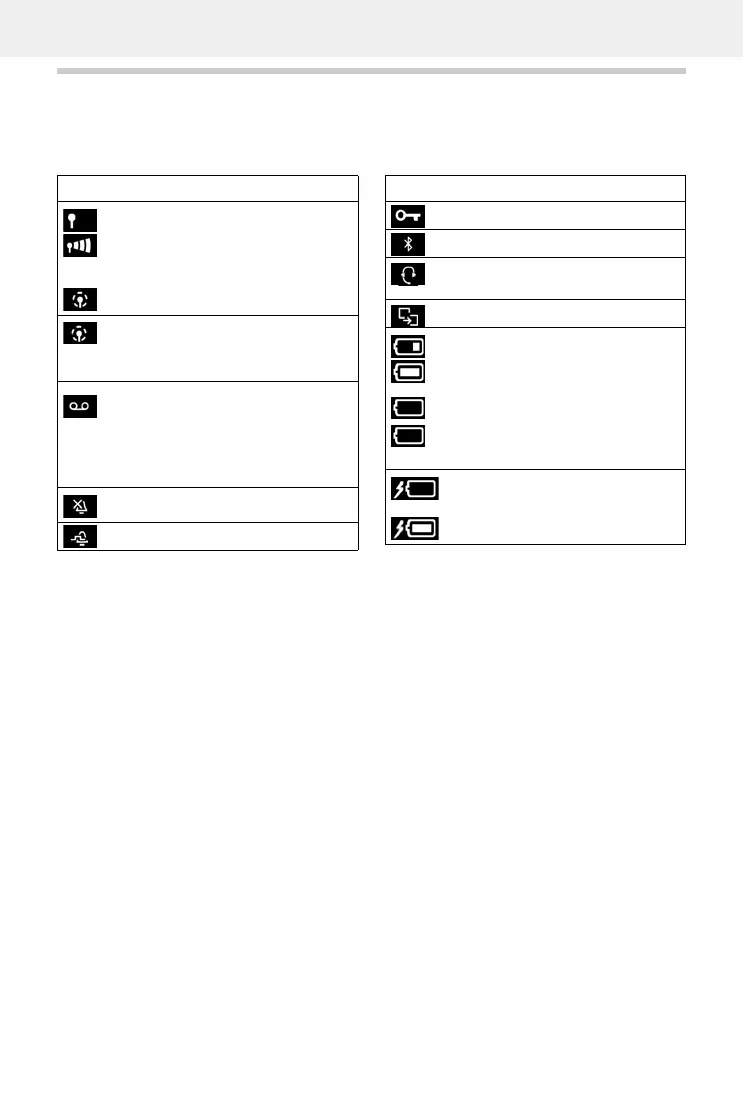
Icon Meaning
Signal strength (No Radiation off)
1% -100%
white, if Maximum Range on;
green, if Maximum Range off
Red: no connection to the base station
No Radiation activated:
white, if Maximum Range on;
green, if Maximum Range off
Answer machine activated indicator
flashes: Answer machine is recording
a message or is being operated by
another internal participant
(only for a system with a local answer
machine)
Ringtone switched off
"Beep" ringtone activated
Keypad lock activated
Bluetooth enabled
Headset / hearing aid connected via
Bluetooth
Data device connected via Bluetooth
Battery charge status:
White: between 11% and 100%
charged
Red: less than 11% charged
Flashes red: battery almost empty
(approx. 5 minutes of talktime left)
Battery is charging
(current charge status):
0% - 100%
Icon Meaning



 To Next Page