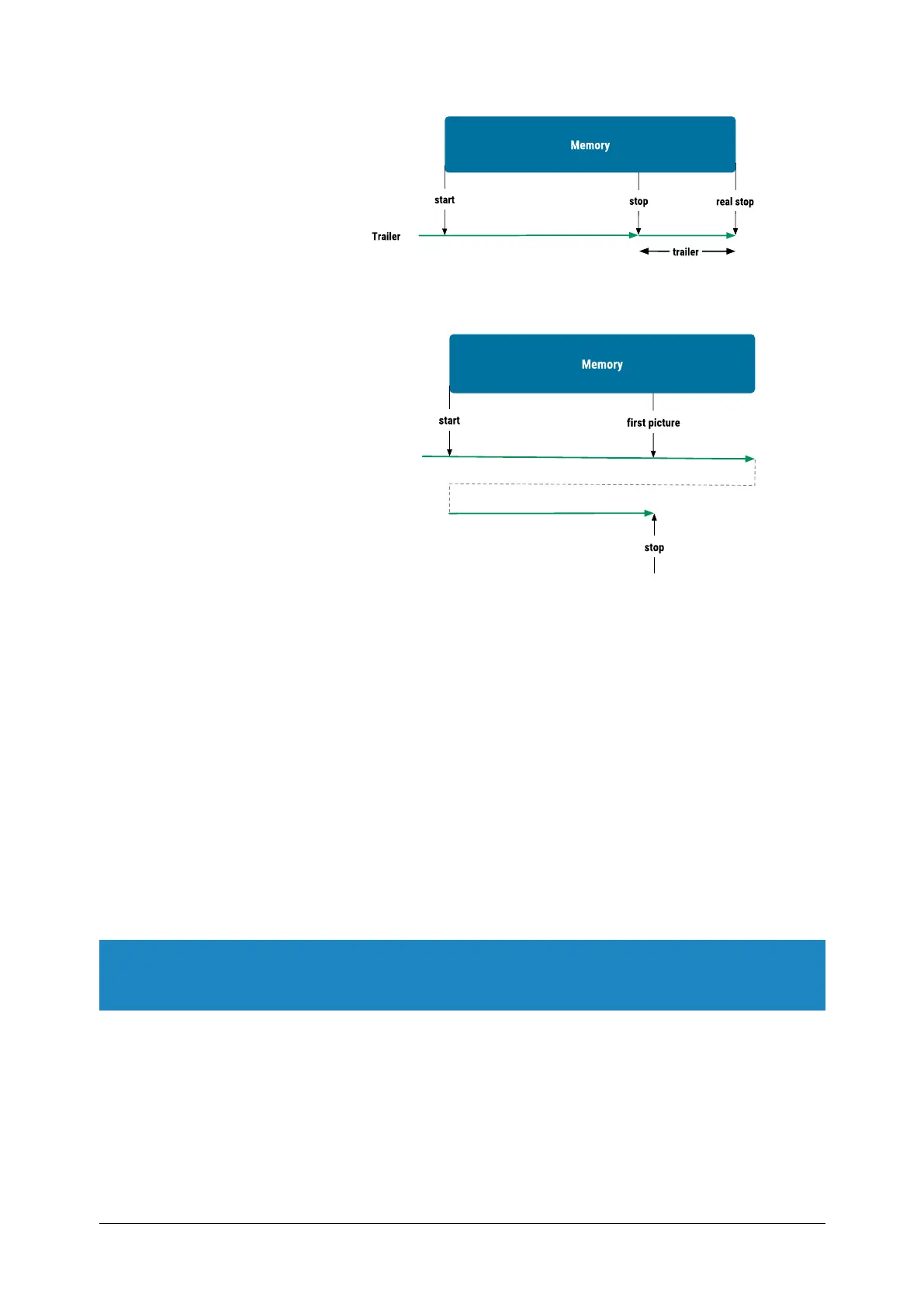
The RecordMode and RecordNumberOfSequences, and RecordTrailer fea-
tures must be set before recording is started.
The value of the feature ‘RecordTrailer’ defines the number of additional
frames to record after a stop signal is detected. The trailer value is only mean-
ingful in continuous recording mode with one or more sequences.
Example
We want to record 100 pictures after a trigger event. So the feature
RecordTrailer has to be set to 100 before recording gets started. The default
value of the RecordTrailer is 0.
Recording is started with the feature RecordStart. As long as recording is run-
ning the Trigger-LED on the camera is blinking and the feature CameraState
returns the state „Recording“.
Recording gets stopped with the feature RecordStop or a trigger signal. After
the record stop event is given recording continuous until the additional 100
frames (defined by RecordTrailer) gets captured and stored in the buffer. Now
the camera state changes to “Idle” and the trigger LED will stop blinking.
NOTE If recording is stopped by an external trigger event (initiated by a signal on
the ext. trigger line of the camera or by the trigger button of the camera), you
have to give the camera an additional RecordStop command.
The programming flow for a continuous recording to one sequence is:
Programming
MikrotronGmbH / mini1 / CAMMC1370/71-RG / 2021 60 - 67


 To Next Page