68
Issue: 8 (Applies to firmware 2387 6.09 onwards)
Document number: 1390-PS-0039
Bench Test
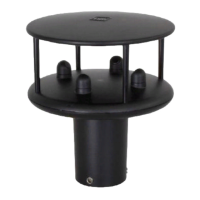
1. Couple the WindObserver 65 to the host system and power supply, using a known working test cable.
2. Check that the unit is correctly configured by going into Configuration mode and using D3 See
Appendix F
(page 49) Checking the Configuration.
3. Check for normal output data, and that the Status Code is OK – 00, 60 or A (for NMEA format).
4. If the status code is other than these, refer to Appendix K Status (error) codes.
5. Use an office fan or similar to check that the unit is sensing wind, turning the unit to simulate changing wind
direction and to check that both axes are functioning.
6. Note that this is a quick functional test. There are no calibration adjustments; the unit is designed NOT to require
re-calibration within its lifetime. Gill has provided and Integrity Check, see next page for details.
Use of an Integrity Check Chamber (Optional item)
The ICC is designed to:
1. Identify any gross changes in the head geometry that would affect the performance.
2. Provide a zero wind environment to confirm the WindObserver 65 zero calibration.
The ICC has been designed to be used in an indoor still air environment with an ambient temperature between 17°C and
23°C. When conducting the test it is important that the ICC is assembled on to the WindObserver 65 head and not
touched or moved during the test.
This test is only valid if undertaken with an ICC purchased from Gill.
Note:- The Heater supply should be disconnected or turned off when using the ICC.
Zero Wind Check
Configure your PC to run HyperTerminal and assemble the ICC by inserting the reflector cases and the two halves of the
ICC onto the WindObserver 65. The ICC must be retained using the strips provided. Then:
1. Ensure that the WindObserver 65 is set in factory default mode. For Factory default settings see section
Appendix F (page 49)
2. Enter Measurement Mode and Record/View data
In still air wind speed measurements should not exceed 0.03m/s. If wind speed exceeds 0.03m/s contact Gill Instruments.


 To Next Page