12
USER’S GUIDE | ASPEC™ POSITIVE PRESSURE MANIFOLD
INTRODUCTION
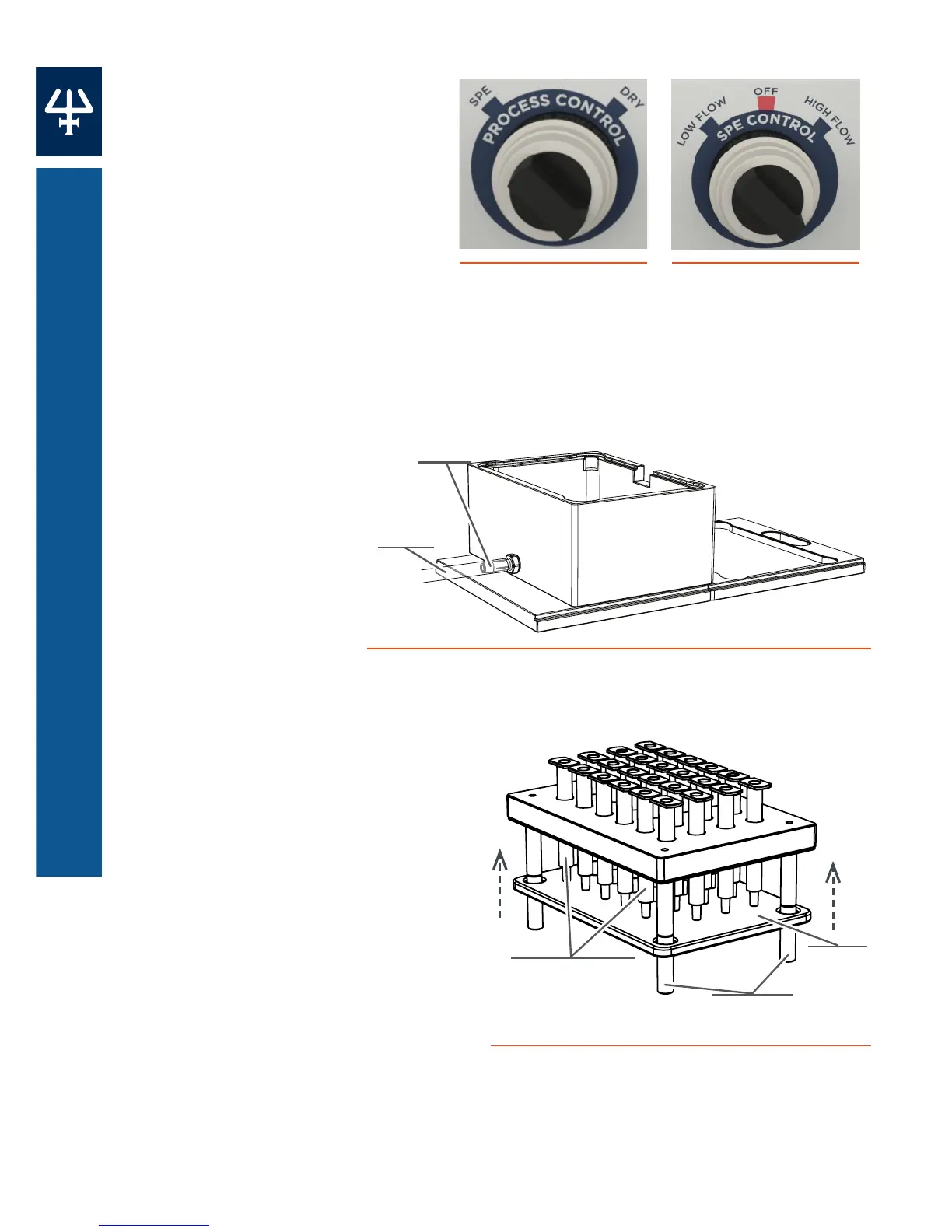
Control Dials
Process Control Dial
Used to select SPE (activates
the SPE control dial to control
high or low flow) or Dry
(maximum flow).
SPE Control Dial
Used to select Low Flow,
High Flow, or Off (to stop flow)
when the process control dial is
set to SPE.
Drain Well
Used primarily to
flow the preparation
solvents and matrix
to waste. Ensure
that the waste
outlet tubing flows
to a large waste
container.
Ejection Plate
Used to quickly eject all the SPE
cartridges from the cartridge rack.
Slide the ejector plate through the
standoffs on the SPE cartridge
rack, and then push the plate up
to eject the SPE cartridges.
Figure 3
Process Control Dial
Figure 4
SPE Control Dial
Figure 5
Collection and Drain Well with Waste Outlet Tubing
Front
Rear
Waste
Outlet
Tubing
Barbed
Fitting
Standos
SPE Cartridges
Ejector
Plate
Figure 6
Ejecting SPE Cartridges













 To Next Page