EasyManua.ls Logo

Gintec G10 - 2.2 Basic operation of G10; 2.2.1 Power on;off; 2.2.2 Self-checking; 2.2.3 Check work station

Gintec G10
36 pages
Print Icon
To Next Page IconTo Next Page
To Previous Page IconTo Previous Page
Loading...
G10
5
6
WIFI indicator
It will be light when the G10 is connected via
WIFI function
7
Satellite indicator
How many time it blink, means how many
satellites are locked, cycle once every
5seconds
8
Bluetooth indicator
It will be light when G10 is connected via
bluetooth
9
Static indicator
It will blink when G10 begin to record static
data
10
Function key
Make a selection
11
Power key
Power on/off the receiver. Keep press to
enter main menu
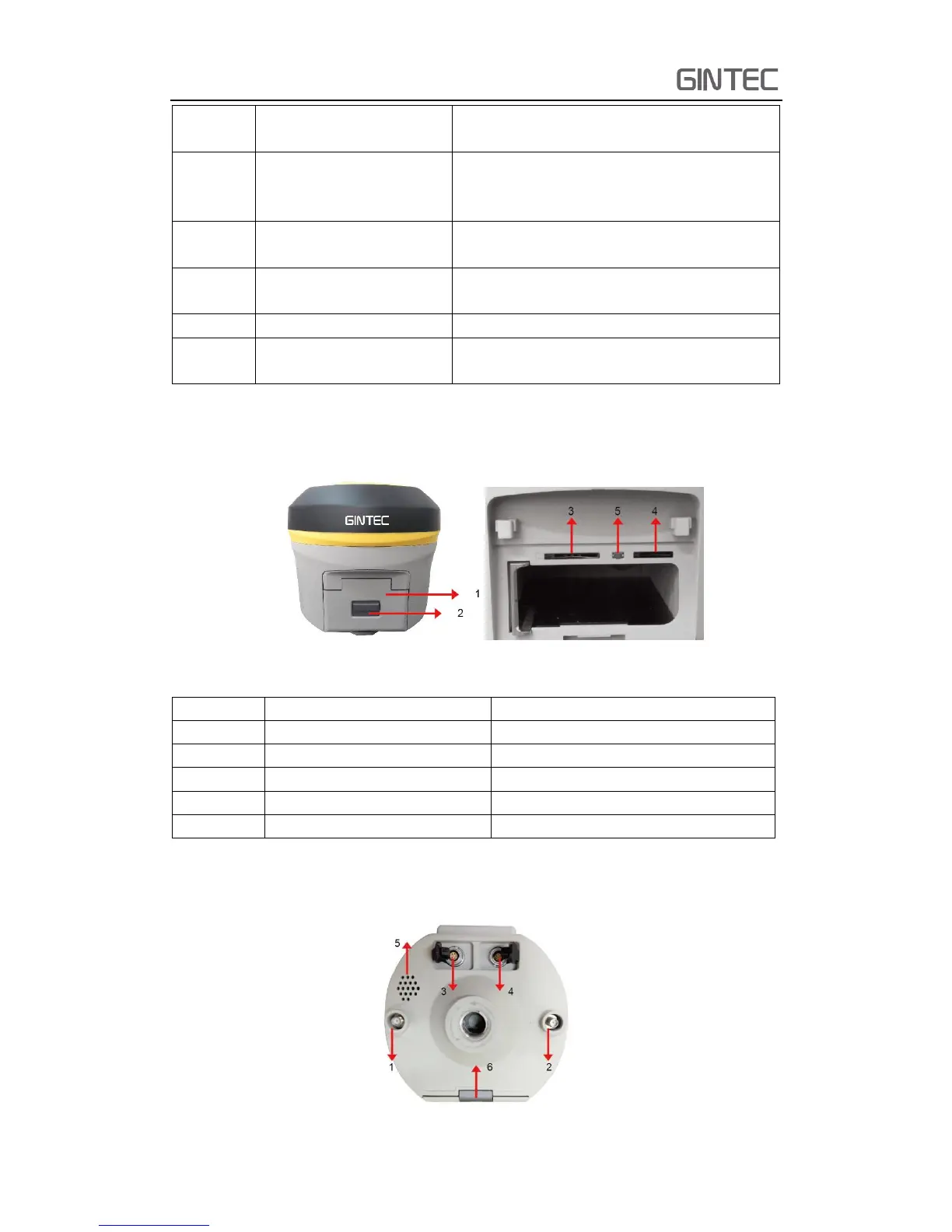
2.1.2 Back side of the mainframe
Figure 2-2 Back Side
Number
Name
Function
1
Battery compartment cover
Protect the battery
2
Compartment locker
Open/lock the cover
3
SIM card slot
Put and read SIM card
4
Micro SD card slot
Put and read Micro SD card
5
Reset key
Press to reset the receiver
2.1.3 The bottom of receiver
Figure 2-3 Bottom

Related product manuals